Shopify variant limit: fix themes, APIs, and apps before 2,048
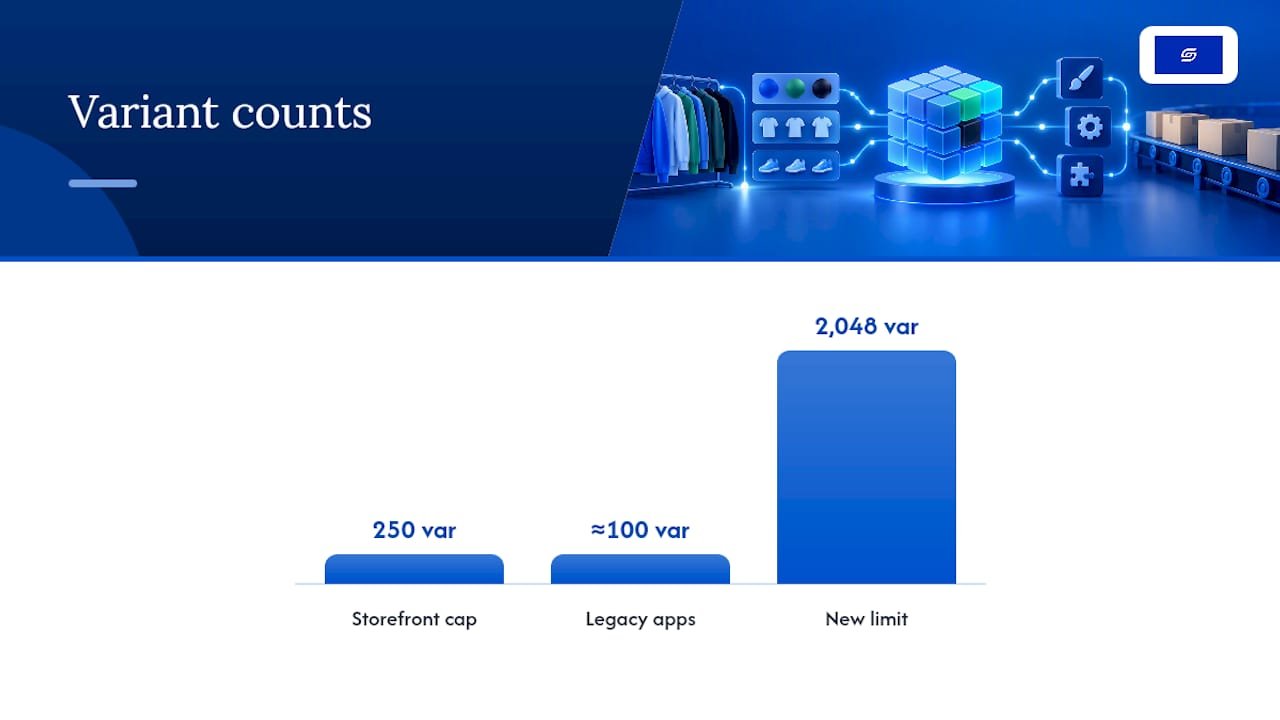
Shopify’s per-product variant limit is 2,048, with a maximum of three options per product. That headroom is far bigger than the old 100-variant cap, but it comes with strings attached: Liquid’s product.variants still only returns 250 items, plenty of apps haven’t migrated to GraphQL yet, and bulk operations carry their own throttles. Before you load up a product with hundreds of variants, check the API, app, and theme audit steps further down.
TL;DR:
- Themes and apps must be updated to support high-variant products, as many still rely on the old 250-variant cap and can malfunction beyond that.
- API integrations should be migrated to GraphQL models and tested with realistic payloads to prevent performance issues during large bulk operations.
- Storefront pages need to fetch only relevant variants dynamically instead of loading all variants upfront to maintain speed with hundreds or thousands of options.
- Bulk import limits, such as 10,000 new variants per day for stores with over 500,000 variants and 50,000 inventory entries per mutation, require careful batching and timing.
- Proper audit, staged rollout, and selective data fetching are essential to prevent customer-facing errors and ensure smooth scaling up to the 2,048-variant limit.
Table of Contents
- What is the Shopify variant limit today?
- Why the higher limit still catches stores out
- Getting your APIs and integrations ready
- Keeping storefront pages fast with hundreds of variants
- Bulk operations have their own ceiling
- Practical ways to manage a large variant catalogue
- A step-by-step checklist before you go live
- Soodo’s perspective: where merchants actually go wrong
- Get your store ready for high-variant products
- Sources
- FAQ
What is the Shopify variant limit today?
Shopify raised the product variant limit to 2,048 for every merchant, replacing the old ceiling of 100. The rule on options hasn’t changed. You still get a maximum of three options per product (think size, colour, material) and the variant count is simply every combination of the values you set within those three options.
The developer changelog confirms the 2,048 figure but flags a real catch: apps that haven’t moved onto in-support GraphQL product models can behave unpredictably once a product crosses the old thresholds. A few numbers worth keeping on a sticky note:
- 2,048 variants per product, maximum.
- Three options per product, maximum, unchanged.
- 250 items maximum returned by Liquid’s
product.variantson the storefront. - There is a ceiling on inventoryQuantities in a single bulk mutation to keep bulk operations reliable.
- 10,000 new variants per 24 hours for stores holding over 500,000 total variants.
Shopify’s own rationale for the increase centred on merchants selling configurable products (furniture, apparel with size and colour and finish, made-to-order goods) who kept hitting the 100-variant wall artificially. The platform also reports that product creation times and admin performance improved after the back-end rework that made the higher limit possible.
Why the higher limit still catches stores out
Raising the ceiling didn’t automatically raise every piece of software built underneath it. Themes, apps, and custom integrations were largely written assuming variant counts stayed low, and a lot of that code is still running on live stores.
The clearest failure mode is on the storefront. Any theme snippet that loops through product.variants or dumps product | json onto the page will only ever see the first 250 variants, because that’s the hard cap Shopify enforces to keep pages rendering quickly. Push past that with a 400-variant product and customers may see missing options, incorrect stock, or a picker that simply stops responding.
Apps are the second problem. Older tools built on REST Admin APIs were often designed around a soft assumption of roughly 100 variants or fewer, and migrating to 2,048 requires vendors to rebuild against GraphQL. Until they do, expect:
- Inventory sync tools that time out or truncate variant lists.
- Bulk editors that silently cap edits at the old limit.
- Product feed apps (for marketplaces or ad platforms) that miss variants beyond their old assumption.
Slow product creation in the admin, laggy variant tables, and storefronts quietly showing stale availability are all symptoms of the same root cause: something in your stack was never tested against a high-variant product.
Pro Tip: Before you add a single extra variant, open your theme’s product template and search for “variants” and “json” across every file. If you find a raw loop over the full array, that’s your first fix, not an afterthought.
Getting your APIs and integrations ready
Technical teams should treat the jump to 2,048 variants as a migration project, not a settings change. A structured pass through your stack catches problems before customers do.
- Audit every app and private integration. For each one, confirm whether it uses GraphQL product models that are in support, or ask the vendor directly if it isn’t obvious. Anything still calling legacy REST endpoints for variants needs a plan, whether that’s an update, a replacement, or a workaround.
- Test the mutations you’ll actually use. Run
productVariantsBulkCreateandproductVariantsBulkUpdatein a staging environment with a realistic payload, not a five-variant sample. Watch howinventoryQuantitiesbehaves as the batch grows. - Roll out behind a flag. Enable high-variant products for a small segment first, then watch error rates, rate-limit responses, and mutation rejections before switching everything on. A full audit of custom apps and integrations before go-live saves far more time than firefighting after launch.
Keeping storefront pages fast with hundreds of variants
The instinct to render every variant up front is exactly what breaks pages once a product has 300 or 500 combinations. Shopify’s guidance is blunt: stop fetching the full set, and fetch only what the shopper is currently looking at.
That means retiring any pattern built on product.variants or product | json for high-variant products, and replacing it with selective, on-demand fetching. In practice, that looks like:
- Using the
option_valuesURL parameter to request only the variant matching the shopper’s current selection. - Rendering variant state through
product_option_valuerather than looping the whole array. - Calling the Section Rendering API to refresh price, stock, and media as options change, instead of reloading everything.
- Lazy-loading variant images and media so the initial page weight doesn’t scale with variant count.
- Using category metafields for shared attributes such as colour swatches, so you’re not duplicating the same data across hundreds of variant rows.
Pro Tip: If your page still feels sluggish after switching to deferred loading, check your caching layer next. Tools covered in guides like this roundup of Shopify caching plugins can shave real seconds off repeat visits to variant-heavy pages.
Bulk operations have their own ceiling
Adding variants one at a time is rarely how this actually happens. Most stores hit trouble during bulk imports, migrations, or large inventory syncs, where a different set of limits applies.
- Stores holding 500,000 or more total variants face a daily limit of 10,000 new variants per 24-hour window.
- Shopify Plus stores are exempt from that particular throttle, though careful staging still matters at that scale.
- Any single bulk mutation is capped at 50,000 inventoryQuantities entries, so large inventory updates need splitting into smaller batches rather than one giant payload.
- Stagger big imports outside peak trading hours, run them through background workers, and build in monitoring for throttled or rejected responses so a failed batch doesn’t go unnoticed.
Practical ways to manage a large variant catalogue
None of this means you should stuff every product to the 2,048 ceiling just because you can. Good catalogue design still matters, and a few habits keep things manageable long after launch.
- Lean on category metafields for shared attributes. Colour names, material descriptions, and care instructions rarely need to live on every single variant. Category metafields let you define that data once and reuse it, which also makes bulk updates far quicker.
- Split products when the difference is real, not cosmetic. If two versions of an item have different SKUs, different tax treatment, or ship separately, they probably deserve separate product listings. Splitting purely to dodge an old limit is no longer necessary and just adds admin overhead.
- Choose apps built for the GraphQL product model. When evaluating new tools for inventory, personalisation, or product feeds, ask directly whether they support the current variant limit. A quick review of the apps already running on your store is worth doing before you add anything new.
A step-by-step checklist before you go live
Treat this as the order of operations, not a menu to pick from.
- Search your theme repository for every instance of
product.variantsandproduct | json, and list which templates need rework. - Build a handful of representative test products at realistic variant counts (100, 500, 1,500) and run them through staging.
- Test your API mutations and inventory update flows against those same test products, not toy data.
- Audit every third-party app and private integration for GraphQL support, and get written confirmation from vendors where it’s unclear.
- Publish one pilot product live, watch analytics, checkout, and fulfilment closely, then schedule the rest of your rollout in stages.
Pro Tip: Keep your pilot product visible in your sitemap and search results. A “hidden” test product tells you nothing about how real traffic and real orders behave against the new setup.
Soodo’s perspective: where merchants actually go wrong
The mistakes we see most often aren’t about the variant limit itself. They’re skipped app audits, themes trusted without testing, and stores going straight from “it works locally” to “it’s live” with no staged rollout in between. Audits, migration planning, and performance-driven rebuilds are key ways to catch these gaps before they cost a sale.
— Soodo
Get your store ready for high-variant products
Auditing every app, theme file, and API call yourself takes real time, and getting it wrong shows up as broken product pages your customers see first. A specialized team can guide you through GraphQL migrations and theme rebuilds based on extensive experience with Shopify stores.

If your store is already showing signs of strain (slow product pages, apps flagging errors, admin lag when you add variants), existing store optimisation covers the performance audit and fixes directly, starting from 1,000 SGD. If you’re planning a bigger catalogue overhaul or coming from another platform entirely, Platform migration work starts from 4,000 SGD, and a full new Shopify build designed around deferred variant loading from the ground up starts from 6,000 SGD. Get in touch to book an audit and find out exactly which of these fits your store.
Sources
FAQ
How do I add more than one variant on Shopify?
Add variants from the product page in your Shopify admin by defining up to three options (such as size and colour) and adding the values you want for each. Every combination of those values becomes a separate variant automatically, up to the 2,048-variant ceiling.
What does variant mean on Shopify?
A variant is a specific version of a product defined by a combination of option values, such as “Small / Blue” for a t-shirt. Each variant can carry its own price, SKU, barcode, and inventory count, separate from every other variant on the same product.
Does Shopify have a SKU limit?
Shopify doesn’t set a separate SKU limit beyond the variant limit itself, since each variant typically carries one SKU. With up to 2,048 variants per product, you can assign up to 2,048 unique SKUs on a single listing.
What is the variant inventory policy in Shopify?
Inventory policy controls whether customers can still order a variant once its stock reaches zero. You set this per variant to either stop selling when stock runs out or continue allowing orders (oversell), which matters more once a product has hundreds of variants to manage.
How do I increase the variant limit on my store?
You don’t need to do anything to unlock it. Shopify applies the 2,048-variant limit automatically to all merchants, though your theme and apps may need updating before they can handle products anywhere near that ceiling reliably.
Recommended

Jessica Bong
Jessica Bong is the founder of Soodo, a Singapore-based Shopify development and CRO agency. She built and scaled her own eCommerce brand before starting Soodo, and has since audited 60+ Shopify stores. Jessica also teaches eCommerce at Equinet Academy. Her hands-on experience running a live brand gives Soodo an edge most agencies lack.