Shopify GA4 Ecommerce Tracking: Setup, Events and QA
For most Shopify stores, GA4 ecommerce tracking takes three steps. Create a GA4 property and web data stream, install Shopify’s Google & YouTube channel, and connect the stream through the app. Google calls this connection the preferred way to set up Shopify. The harder part comes afterwards: checking that purchases fire once, that revenue is plausible, and that consent settings are not quietly hiding half your visitors.
This guide covers the setup, the events you get, when to bring in Google Tag Manager, and how to test before you trust a single report. It is written for Singapore brand owners who want numbers they can make decisions with.
TL;DR
- Use the Google & YouTube channel first. It sends the standard funnel from page_view to purchase without code.
- Do not add a second GA4 tag or a GTM ecommerce setup on top of it. Shopify warns this can duplicate page views, carts and purchases.
- Validate in DebugView and Realtime, then place a real test order. Standard reports can take 24 to 48 hours to fill.
- GA4 will not match Shopify’s order totals exactly. Treat Shopify as the ledger and GA4 as the behaviour layer.
- If you sell abroad, set up Shopify’s customer privacy banner by region and confirm consent signals reach Google.
Table of Contents
- What you need before you start
- Connect GA4 through the Google & YouTube channel
- Which ecommerce events you actually get
- Native integration, custom pixel or GTM?
- Test before you trust the data
- Why GA4 and Shopify revenue never match exactly
- Consent and privacy for Singapore stores
- Our perspective: measure first, then optimise
- When to bring in an expert
- FAQ
- Sources
What you need before you start
Google lists the requirements for the Shopify connection: a Google sign-in, an active Shopify account, a GA4 property, a web data stream and the Tag ID. A Merchant Center connection is not needed to finish GA4 setup. All of this is in Google’s Shopify guide.
Two small decisions save trouble later:
- Own the property. Create the GA4 property under a Google account the business controls, not a freelancer’s or an old agency’s. We regularly see stores whose analytics sits in a former developer’s account.
- Set the currency and time zone. Pick SGD and Singapore time if that is how you report. Mismatches here are a common reason GA4 and Shopify disagree on daily revenue.
Shopify’s own Google Analytics 4 setup page walks through the same prerequisites if you prefer the platform’s version.
Connect GA4 through the Google & YouTube channel
- In GA4, create a property and a web data stream for your store domain. Copy the Tag ID that starts with G-.
- In Shopify admin, install the Google & YouTube channel and sign in with the Google account that owns the property.
- Connect the Analytics web stream inside the app. Pick the property you created.
- Publish, then browse your store and open GA4 Realtime to confirm you appear.
Manual entry of the Google tag is the alternative. Google positions it for stores that need multiple properties or cannot use the connection flow. If you have no such reason, stay with the connection.
One gotcha from merchant forums: if GA4 shows only automatic events such as page_view and scroll, check that the property is actually linked inside the app and that no separate GA tag is also installed. Replies in this Shopify Community thread point to those same two checks, plus testing with a real published product.
Which ecommerce events you actually get
People search for “enhanced ecommerce” because that was the Universal Analytics name. In GA4 it is simply the set of recommended ecommerce events. With the native Shopify integration, the standard journey includes page_view, search, view_item, add_to_cart, begin_checkout, add_payment_info and purchase. Google’s documentation also describes an expanded range, such as view_item_list when a collection is viewed.
For reference, Google recommends this fuller list for deeper measurement: view_item_list, select_item, view_item, add_to_cart, remove_from_cart, view_cart, begin_checkout, add_shipping_info, add_payment_info, purchase, refund, view_promotion and select_promotion. These populate GA4’s ecommerce dimensions and metrics and can be used in standard reports, Explorations, BigQuery and the Data API.
| Funnel stage | GA4 event | What it tells you |
|---|---|---|
| Browse | view_item_list, select_item | Which collections and products attract clicks |
| Consider | view_item, add_to_cart | Product page appeal and add-to-cart rate |
| Checkout | begin_checkout, add_shipping_info, add_payment_info | Where shoppers drop out of checkout |
| Buy | purchase | Revenue, transaction count, product performance |
| After | refund | Net performance (needs extra work, see below) |
Why event names matter
GA4 builds its ecommerce reports around recognised event names. A custom event called product_added may fire perfectly well, but it will not behave like add_to_cart in the reports. Keep Google’s names and parameters exactly.
The payload matters too. Google recommends sending currency whenever you send value, plus a transaction ID and a complete items array. Missing currency or transaction IDs makes reconciliation much harder. The items array also takes up to 27 custom parameters on top of the prescribed ones, which is useful for attributes such as margin group or merchandising category.
What native tracking does not cover
The native connection handles the core funnel. It does not automatically represent every business-specific event or every promotion and refund requirement. Typical gaps for Singapore stores:
- Refunds and cancellations processed in Shopify admin, which GA4 does not see unless you send them.
- Subscription or pre-order flows with their own logic.
- Custom product attributes you want to analyse, such as bundle type.
- Clicks on a WhatsApp button, which many local shoppers use before buying.
Native integration, custom pixel or GTM?
Google Tag Manager is a tag-delivery tool, not a replacement for GA4. Shopify recommends its built-in integration because it contains the logic for Enhanced Ecommerce data. Layering GA4 through GTM on top of it is the most common cause of double-counted purchases.
The pragmatic order is:
- Native channel for the standard funnel.
- Custom pixel for exceptional requirements. Shopify’s checkout runs in a sandbox, so a custom pixel means recreating events by hand that GA4 would otherwise infer. Shopify also directs merchants to custom web pixels rather than deprecated checkout.liquid or old additional-script methods.
- GTM only when there is a clear governance reason: several marketing vendors, a team that publishes tags without a developer, or a need for one container across properties. Shopify has a tutorial for setting up GTM as a custom pixel.
If you go the GTM route, switch the native GA4 connection off first so only one system owns the purchase event. If you are weighing up tooling and want a broader view of how Shopify’s measurement and SEO tools fit together, this Shopify SEO academy is a useful companion read.
The same rule applies to ad pixels. Our guide to setting up the TikTok pixel on Shopify explains how duplicate firing inflates conversions, and the logic is identical for GA4.
Test before you trust the data
Google’s guidance is that data typically begins appearing within 24 to 48 hours once events are implemented and users interact with the store. DebugView and Realtime are the right places to validate first, not the standard reports.
Here is the QA routine we would run on a new store:
- Open GA4 DebugView with a debug-enabled browser session.
- Walk the journey: collection, product, add to cart, begin checkout, shipping, payment.
- Place a real low-value order, then refund it in Shopify.
- Confirm one purchase event, with the right transaction_id, currency (SGD) and value.
- Reload the thank-you page. The purchase should not fire a second time.
- Repeat with accelerated checkout buttons and, if you use one, a post-purchase upsell.
Steps 5 and 6 matter because of how Shopify’s event works. checkout_completed normally fires once, typically on the Thank you page, but it may fire on a post-purchase upsell page instead, and may not fire if the expected page fails to load. A completed checkout is not a guaranteed purchase event.
Why GA4 and Shopify revenue never match exactly
GA4 measures tagged behaviour and transaction payloads. Shopify remains the operational source for orders. Google’s ecommerce documentation and Shopify’s guidance both point to the usual causes of gaps: consent choices, ad blockers, checkout behaviour, refunds, time zones, currencies and implementation errors.
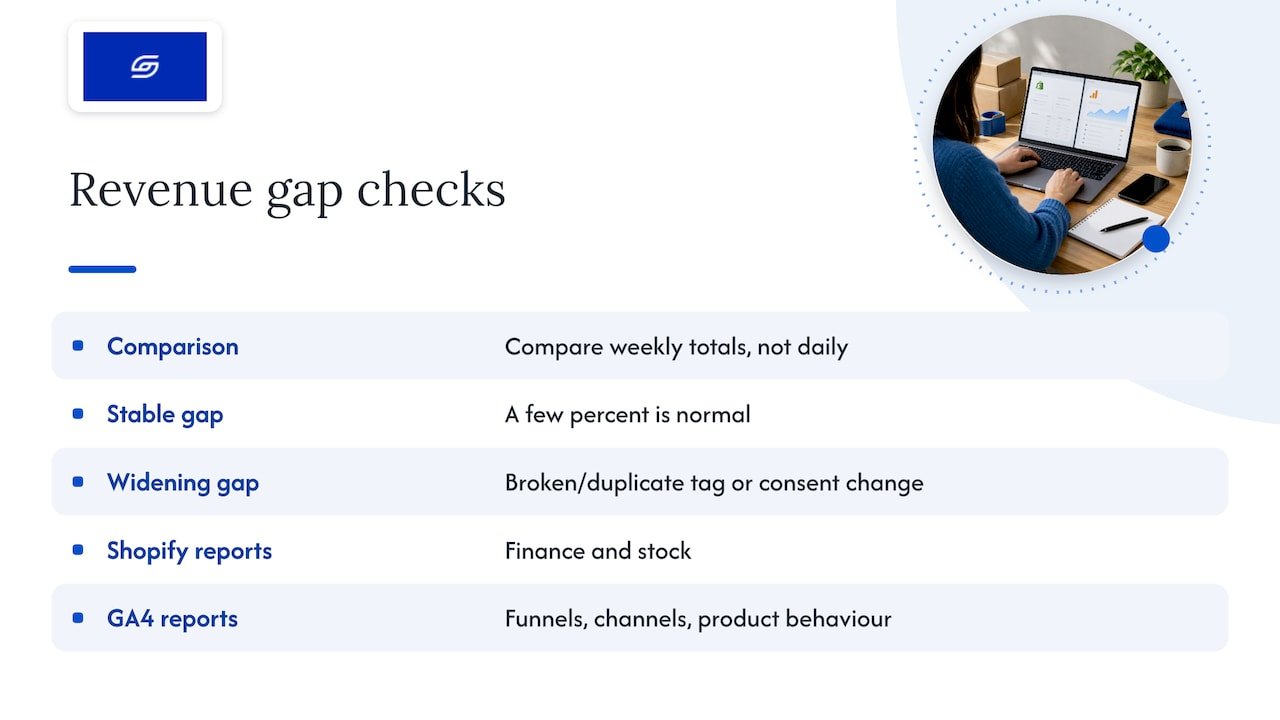
A sensible habit is to compare weekly totals rather than individual days. A gap of a few percent that stays stable is normal. A gap that suddenly widens usually means a broken tag, a duplicated tag or a consent change. Use Shopify reports for finance and stock, and GA4 for funnels, channels and product behaviour.
Consent and privacy for Singapore stores
Singapore’s PDPA has no dedicated cookie law, but analytics cookies tied to an identifier can fall within its scope, and consent is one of its obligations. If you sell to the EU, the UK or other regions, their rules can apply too. Check your obligations with a qualified adviser if you are unsure.
On the technical side, Shopify states that cookie banner and data-sharing settings can be managed per region through Customer Privacy settings. Google explains how to set up Shopify to obtain user consent, and says Shopify’s Google & YouTube conversion setup can work automatically with a compatible consent management setup.
The effect on your numbers is real. Under Google’s consent mode, when analytics_storage is denied, Google does not read or write first-party analytics cookies and may send cookieless pings instead. GA4 may model some of the gaps.
This changes how you read conversion rate. A drop after you add a banner is not automatically a CRO failure. Separate real funnel deterioration from a change in measurement coverage before you redesign anything. We cover the front-end side in our guide to mapping your cookie consent UI to the Customer Privacy API and PDPA.
Our perspective: measure first, then optimise
We have consulted on over 100 Shopify stores, and the pattern is consistent. Owners ask us for a redesign when what they need first is trustworthy data. A conversion rate built on duplicated purchases or missing consent coverage sends you in the wrong direction, and you pay for fixes to problems that do not exist.
Our view is simple. Use the native integration until you have a specific reason not to. Name that reason in writing before anyone adds GTM. Test with a real order every time you change themes, apps or checkout settings. And keep one person accountable for the GA4 property, ideally you.
As a founder-led agency, we also care about what the data is for: deciding which pages to fix, which products to push and which channels to fund. If you want to see how we think about baselines, read our piece on measurement-first conversion rate benchmarks.
— Soodo
When to bring in an expert
Google makes a useful distinction: Shopify provides built-in ecommerce events, but a developer is still needed when the business wants features beyond the platform’s standard functionality. That is the practical line between a straightforward connection and a tracking project.
You probably do not need help if you run a standard theme, one GA4 property and one checkout. You probably do if you are migrating from WooCommerce or Magento, running several markets, using custom checkout logic, or seeing purchase numbers you cannot explain.
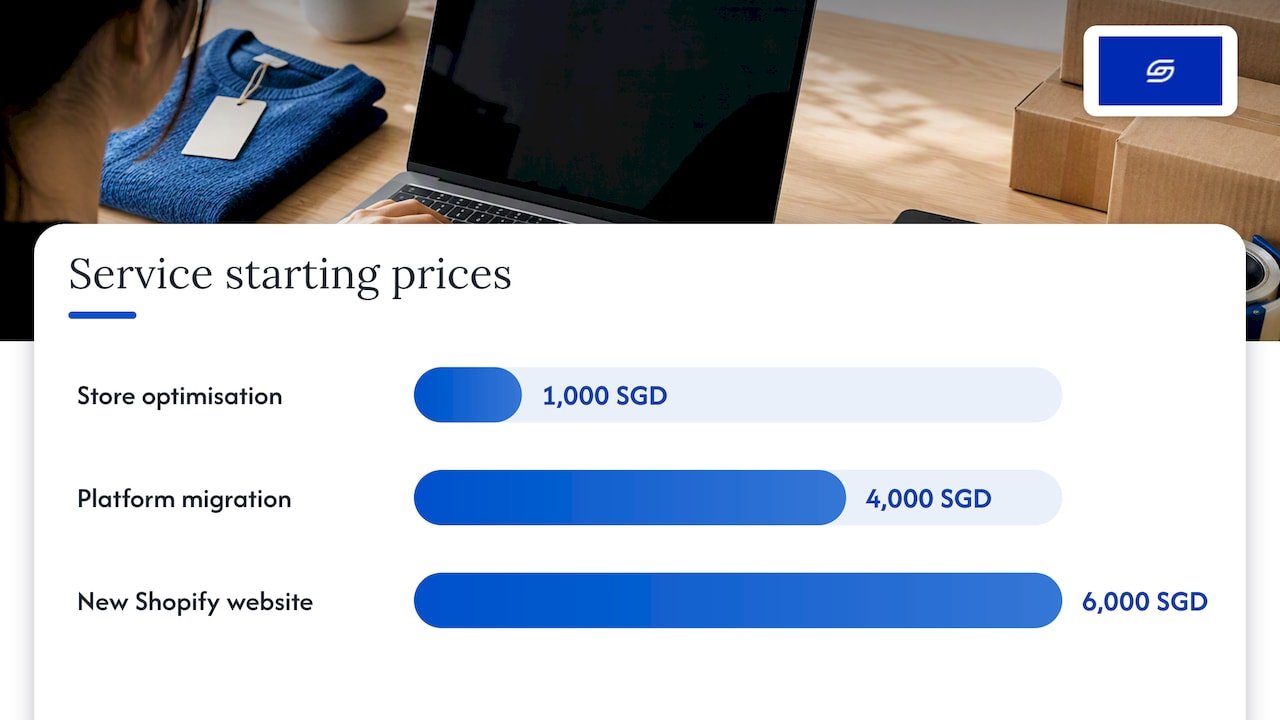
Our existing Shopify store optimisation service starts from 1,000 SGD and includes the measurement checks that make CRO work reliable. If you are rebuilding, tracking is part of the plan from day one on a new Shopify website, which starts from 6,000 SGD. For stores moving platforms, migration starts from 4,000 SGD. Historical Universal Analytics data should not be treated as a live baseline, so we set the new GA4 property up before the switch.
Not sure which applies? Message us and we will tell you honestly whether you need a project or just a checklist. Our Shopify optimisation checklist is a free place to start.
FAQ
Does Shopify set up GA4 ecommerce tracking automatically?
Not on its own. You need a GA4 property and web data stream, then you connect it through the Google & YouTube channel. Once connected, the standard funnel events, including purchase, are sent without code.
Do I need Google Tag Manager for GA4 on Shopify?
Usually not. Shopify recommends its built-in integration for Enhanced Ecommerce data. Use GTM only when you have a clear reason, such as managing several vendors’ tags, and then turn off the native GA4 connection to avoid duplicates.
How long until ecommerce data appears in GA4?
Google says data typically appears within 24 to 48 hours of correct implementation and real visits. Use DebugView and Realtime to check events straight away rather than waiting for standard reports.
Why is GA4 revenue different from my Shopify sales?
GA4 measures tagged behaviour, so consent choices, blockers, refunds, currency and time zone differences all create gaps. Duplicate or missing tags can widen them. Use Shopify as the source of truth for orders and compare GA4 with it weekly.
Sources
- Shopify: Set up your Google tag, Analytics Help
- Set up ecommerce events, Analytics Help
- Measure ecommerce, Google for Developers
- Shopify Help Center: Google Tag Manager
- Shopify Help Center: Create a Google Tag Manager custom pixel
- Shopify Help Center: Setting up Google Analytics 4
- Shopify.dev: checkout_completed
- Analytics Help: data availability guidance
- Analytics Help: Set up Shopify to obtain user consent
- Analytics Help: Consent mode reference
- Shopify Help Center: Customer privacy settings
- Shopify Community: Enabling all events in GA4
- Kukie: Singapore PDPA cookie consent guide
Recommended

Jessica Bong
Jessica Bong is the founder of Soodo, a Singapore Shopify agency that builds, revamps and migrates Shopify stores, with every store set up to be found in AI search (GEO). She has spent over 10 years in ecommerce and runs her own Shopify brand, Patch&Bagel, where every Soodo technique is tested first. Jessica is also a WSQ-certified Shopify trainer at Equinet Academy.