
Audit 5 Top Shopify Product Pages to Fix Structured Data Gaps
Shopify adds basic Product schema to every store by default, but that alone won’t win you rich results or AI citations. You need to extend it with brand, GTIN and aggregateRating fields, then add FAQPage, Organisation and BreadcrumbList schema on top. Start today by running Google’s Rich Results Test on your five highest-traffic product pages and your homepage to see exactly what’s missing.
TL;DR:
- Adding brand, GTIN, and aggregateRating fields to product schema is crucial for qualifying for rich results and AI citations, beyond basic schema.
- Review schema often goes unused by stores but can boost star ratings in search if implemented correctly with real reviews and visible Q&As.
- Ensuring no duplicate schema blocks exist and correctly sourcing variant prices are common issues that hinder schema effectiveness.
- Using metafields with a single snippet is safer for large catalogues, while manual edits suit smaller stores but require caution during theme updates.
- Validation tools like Google’s Rich Results Test and Search Console highlighting errors should be used regularly to maintain schema eligibility.
Table of Contents
- Which schema types actually matter for Shopify SEO
- How Shopify themes generate this markup automatically
- Choosing your implementation route: Liquid, metafields, or an app
- Testing your markup and fixing the errors that block eligibility
- Your implementation checklist for this week
- What we see when we audit client stores
- What structured data will and won’t do for your rankings
- Get your structured data implemented properly
- Docs and validators worth bookmarking
- Sources
- FAQ
Which schema types actually matter for Shopify SEO
Not every schema type carries equal weight. Get these four right before you touch anything else.
Product schema is the foundation, and it needs name, image, description and an offers object with price, priceCurrency and availability to qualify for Product rich results. Add seller too. Miss any of these and Google simply won’t show the price or stock badge in search results, no matter how well the rest of your page performs.
AggregateRating and Review schema are where most Shopify stores leave money on the table. Google checks for ratingValue, reviewCount and bestRating before it displays star ratings under a listing, and most themes don’t emit this at all unless reviews are genuinely present on the page.
FAQPage schema works best when it mirrors visible Q&As already on the product page, not hidden or fabricated content. It’s genuinely high-leverage: Google and AI overviews frequently lift answers straight from FAQ entries into search results and chat responses, according to implementation guides tracking this behaviour.
Organisation and BreadcrumbList schema work site-wide rather than page by page. Organisation confirms who you are to search engines and AI crawlers; BreadcrumbList gives category context that helps both ranking systems and shoppers understand where a product sits in your catalogue.
- Product: name, image, description, offers (price, priceCurrency, availability), seller
- AggregateRating: ratingValue, reviewCount, bestRating
- FAQPage: matches visible on-page Q&As
- Organisation and BreadcrumbList: site-wide identity and navigation context
How Shopify themes generate this markup automatically
Shopify’s own structured_data Liquid filter converts product and article objects into schema.org JSON-LD without you writing a line of code. Products with variants output as ProductGroup, while single-variant products output as plain Product. Articles map to Article schema automatically.
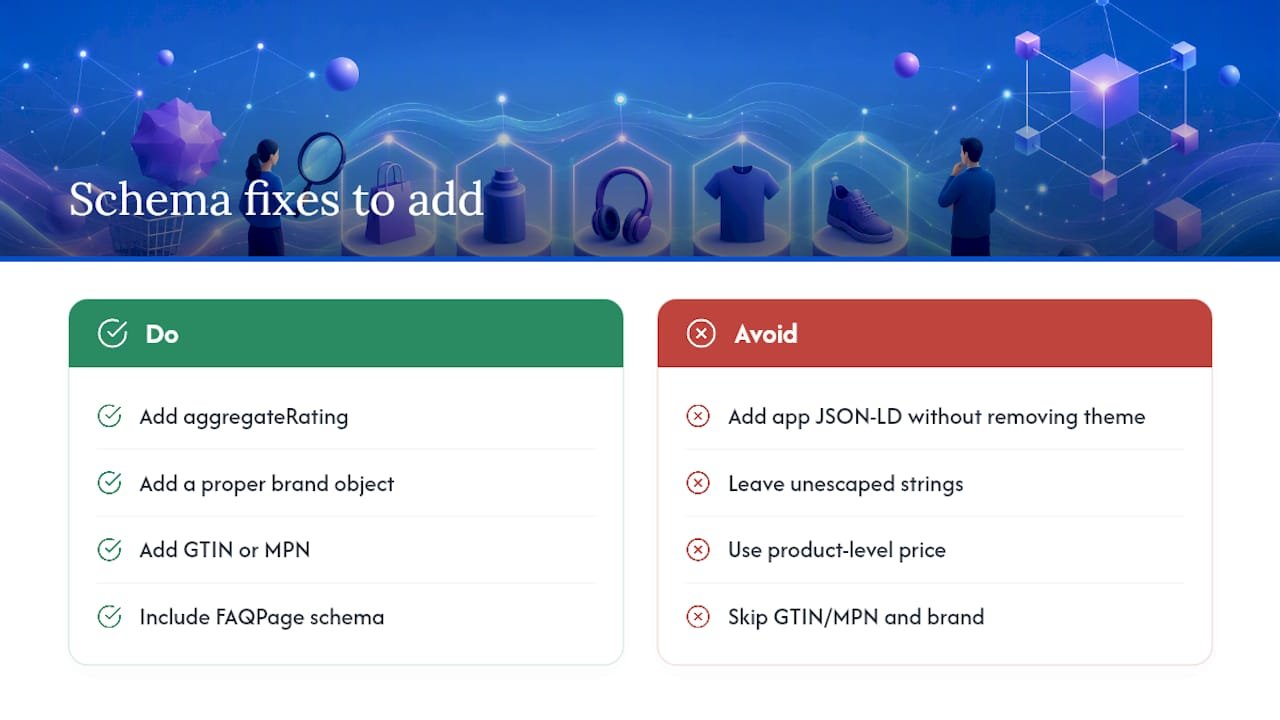
The catch is what themes typically leave out. Most emit basic name, image and price fields but skip aggregateRating, a proper brand object, GTIN or MPN, and FAQPage entirely, a gap confirmed across multiple Shopify schema audits. That gap is exactly where competitors who bother to fill it pull ahead in rich result eligibility.
Duplicate schema blocks are a related headache. They creep in when your theme already outputs Product JSON-LD and you then install a schema app that adds its own block on top, leaving two competing application/ld+json scripts in your page source. View source on a product page and search for “ld+json” to check.
Two Liquid pitfalls trip up developers constantly: unescaped strings breaking the JSON syntax, and pulling price from product.price instead of the variant-level price, which goes stale the moment a size or colour has a different price than the default variant shown.
Choosing your implementation route: Liquid, metafields, or an app
Three paths lead to complete structured data on Shopify. Which one fits depends on your catalogue size and how comfortable you are editing theme code.
- Manual Liquid edits. Add JSON-LD directly into
theme.liquidor your product template, always running free-text fields throughjsonandstrip_htmlfilters first. Quotes and line breaks in product descriptions are the most common cause of broken JSON, so escape everything before it ships. - Metafields plus a single snippet. Store GTIN, FAQ question-and-answer pairs, and review aggregates as metafields, then call one shared snippet from your theme that reads those values. This keeps your markup centralised and easy to update without touching multiple templates.
- A dedicated schema app. Worth it when your catalogue runs into the thousands of SKUs or you simply don’t have development time to spare. Apps keep schema synced automatically as product data changes, which manual edits can’t match at scale, provided you check first that it isn’t duplicating what your theme already outputs.
Whichever route you take, back up your theme before editing, test on a staging page first, decide your policy on injecting real customer reviews before adding aggregateRating, and set a recurring check after every theme update.
Pro Tip: If your theme update history shows more than two updates a year, metafields plus a snippet is safer than manual Liquid edits; theme updates routinely wipe out hardcoded changes to theme.liquid.
Testing your markup and fixing the errors that block eligibility
Three tools cover validation from start to finish: Google’s Rich Results Test tells you if a page qualifies for Google’s rich result types, the Schema Markup Validator at validator.schema.org checks raw compliance against schema.org’s specification, and Search Console’s Enhancements report tracks issues across your whole site over time.
Errors block eligibility outright; warnings are usually recommendations you can address later. Fix errors first.
The recurring offenders:
- Unescaped quotes or line breaks in descriptions breaking the JSON entirely
- Hardcoded prices that drift out of sync with actual variant pricing
- Duplicate
application/ld+jsonblocks from a theme and an app both firing - Availability values that don’t match schema.org’s expected format (
InStock, not “In Stock”)
A focused run of auditing five pages, fixing three high-impact fields, and re-testing is often enough to see measurable gains without a full site rebuild. Set a weekly Search Console check and re-test immediately after any theme update.
Your implementation checklist for this week
Work through this in order and you’ll cover the highest-impact fixes first.
- Run the Rich Results Test on your top five product pages and record every missing schema type.
- View page source and remove any duplicate
application/ld+jsonblocks you find. - Add Organisation schema site-wide if it’s currently absent.
- Extend Product schema with brand, SKU/GTIN, and variant-correct offers values.
- Add FAQPage schema wherever visible Q&As already exist, and aggregateRating wherever real reviews exist.
- Re-test every page and start monitoring Search Console’s Enhancements report weekly.
For a broader technical audit alongside this, Soodo’s Shopify optimisation checklist covers the adjacent site-speed and UX items that tend to sit next to schema gaps on the same underperforming pages.
What we see when we audit client stores
Across client audits, the pattern repeats: Product fields get completed first, then AggregateRating, then FAQPage, Organisation and BreadcrumbList last, because that order matches where the eligibility gains are biggest.
The three pitfalls we fix most often are duplicate schema left behind after a store installs (and later removes) a schema app, prices pulled from the wrong variant field so schema shows a price nobody can actually buy at, and custom Liquid edits that vanish silently the moment a theme update ships.
Bring in outside help once your catalogue has complex variant pricing rules, or once rich results are clearly moving click-through rate and revenue enough to justify dedicated time.
— Soodo
What structured data will and won’t do for your rankings
Structured data doesn’t move your ranking position. What it does is make your pages eligible for rich results and AI citations, which is where the actual click-through gains come from.
The biggest returns come from pairing accurate schema with real product data and genuine reviews, not from bolting on every schema type schema.org offers. Prioritise accuracy and ongoing monitoring over chasing completeness for its own sake.
Get your structured data implemented properly
As an agency focused on Shopify, some specialists handle theme edits, metafield architecture and CRO-focused schema work directly, built by people who run Shopify stores, not junior staff following a template.

If your store is already live and you suspect gaps in your Product, FAQ or Organisation schema, Existing Shopify Store Optimization covers the audit, the fixes, validation against Google’s tools, and ongoing monitoring so the gains don’t disappear at the next theme update. Building from scratch instead? New Shopify Website Development bakes correct structured data in from the first line of theme code. Get in touch to scope an audit before your next theme update undoes the work you’ve already done.
Docs and validators worth bookmarking
- Google Rich Results Test for checking eligibility page by page
- Search Console’s Enhancements report for ongoing site-wide monitoring
- Shopify’s structured_data Liquid filter documentation for how Product, ProductGroup and Article map to JSON-LD
- schema.org’s own pages for Product, Organization, FAQPage and BreadcrumbList specifications
- BabyLoveGrowth’s catalogue of rich result types for prioritising which schema to tackle next
Sources
- Liquid filters: structured_data
- Shopify schema markup: practical implementation guide | Sutton Commerce
- How to add schema markup to Shopify (step‑by‑step) | Naridon
FAQ
Does structured data improve Shopify SEO rankings directly?
No, structured data isn’t a direct ranking signal. It makes your pages eligible for rich results and AI citations, which increases click-through rate rather than moving your position in search results.
Does Shopify add structured data automatically?
Yes, Shopify’s theme engine outputs basic Product schema through the structured_data Liquid filter without any setup. It typically omits aggregateRating, brand objects, GTIN and FAQPage, so those need adding manually or through metafields.
Should I use an app or edit Liquid myself for schema markup?
Manual Liquid edits work well for smaller catalogues where you can escape and test each field carefully. Larger catalogues often benefit from an app that keeps schema synced as inventory and pricing change, provided you check it isn’t duplicating your theme’s existing output.
How do I check if my structured data is working?
Run the page through Google’s Rich Results Test to see eligibility, then monitor the Enhancements report in Search Console over time. Re-test immediately after any theme update, since updates can silently remove custom code.
What does Soodo charge to fix structured data on an existing store?
Soodo’s Existing Shopify Store Optimization service starts from 1000 SGD one-off and covers schema audits and fixes alongside broader technical SEO work. Exact scope and pricing depend on your catalogue size and current setup.
Recommended

Jessica Bong
Jessica Bong is the founder of Soodo, a Singapore-based Shopify development and CRO agency. She built and scaled her own eCommerce brand before starting Soodo, and has since audited 60+ Shopify stores. Jessica also teaches eCommerce at Equinet Academy. Her hands-on experience running a live brand gives Soodo an edge most agencies lack.