
Shopify 301 Redirects: Fix CSV Imports or Hire an Agency
Shopify 301 redirects are server-side permanent redirects that you create in the admin under Online Store → Navigation → View URL redirects. According to Shopify’s documentation, they pass on most of a page’s SEO equity. You can add them one at a time, or import many by CSV or API, but platform limits and reserved paths apply.
TL;DR:
- Shopify applies a redirect only when the old path returns a 404, so unpublish, delete, or rename its page before testing.
- Basic redirects match exact paths, support no wildcards or redirect chains, and need a full URL only for destinations on another domain.
- CSV imports require exactly two headers, Redirect from and Redirect to; test a small batch first, and run large API imports sequentially.
- Shopify says redirects pass roughly 90% to 99% of SEO equity, so update internal links and sitemaps, then monitor Search Console after launch.
Table of Contents
- How do you create a single 301 redirect in Shopify?
- How do you bulk import redirects with CSV or GraphQL?
- What are Shopify’s redirect limits and restrictions?
- How do you manage and troubleshoot your redirects?
- What SEO steps matter beyond adding redirects?
- How do you handle redirects in multi-language or multi-region stores?
- When should you do it yourself and when should you hire an agency?
- How can we help protect your SEO during a migration?
- FAQ
- Sources
How do you create a single 301 redirect in Shopify?
A single redirect takes only a few steps. Here is the sequence, as documented in the Shopify Help Centre and walked through by Practical Ecommerce:
- In your Shopify admin, go to Online Store → Navigation.
- Click View URL redirects, then Create URL redirect.
- In Redirect from, enter the old path, written relative to your domain (for example, /products/old-mug).
- In Redirect to, enter the new path, or a full URL if the destination sits on another domain.
- Click Save.
Use a relative path for anything inside your own store. Use a full URL only when the destination is a different domain, such as a new brand site. Matching is exact apart from capitalisation, so /products/old-mug and /products/old-mug/ are not the same thing, and wildcards are not supported in basic redirects. A redirect also cannot point at another redirect, so always send the old path straight to its final destination.
The rule that catches most people out: a redirect only fires when the “from” path returns a 404. If a page, product or collection still lives at that path, Shopify ignores the redirect. So before you save, make sure the old page is unpublished, deleted or renamed.
To verify, open the old URL in a private or incognito window and confirm it lands on the new page. Browsers and search engines cache redirects, so a normal window may show stale behaviour for a while.
Pro Tip: Test with a private window first, then check the old URL again after clearing your browser cache. If the old page still loads, the path is still active and Shopify is ignoring your redirect.
How do you bulk import redirects with CSV or GraphQL?
Once you have created one redirect, an Import link appears on the URL redirects page. That is where you upload a CSV file, as Practical Ecommerce describes. The file needs exactly two columns, headed Redirect from and Redirect to.
Work through it in this order:
- Export your old URL list from your previous platform, analytics or a crawler.
- Map each old path to its closest new equivalent, one row per path.
- Name the two columns exactly
Redirect fromandRedirect to, with no extra spaces in the header row. - Deduplicate rows, strip stray whitespace and normalise paths so they all start with a forward slash.
- Confirm that every “from” path returns a 404 on the live store.
- Import a small test batch first, check the results, then upload the rest.
Most failed imports trace back to the same few things: header spacing, columns in the wrong order, duplicate rows, and paths that still resolve to live content. The Shopify developer community shows these over and over in troubleshooting threads.
For very large or automated batches, the GraphQL Admin API offers the urlRedirectImportCreate mutation, followed by a submit step on the resulting import. That suits migrations driven by scripts or tooling. Expect to hit concurrency errors if you start a new import while another is still processing, so queue your jobs rather than firing them in parallel. The same header-formatting rule applies to the CSV you feed into the API.
Shopify’s built-in bulk editor no longer handles URL redirects, so if you need to edit many existing redirects at once, an app is the practical route.
Pro Tip: Keep your CSV in a spreadsheet with a “status” column for your own tracking. After each test batch, mark the rows that worked, so a failed full import never leaves you guessing which ones landed.
What are Shopify’s redirect limits and restrictions?
Planning a migration means knowing the ceilings before you map a single URL. Per the Shopify Help Centre:
- Standard stores can hold up to 100,000 URL redirects.
- Shopify Plus stores can hold up to 20,000,000 URL redirects.
- Reserved prefixes such as /apps, /application, /cart, /carts, /orders, /services and /shop cannot be redirected.
- Fixed system paths such as /products, /collections and /collections/all cannot be redirected either.
- A redirect never applies while the “from” path serves a page.
The last point has the biggest practical effect. If you are moving content around inside the same store, the old page must stop existing before the redirect works. That means unpublishing or deleting the old page, product or collection, or changing its handle, and only then expecting the redirect to take over.
For most stores the quota is generous, so the real constraint is the 404 rule and the reserved paths. If an old URL clashes with a reserved path, you cannot redirect it, so you will need to change how the new store handles that route instead. Check your old URL list against the reserved prefixes early, because finding a clash during launch week is far more stressful than finding it in planning.
How do you manage and troubleshoot your redirects?
The URL redirects table is your audit tool. You can search it, filter by creation date and save a filter, which is handy for reviewing everything added during a specific migration window, as Practical Ecommerce notes. Open any individual redirect to edit or delete it. When you create a redirect for a path that already has one, the overwrite option lets you replace the existing rule.
Export the full list to CSV before and after any large change. It works as a backup, and it gives you a ready-made starting point for the next import.
When a redirect is not working, run through this list:
- Confirm the “from” path really returns a 404 and is not an active page, product or collection.
- Check for extra spaces in the CSV header row.
- Look for an import still running; wait for it to finish before starting another.
- Make sure you are not redirecting a reserved path.
- Clear your cache and test in a private window.
Shopify documents that redirects are server-side 301s, so browsers and search engines can cache them. Even after you fix a rule, you may keep seeing the old result for a while. Always test in a private window before assuming the fix failed. (Shopify Help Centre)
What SEO steps matter beyond adding redirects?
Redirects protect rankings, but they are only one part of a safe URL change. Shopify states that a 301 passes on roughly 90% to 99% of existing SEO equity, so a small amount can still be lost. The rest of the checklist is about closing that gap.
- Update internal links first. Point your menus, collections, blog posts and product pages directly at the new URLs. Leaving internal links aimed at redirects wastes crawl efficiency and can delay indexing.
- Build an old-to-new URL map. Keep it as a spreadsheet. It becomes your import file, your QA checklist and your record if anything goes wrong.
- Protect high-value pages. Export your backlink list and make sure the pages that attract the most links have the cleanest, most relevant redirect targets.
- Submit an updated sitemap to Google Search Console as soon as the new URLs are live.
- Use the change-of-address tool for domain moves. Google’s Change of Address tool checks ownership and a few 301s before sending the move request, and it forwards signals for 180 days.
- Monitor crawl and index reports for several weeks after launch, watching for 404 spikes and pages dropping out of the index.
The right order is: implement redirects, update internal links and sitemaps, then monitor Search Console. For a deeper walkthrough of sequencing on a full platform move, read our post-migration SEO checklist for Magento stores, or the site migration SEO guide for another angle on timing.
Pro Tip: Sort your old URLs by traffic and backlinks before you map them. Spend your care on your highest-priority pages, and let the long tail follow a simple pattern.
How do you handle redirects in multi-language or multi-region stores?
Multi-language and multi-region setups add one wrinkle: each market has its own URL prefix, such as /fr/ or /en-gb/, and your redirect rules must respect them. Treat each locale path as its own “from” path, and map it to the matching locale on the new store. Sending every old URL to one default-language page throws away relevance and confuses both visitors and crawlers.
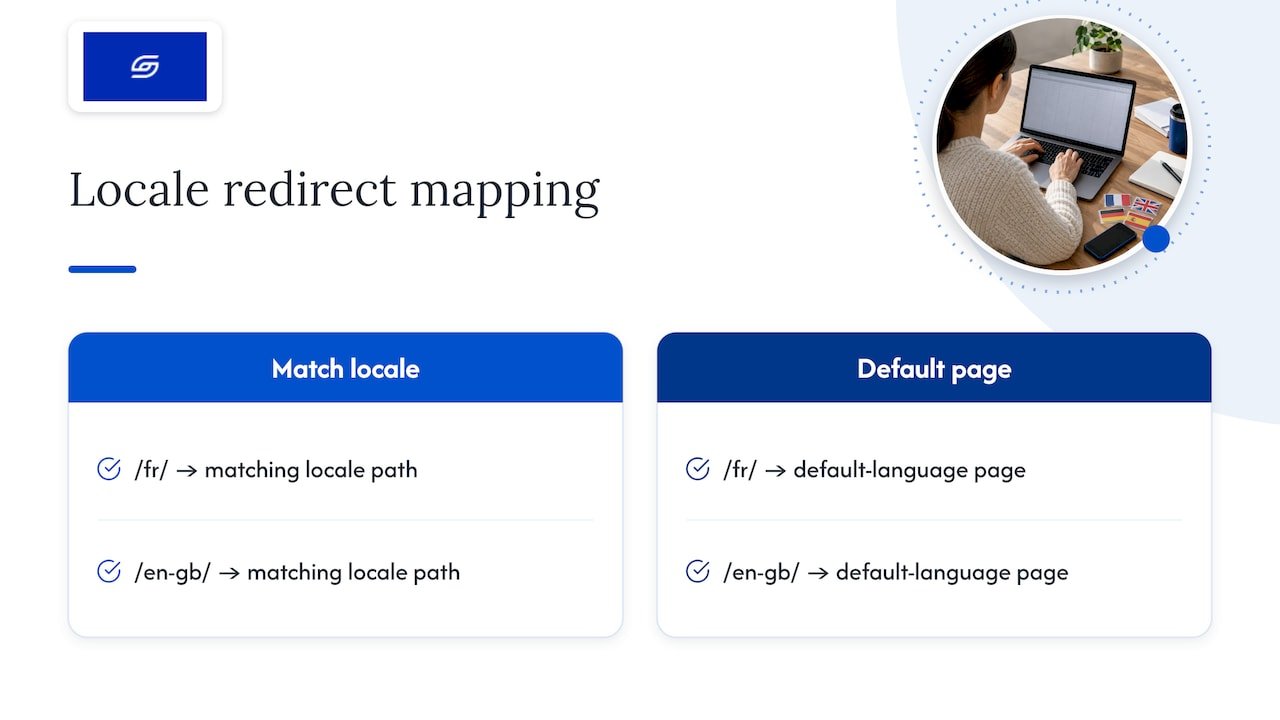
A few habits help. Keep a separate section of your URL map for each language or region, so gaps are easy to spot. Do not redirect a localised page to the main-market equivalent unless no localised version exists. If a market is being retired, redirect its pages to the closest relevant page in another market, and say so in your records so you can revisit it later.
The Shopify limits still apply to the whole store, so a large catalogue across many markets multiplies your redirect count quickly. Count the total across all locales before you commit to a plan, and check that your sitemap and internal links update for every market, not just your primary one.
When should you do it yourself and when should you hire an agency?
Our view is simple: the size and shape of the job decide it, not pride. If you have a handful of changed URLs, a clean 404 on each old path and no complicated patterns, the steps above are all you need. Do it yourself and keep a backup export.
The picture changes once you have a large inventory, many legacy backlinks, a need for pattern-style rules that basic Shopify redirects cannot express, or several markets moving at once. At that point the redirects are the easy part. The risk sits in the coordination: mapping every URL sensibly, importing in safe batches, updating internal links and sitemaps, and watching Search Console afterwards for the problems nobody predicted.
An agency earns its fee on that coordination. A good engagement covers mapping, bulk import, post-launch monitoring and optimisation, so rankings are protected instead of hoped for. Just as important, the agency tells you what not to redirect. A redirect to an irrelevant page often does more harm than a clean 404.
— Soodo
How can we help protect your SEO during a migration?
We build and migrate Shopify stores, and redirect mapping sits at the centre of every project. We do the mapping, support the bulk import and monitor the store after launch.

Here is what we can do for you:
- Platform migration, from 4000 SGD one-off, with redirect mapping and post-launch checks
- Existing Shopify store optimisation, from 1000 SGD one-off, for fixing SEO problems after a redirect-heavy change
- Custom one-time projects
Send us your current URL count and where you are moving to, and ask for a quote or audit.
FAQ
How do you do a 301 redirect in Shopify?
Go to Online Store → Navigation → View URL redirects, then click Create URL redirect. Enter the old path in “Redirect from” and the new path in “Redirect to”, then save. The old path must return a 404 for the redirect to work.
What does a 301 redirect mean?
A 301 redirect tells browsers and search engines that a page has moved permanently to a new address. Shopify’s redirects are server-side 301s, so visitors and crawlers are sent straight to the new URL.
Why are my Shopify redirects not working?
The most common cause is that the “from” path still serves a live page, so Shopify ignores the redirect. Other causes include extra spaces in a CSV header, a redirect pointing at another redirect, or a cached result in your browser. Test in a private window after fixing the path.
Will a 301 redirect affect SEO?
A 301 passes on most of a page’s SEO value, but not quite all of it. Shopify says roughly 90% to 99% of equity transfers to the new URL. Updating internal links and sitemaps helps keep the loss as small as possible.
Sources
- Shopify Help Center | Creating and managing URL redirects
- How to Create and Manage 301 Redirects with Shopify
- Error when attempting Bulk API urlRedirectCreate – GraphQL Admin API Troubleshooting – Shopify Developer Community Forums
- Change of Address tool – Search Console Help
Recommended

Jessica Bong
Jessica Bong is the founder of Soodo, a Singapore Shopify agency that builds, revamps and migrates Shopify stores, with every store set up to be found in AI search (GEO). She has spent over 10 years in ecommerce and runs her own Shopify brand, Patch&Bagel, where every Soodo technique is tested first. Jessica is also a WSQ-certified Shopify trainer at Equinet Academy.