Stop Losing Sales: Fix the 3 Leaks in Your Shopify Customer Journey
The Shopify customer journey is the five-stage lifecycle that takes a shopper from first discovery to repeat loyalty: awareness, consideration, acquisition, service, and loyalty. For most merchants, the fastest wins sit in three places: clearer product pages, less friction at checkout, and first-party event tracking that shows you exactly where shoppers drop off. Fix those three before anything else.
TL;DR:
- Improving checkout flow by reducing form fields and enabling Shop Pay can significantly boost conversion rates, especially when tested with small tweaks.
- Tracking product views, variant clicks, and shipping policy visibility on product pages helps identify and fix drop-offs before customers reach checkout.
- Stitching customer data from events like PDP views, cart additions, and purchase attempts allows for more accurate journey analysis and targeted optimizations.
- A prioritized, experiment-driven approach based on actual pain points yields faster revenue gains than isolated or department-specific fixes.
- Small, continuous tests aligned with clear hypotheses and metrics are more effective than full redesigns for improving the entire customer journey.
Table of Contents
- The five stages of the Shopify customer journey and what happens in each
- Where to collect and stitch journey data on Shopify
- Checkout and cart: common leaks, benchmarks and Shopify-specific levers to fix them
- Product page and acquisition touchpoints: raise intent before users reach cart
- Design experiments and a short testing framework for journey improvements
- Soodo case study: TAHAN landing page optimisation and what it proves
- How to build a customer journey map for your Shopify store
- Metrics and dashboards: what to monitor daily, weekly and monthly
- Why founder-led, conversion-first optimisation matters
- How Soodo helps map and optimise Shopify customer journeys
- Primary sources for verification and deeper reading
- Sources
- FAQ
The five stages of the Shopify customer journey and what happens in each
Every Shopify store, regardless of size, moves customers through the same five stages. The Shopify Enterprise blog frames these as awareness, consideration, acquisition, service, and loyalty, and each one has its own intent, its own touchpoints, and its own metric that tells you whether it’s working.
Awareness is where a shopper first sees your brand, usually through an ad, a social post, or a search result. You’re not selling yet. You’re earning attention, and click-through rate combined with traffic quality tells you whether the right people are noticing you.
Consideration is where they start comparing. They’re on your product detail pages, reading descriptions, checking variants, maybe opening a second tab to see what a competitor charges. Product views, time on page, and variant interactions reveal how convincing your PDP actually is.
Acquisition is the purchase itself, and it’s where most revenue quietly leaks away. Add-to-cart rate, checkout starts, and payment failures tell you whether your cart and checkout are helping or hurting.
Service covers everything after the order confirmation: fulfilment speed, tracking updates, and how you handle a return or a support query. This stage shapes whether a customer ever buys from you again.
Loyalty is the payoff: repeat purchases, subscriptions, and referrals. Repeat purchase rate, lifetime value, and referral activity are the numbers that separate a store with genuine traction from one that’s constantly buying new customers to replace the ones it lost.
The practical takeaway for each stage:
- Awareness: track click-through rate and traffic quality, not just impressions.
- Consideration: watch product views, time on PDP, and variant clicks.
- Acquisition: monitor add-to-cart rate, checkout starts, and payment failure rate.
- Service: measure delivery experience, return rate, and customer satisfaction.
- Loyalty: follow repeat purchase rate, lifetime value, and referral activity.
Treating these as one connected sequence, rather than five separate marketing channels, is the shift that the Klaviyo guide to journey mapping points to as well: touchpoints that talk to each other compound value, while isolated flows just add noise.
Where to collect and stitch journey data on Shopify
You can’t fix what you can’t see, and Shopify gives you more visibility than most merchants use. Shopify Analytics and customer profiles should be your baseline source of truth for orders, sessions, and returning-customer behaviour. From there, the platform’s developer tools let you go deeper.
- Use Shopify’s Analytics API to publish custom events through
analytics.publishand identify returning visitors throughanalytics.visitor, giving you granular journey data beyond default reporting. - Capture a minimal event set: PDP view, add-to-cart, checkout start, payment attempt, order complete, and post-purchase actions like tracking-link clicks.
- Tag these events consistently across your theme, app extensions, and checkout UI extensions so the same action always fires the same event name.
- Publish richer events where useful, such as
pdp_recommendation_viewedorsubscription_default_selected, which Shopify’s web pixels documentation supports through theme, app, and checkout extension points, and which help with identity stitching and personalisation. - Keep consent and data governance front of mind: only collect what you have a lawful basis to use, and be transparent with shoppers about tracking, in line with the privacy obligations that apply in your market.
Once these events are flowing, you can stitch a single customer’s path across sessions and devices instead of guessing from separate, disconnected reports.
Checkout and cart: common leaks, benchmarks and Shopify-specific levers to fix them
Checkout is where good marketing gets undone by bad forms. Baymard’s benchmark research finds that checkout flows with a high number of visible form fields see measurably higher abandonment, and that trimming those fields reliably improves usability. Most stores ask for more than they need.
Shopify’s shift to native one-page checkout and Shop Pay addresses this directly. Merchants who migrated report measurable improvements in checkout-to-order conversion compared with older, multi-step flows, according to reporting on Shopify’s checkout changes. The mechanism is straightforward: fewer steps and fewer fields mean fewer moments where a shopper hesitates, gets confused, or simply gives up.
Practical fixes you can make this week:
- Remove any field that isn’t strictly needed to fulfil the order.
- Delay account creation until after the purchase, or make it optional entirely.
- Add address autocomplete so shoppers don’t retype details they’ve already given elsewhere.
- Show shipping costs and totals early, not as a surprise at the final step.
- Enable Shop Pay if you haven’t, since returning shoppers can check out with saved details.
A one-week test: pick your highest-traffic product, strip your checkout form to the fewest fields Shopify allows, and compare checkout-start-to-order conversion against the prior week. It’s a small change with a fast read on impact, and it’s the cheapest experiment on this list.
Product page and acquisition touchpoints: raise intent before users reach cart
As checkout friction falls, the product detail page becomes the bigger drop-off point, a pattern the Shopify Enterprise blog on retail journeys highlights as checkout improvements shift where the leaks happen. A confusing PDP will undo a clean checkout every time.
The usual culprits: a price that’s hard to find, no social proof near the buy button, and product photography that doesn’t answer basic questions like size, fit, or material. Shoppers who can’t quickly answer “is this right for me?” simply leave.
Fixes that tend to move the needle:
- Lead with one clear value proposition instead of five competing claims.
- Sequence images to answer objections in order: what it is, how it’s used, scale, and detail.
- State shipping times and return policy directly on the PDP, not buried in a policy page.
- If you sell subscriptions, make the subscription option the sensible default rather than an afterthought toggle.
Pro Tip: Put your strongest customer review directly beside the “add to cart” button. Social proof works best when it’s seen in the same glance as the buying decision.
Design experiments and a short testing framework for journey improvements
A journey map only earns its keep once you start testing changes against it. The workflow is simple enough to run without a dedicated analytics team.
- Write a one-line hypothesis: what you’re changing, and what you expect it to do to a single primary metric.
- Pick the primary metric before you launch: PDP tests usually track add-to-cart rate, cart tests track checkout-start rate, checkout tests track checkout-to-order conversion, and post-purchase tests track repeat purchase rate.
- Define your segment, whether that’s all traffic, new visitors only, or a specific product category.
- Estimate the traffic you’ll need to see a real difference, and give the test enough time to include a full weekly cycle.
- Run a launch checklist: confirm tracking events fire correctly, confirm the test doesn’t break mobile, and confirm you have a way to roll back quickly.
- Set an evaluation window in advance, typically two to four weeks depending on traffic volume, so you’re not tempted to call it early.
Three experiments worth running first: a PDP layout test that moves social proof above the fold, a checkout test that removes two non-essential fields, and a three-touch abandoned-cart recovery sequence for shoppers who reach checkout but don’t complete payment.
Soodo case study: TAHAN landing page optimisation and what it proves
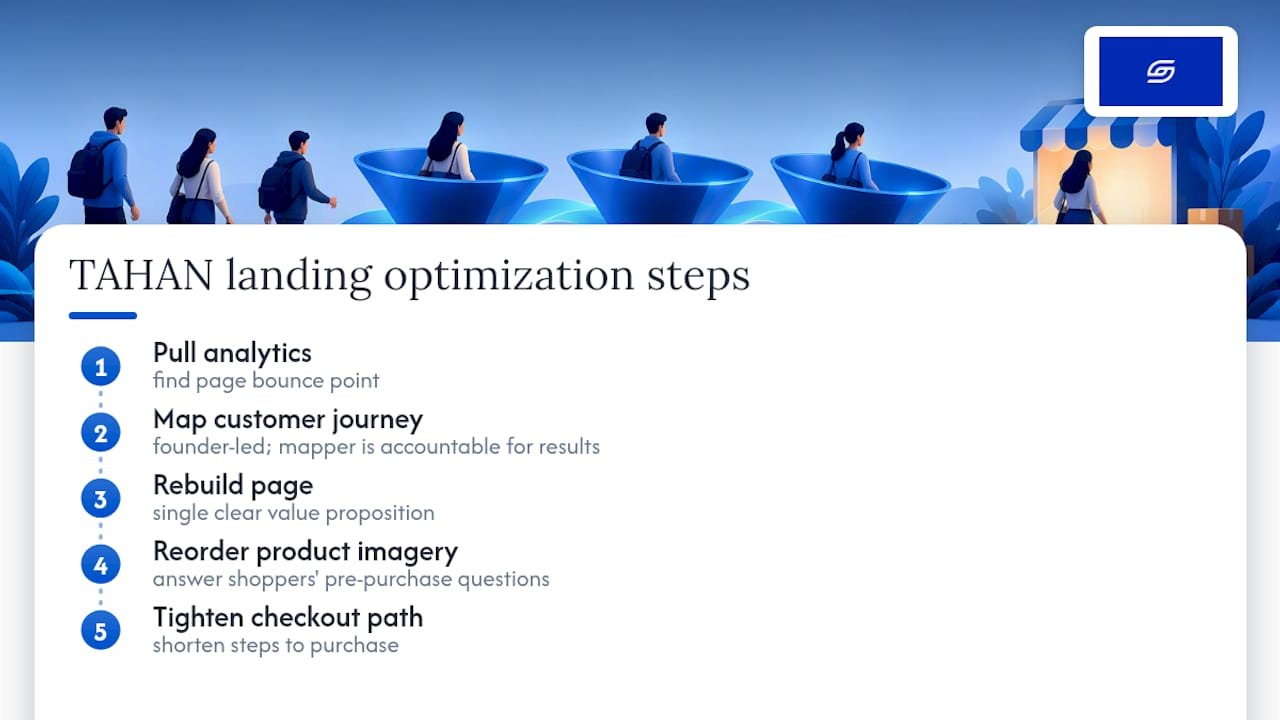
When Soodo worked on the TAHAN landing page optimisation, the brief was familiar: traffic was arriving but not converting, and the existing page wasn’t answering the questions shoppers had before they reached checkout. The engagement mapped the journey from ad click through to purchase, then rebuilt the landing page around a single clear value proposition, reordered product imagery, and tightened the path to checkout.
Founder-led execution means the person mapping the journey is the same person accountable for the conversion result.
The lesson generalises well beyond one store: a page redesign that isn’t grounded in where shoppers actually drop off is just decoration. Mapping first, then designing against the map, is what makes the difference between a page that looks better and one that sells better.
Pro Tip: Before redesigning any landing page, pull your existing analytics for that page’s bounce point. Design the fix to address that specific point, not the page in general.
How to build a customer journey map for your Shopify store
A journey map is only useful if it turns into a list of things you’ll actually build and test. Here’s a sequence that gets you there without weeks of workshops.
- Define the scope and the outcome you’re mapping for, such as reducing checkout abandonment or lifting repeat purchase rate.
- Gather existing data first: Shopify Analytics, support tickets, and any survey responses you already have.
- Build two or three rough personas based on your actual customer data, not guesswork about who you wish was buying.
- List every touchpoint each persona hits, from the first ad to the post-purchase email.
- Plot friction and emotion at each touchpoint: where do they hesitate, get confused, or feel reassured?
- Score each friction point on impact and effort, and prioritise the ones that are high impact and low effort first.
- Turn the top-scoring items into experiment tickets with a hypothesis and a metric attached, following the testing framework above.
- Note implementation details for each: consistent event names, consent requirements, and a plan to test changes on a staging theme before pushing live.
The output isn’t a poster for the wall. It’s a backlog, ranked by what will actually move revenue, that your team can work through one experiment at a time.
Metrics and dashboards: what to monitor daily, weekly and monthly
Different metrics matter at different speeds, and checking the wrong one too often just adds noise.
- Daily: traffic quality, product-view-to-add-to-cart rate, checkout starts, and completed orders.
- Weekly: checkout conversion rate, average order value, cart recovery rate, and failed payment rate.
- Monthly: repeat purchase rate, cohort lifetime value, customer acquisition cost, and a running tally of which experiments won or lost.
Daily numbers catch a broken form field or a payment gateway outage before it costs you a week of sales. Weekly numbers tell you whether your checkout changes are actually holding up once the novelty wears off. Monthly numbers are where you judge whether the whole journey, not just one stage of it, is improving.
Keep this list short. A dashboard with forty metrics gets checked once and then ignored, while five or six well-chosen numbers get checked every day.
Why founder-led, conversion-first optimisation matters
Most Shopify teams treat marketing, design, and checkout as separate workstreams handled by separate people, which means friction in one area often goes unnoticed by whoever owns another. I’ve found the fastest fixes happen when one person, or one small team, is accountable for the whole path from ad to repeat order, because that’s the only way priorities get set by actual impact rather than department politics.
The common mistake is optimising the part that’s easiest to measure, usually ad spend, while leaving checkout and PDP friction untouched because no one owns them directly. Pick one experiment from this article and run it this week. Small, measured changes compound faster than any full redesign.
— Soodo
How Soodo helps map and optimise Shopify customer journeys
If mapping your own journey and running the tests above sounds like more than your team has time for, that’s a gap a specialized agency can fill, bringing a prioritised, conversion-first approach built on practical experience rather than generic checklists.

Depending on where your store stands, the right starting point differs:
- If your store exists but conversion is underperforming, Existing Shopify Store Optimization starts from 1,600 SGD one-off and focuses on the PDP, cart, and checkout fixes covered above.
- If you’re planning a full relaunch, New Shopify Website Development builds the journey in from the start rather than retrofitting it.
- If you’re moving off another platform, platform migration from 4,000 SGD one-off carries your journey data and SEO equity across cleanly.
For a broader look at conversion tactics before you commit to an engagement, our proven CRO strategies guide is a useful next read. When you’re ready to talk specifics, get in touch about existing store optimisation and we’ll walk through where your journey is leaking first.
Primary sources for verification and deeper reading
This article draws on Shopify’s customer journey mapping guide, Shopify’s Analytics API documentation, Baymard’s checkout form-field benchmarks, and reporting on Shopify’s one-page checkout, alongside insight on unifying omnichannel touchpoints.
Sources
- Customer journey map for ecommerce – Shopify Enterprise blog
- Checkout optimisation: minimise form fields – Baymard
- Ad-times
FAQ
What are the five stages of a customer journey?
The five stages are awareness, consideration, acquisition, service, and loyalty, as outlined in Shopify’s journey mapping guide. Each stage has distinct shopper intent and needs its own metrics, from click-through rate at awareness through to repeat purchase rate at loyalty.
Is Shopify still worth it in 2026?
Shopify remains a strong choice for merchants who want a platform with active checkout innovation, since features like one-page checkout and Shop Pay continue to deliver measurable conversion gains for stores that adopt them, per reporting on Shopify’s checkout changes. Its value depends on whether a merchant actually uses the platform’s data and checkout tools rather than leaving them at default settings.
What are the seven steps of the customer journey?
Definitions vary by source, and there’s no single agreed seven-step model in the way there is for the five-stage lifecycle. A common practical version breaks the five core stages into finer steps, such as splitting acquisition into cart and checkout, but the five-stage model from awareness to loyalty is the more consistently cited framework.
Where should I start mapping my Shopify customer journey?
Start with the checkout and product page, since these are the highest-traffic touchpoints where friction most directly costs sales. Pull your existing Shopify Analytics data first, then build your map around where shoppers are actually dropping off rather than where you assume they are.
How do I track customer journey events on Shopify?
Use Shopify’s Analytics API to publish custom events through analytics.publish and identify returning visitors through analytics.visitor, which gives more detail than standard reporting. Tag a minimal event set covering PDP views, add-to-cart, checkout start, and order completion, and keep event names consistent across your theme and app extensions.
Recommended

Jessica Bong
Jessica Bong is the founder of Soodo, a Singapore Shopify agency that builds, revamps and migrates Shopify stores, with every store set up to be found in AI search (GEO). She has spent over 10 years in ecommerce and runs her own Shopify brand, Patch&Bagel, where every Soodo technique is tested first. Jessica is also a WSQ-certified Shopify trainer at Equinet Academy.