Shopify Email Capture: 3 Native Touchpoints Owners Can Implement Today
Combine three Shopify-native touchpoints (a one-field Shopify Forms pop-up, checkout marketing opt-in, and POS email capture if you sell in person) with one strong incentive and an immediate welcome email. That’s the fastest path to a growing list without adding a single app. Add a paid tool only once you’ve squeezed the free tier dry.
TL;DR:
- Most Shopify stores should prioritize optimizing checkout and POS email capture, as these touch high-intent customers who are already purchasing or about to buy.
- Using regional default settings and clear benefit statements can significantly improve opt-in rates at checkout, especially when combined with targeted incentives.
- A well-sequenced welcome email that delivers a relevant incentive immediately can convert more subscribers into first-time buyers than relying solely on pop-up forms.
- Native Shopify features like Forms, checkout opt-in, and POS capture are sufficient initially, with third-party apps reserved for advanced needs like quizzes and referral programs.
- Regular testing of incentives and form timing, along with tracking opt-in and conversion metrics, is essential to continuously improve list building effectiveness.
Table of Contents
- How Shopify email capture works and where captured data lives
- Where to capture emails: website, checkout, POS and post-purchase
- Seven best-practice tactics for high-converting email capture
- Which tools to use: Shopify-first features and third-party apps
- Implementation checklist: step-by-step setup and your first test
- Measuring success and simple optimisation experiments
- Soodo’s perspective: email capture as a conversion optimisation project
- What most guides get wrong about this
- Turn subscribers into a genuine revenue channel
- Sources
- FAQ
How Shopify email capture works and where captured data lives
Shopify email capture isn’t one feature. It’s a set of first-party mechanisms that all feed the same place: your Email subscribers segment in the Shopify admin.
Understanding where each address lands makes the rest of this guide much easier to act on.
- Shopify Forms builds pop-ups and inline forms; every submission drops straight into your customer segments, ready for automations.
- Checkout marketing opt-in is a checkbox at checkout that captures explicit consent. Shopify’s own guidance confirms you can configure regional preselection, since some markets require a deselected box by default.
- Shopify POS email capture matches payment details with Shop Pay accounts, surfacing a customer’s email or phone at the till without asking them to type anything.
- Once captured, addresses can be exported as a CSV or synced live to an external email service provider for more advanced lifecycle automations.
That last point matters more than it sounds. Marketing data integration between your capture points and your customer records means a new subscriber can trigger a welcome flow within minutes, not after your next manual export.
Where to capture emails: website, checkout, POS and post-purchase
Every store has four realistic capture zones, and each behaves differently in terms of volume versus intent.
- On-site forms — welcome pop-ups, inline forms in the footer, blog sign-up boxes, and dedicated landing pages. Pop-ups usually convert best because they interrupt the visit, but they can also annoy first-time browsers if timed badly. Inline and footer forms convert lower but capture visitors who were never going to accept an interruption anyway, so the two work well side by side.
- Checkout and the thank-you page — this is your highest-intent moment. Someone paying you money is already sold; asking for consent here, with copy that states the benefit clearly (“Get 10% off your next order”), tends to outperform a generic “Sign up for updates” checkbox.
- Shopify POS — available where Shop Pay account matching is enabled, this captures email or phone at the register without extra staff effort. It works best in stores with repeat foot traffic, where the same shopper’s Shop Pay details resurface automatically.
- Post-purchase and referral prompts — a follow-up email inviting a shopper to refer a friend, or a request for a review, often nets a second wave of addresses from people who weren’t ready to opt in at first contact.
None of these four replace the others. Volume comes from stacking them, not picking a favourite.
Seven best-practice tactics for high-converting email capture
The mechanics matter less than what you put in front of the shopper. Here’s what consistently moves the needle:
- Match the incentive to your price point. A £5 discount code feels generous on a £30 order and meaningless on a £300 one; a free shipping offer or early access to new stock often performs better for premium brands.
- Ask for one thing first. Email only. Save birthday, phone number, and preferences for a second-step form once the subscriber has already said yes once, a technique known as progressive profiling.
- Time your pop-up deliberately. A delay of five to eight seconds lets visitors see your product before you interrupt them, and pairing that with an exit-intent trigger for people about to leave the tab catches a second audience entirely.
- Use a lead magnet with weight. A styling guide, a fit quiz, or a discount tied to a specific collection tends to attract a more engaged subscriber than a blanket “10% off everything” banner.
- Deliver the incentive fast. If your welcome email doesn’t land within a few minutes, you’ve already lost some of the goodwill that got someone to sign up.
- Tag the source at capture. Whether someone joined via the checkout box, a quiz, or a footer form, tagging that source in the customer record lets you segment and measure each channel separately later.
- Test one variable at a time. Incentive, copy, timing, and field count all move opt-in rate independently, so testing them together tells you nothing useful.
Pro Tip: Run your first A/B test on the incentive alone, not the design. A £10 voucher against a free guide will teach you more about your audience in two weeks than five rounds of pop-up colour tweaks ever will.
Which tools to use: Shopify-first features and third-party apps
Start with what’s already inside Shopify before you pay for anything else.
- Shopify Forms is free and first-party, builds both pop-ups and inline forms, and writes directly into your existing customer segments with no data-syncing headache.
- Shopify Messaging extends capture into SMS and chat channels, useful if your audience responds better to a text than an email.
- Shopify POS email capture solves the physical-retail problem specifically. Shopify reports that enabling it drives an average 9% increase in POS orders with an email attached, and 11% when both email capture and marketing opt-in are combined.
- Third-party apps earn their subscription when you need something Shopify Forms doesn’t do out of the box: gamified spin-to-win widgets, multi-step quizzes with branching logic, or referral programmes with built-in reward tracking.
- Klaviyo is the most common upgrade path once list size grows past a few thousand. It syncs Shopify’s Email subscribers segment automatically and adds behavioural flows (browse abandonment, post-purchase series, win-back campaigns) that Shopify’s native tools don’t build natively.
The honest rule of thumb: if your current bottleneck is volume, fix your on-site and checkout capture first. If your bottleneck is what happens after someone subscribes, that’s when an ESP like Klaviyo or Mailchimp starts paying for itself.
Implementation checklist: step-by-step setup and your first test
Work through this in order rather than trying to launch everything on day one.
- Audit your current capture points. Note your baseline opt-in rate for each: pop-up, checkout, POS if applicable.
- Build a single-field pop-up in Shopify Forms. One incentive, one field, a five to eight second delay.
- Turn on checkout marketing opt-in. Check your region’s preselection default and rewrite the label to state the benefit, not just “Subscribe to our newsletter.”
- Build a one-email welcome automation that fires immediately, delivers the incentive, and tags the new subscriber by source.
- If you sell in person, enable Shop Pay matching in POS and brief staff to mention email capture at the till, since enabling it can lift POS orders with attached emails by around 9%.
- Connect your subscriber list to your ESP, or export manually if you’re not there yet, and create a segment specifically for new sign-ups.
- Run your first A/B test on either the incentive or the CTA copy, and track opt-in rate alongside first-order conversion over two to four weeks.
Compliance sits underneath all of this: only send marketing to contacts who’ve given explicit consent, and check your regional checkbox settings so you’re not relying on a preselected tick a customer never noticed.
Measuring success and simple optimisation experiments
Three numbers tell you almost everything: opt-in rate by touchpoint, subscriber quality (measured as conversion rate to first order), and revenue per subscriber over time. List growth velocity, how fast your subscriber count is climbing week over week, tells you whether your current tactics are compounding or stalling.
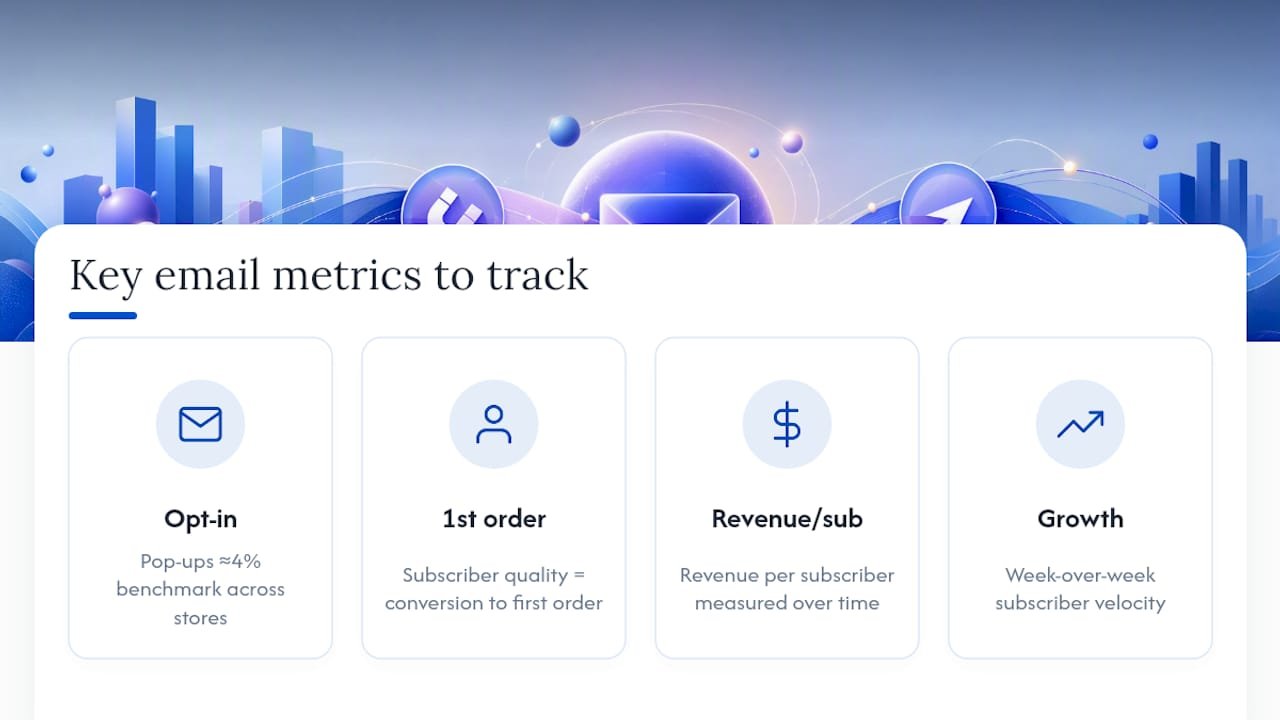
For a benchmark, pop-ups typically convert at around 4% across Shopify stores. If you’re well below that, the problem is usually timing or incentive, not the concept of pop-ups themselves. If you’re well above it, a sharper lead magnet or better audience targeting is likely doing the work.
Worth testing in order of effort: swap the incentive, cut a field from your form, shift the pop-up delay, or target the offer differently by traffic source (a Google Ads visitor and a returning Instagram follower rarely respond to the same message). And if your list is growing but conversion isn’t, discount-driven capture may be training subscribers to wait for the next code rather than buy at full price. A content-led lead magnet, like a buying guide or quiz, tends to attract a less price-sensitive subscriber.
Soodo’s perspective: email capture as a conversion optimisation project
Soodo builds and optimises Shopify stores across Singapore and Southeast Asia, and the pattern repeats across nearly every store we look at: email capture is treated as a plug-in afterthought rather than part of the store’s conversion architecture. That’s the wrong frame.
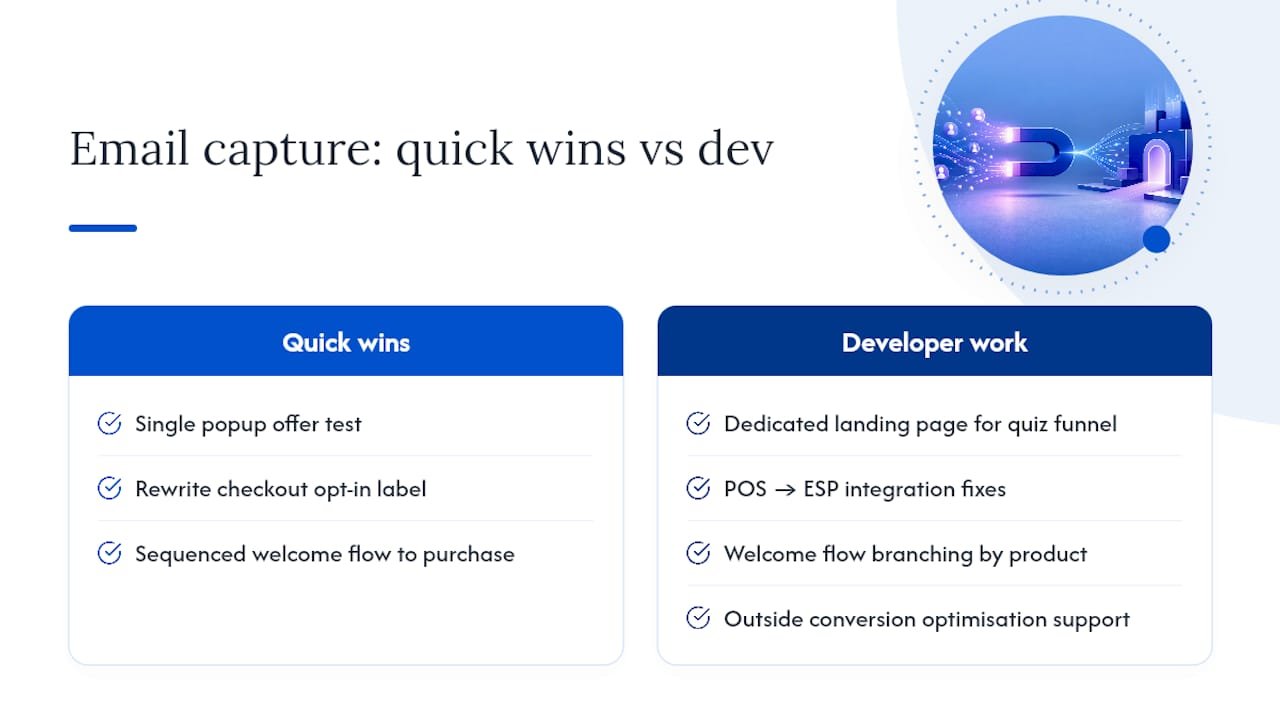
The quick wins we implement most often are unglamorous: a single popup offer test, a rewritten checkout opt-in label that states the benefit instead of the obligation, and a properly sequenced welcome flow that doesn’t just say “thanks for signing up” but actually moves someone toward a first purchase. None of that needs a developer.
Where it does start needing one is when capture requires real UX work: a dedicated landing page for a quiz funnel, a POS-to-ESP integration that doesn’t sync cleanly, or a welcome sequence that needs to branch by product interest. That’s the point where in-house effort stalls and outside conversion optimisation support shortens the gap between “we should fix this” and it’s actually shipping.
What most guides get wrong about this
Most email capture advice treats the pop-up as the whole strategy, when in reality the pop-up is the easiest, lowest-leverage piece of the puzzle. Checkout opt-in copy and POS capture get far less attention despite touching your highest-intent customers, the people already paying you.
The bigger blind spot is measurement. Merchants obsess over opt-in rate and ignore what happens after: whether that subscriber ever buys, and whether they were only there for a discount they’d have used anyway.
Prioritise checkout and POS copy before you touch pop-up design again. Then fix what your welcome email actually does, since most stores send a coupon and nothing else, missing the chance to start a real relationship with a new customer.
— Soodo
Turn subscribers into a genuine revenue channel
Soodo builds email capture into the store itself, not as a bolted-on app, but as part of the conversion path from first visit to first order. That’s the practical difference between a pop-up that collects addresses and a system that turns those addresses into repeat revenue.

For merchants who already have a store but know their capture flow, welcome sequence, or checkout copy is underperforming, Existing Shopify Store Optimization is built exactly for this: a founder-led team audits what’s live, fixes the highest-impact gaps first, and works to a fixed-price project scope so there’s no open-ended retainer to manage. If you’re building from scratch and want capture, ESP integration, and checkout flow designed in from day one rather than patched on afterward, New Shopify Website Development starts from SGD 4,500 one-off. Either way, the first step is an audit of where your current capture points are leaking subscribers, so get in touch and we’ll tell you exactly where to start.
Sources
For configuration details, see Shopify’s guidance on collecting customer contact information, the Shopify Forms app page, and further list-building tactics from Baby Love Growth.
- What is Shopify Email Capture? How it Works & Examples
- Collecting customer contact information
- Shopify Forms | Free email capture app
FAQ
What does email capture mean?
Email capture is the process of collecting a visitor’s or customer’s email address through a form, checkout field, or in-store prompt, with their explicit consent to receive marketing. On Shopify, captured addresses land in the Email subscribers customer segment in your admin, ready to sync with an email platform.
What are the disadvantages of using Shopify email?
Shopify’s native email tools cover the basics well but lack the advanced behavioural automation, deep segmentation, and third-party integrations that platforms like Klaviyo offer. Stores with larger lists or complex lifecycle marketing often outgrow native tools and add an ESP for that reason.
Can I get emails through Shopify?
Yes. Shopify Forms captures emails via pop-ups and inline forms, checkout marketing opt-in collects consent at purchase, and Shopify POS email capture matches payment details with Shop Pay accounts in physical stores. Enabling POS capture alone has driven an average 9% increase in POS orders with attached emails for stores that use it.
How to do an email blast on Shopify?
Shopify doesn’t include a full email marketing sender for mass campaigns, so most merchants connect their subscriber list to Shopify Email or an external platform like Klaviyo to send blasts. Whichever tool you use, only send to contacts who’ve given explicit consent, and segment your list so the message is relevant to who receives it.
Recommended

Jessica Bong
Jessica Bong is the founder of Soodo, a Singapore Shopify agency that builds, revamps and migrates Shopify stores, with every store set up to be found in AI search (GEO). She has spent over 10 years in ecommerce and runs her own Shopify brand, Patch&Bagel, where every Soodo technique is tested first. Jessica is also a WSQ-certified Shopify trainer at Equinet Academy.