Shopify Cart Abandonment in Singapore: How to Recover More Orders
Short answer: Most abandoned carts come from surprises late in checkout: unexpected delivery fees, a missing payment method or a slow page. For Singapore stores, the biggest fixes are showing delivery costs early, offering PayNow alongside cards, and sending a recovery email within a few hours. Soodo fixes cart and checkout friction as part of a Shopify revamp from SGD 3,000.
Enable Shopify’s abandoned checkout emails today and check your accelerated checkout options this week. That single move starts recovering lost sales immediately, while prevention fixes (transparent pricing, faster mobile checkout) chip away at the root causes. Together, prevention can cut abandonment by a few percentage points, and recovery flows typically claw back another 10 to 30% of otherwise lost revenue.
TL;DR:
- Fix shipping costs and streamline checkout to reduce unexpected fees and friction, cutting abandonment rates by up to 15 percentage points.
- Use segmented recovery emails tailored to abandonment timing, with faster triggers for checkout abandoners within 30 to 60 minutes.
- Enable accelerated checkout options like Shop Pay and Apple Pay to minimize manual input and improve mobile conversion.
- Monitor the payment event log to distinguish genuine hesitation from failed or declined payments before implementing fixes.
- Focus first on increasing recovery flow coverage through visitor identification tools before optimizing email content and offers.
Table of Contents
- How do I review abandoned checkouts in Shopify?
- What causes Shopify checkout issues and cart abandonment?
- Prevention tactics that cut Shopify cart abandonment
- Recovery sequences: what to send and when
- Which apps and tools handle Shopify cart recovery?
- How do you calculate Shopify’s cart abandonment rate?
- Soodo’s quick audit checklist and common pitfalls
- What most cart abandonment advice gets backwards
- Want Soodo to handle the checkout fixes for you?
- Sources
- FAQ
How do I review abandoned checkouts in Shopify?
Shopify keeps every abandoned checkout in one place: Orders > Abandoned checkouts in your admin. Each entry shows the customer’s contact details (if captured), the products left behind, and whether an automatic recovery email has already gone out. Shopify’s own documentation explains how to view payment events and send manual or automatic recovery emails directly from that screen, so start there before installing anything new.
Before you assume every one of those checkouts represents a lost customer, check the payment event log. Some “abandoned” checkouts are actually failed card payments or blocked transactions flagged for suspected fraud, not shoppers changing their minds. Treating a declined card the same as genuine hesitation wastes recovery effort on the wrong problem.
Pull these numbers before deciding what to fix:
- Cart abandonment rate: percentage of shoppers who add to cart but never complete checkout.
- Trigger or coverage rate: the share of abandoners who actually enter a recovery email or SMS flow.
- Recovered revenue: sales directly attributed to recovery messages within your attribution window.
- Segment breakdown: abandonment by device, cart value, and stage (added to cart versus started checkout).
Mobile shoppers, low average order value carts, and checkout-stage abandoners each need different responses, so segmenting first stops you wasting weeks fixing the wrong thing.
What causes Shopify checkout issues and cart abandonment?
Unexpected costs are the biggest single culprit. Around 40% of abandoners in Baymard’s research cite hidden shipping fees, taxes, or surcharges that only appear at the final step, after the customer has already mentally committed to buying.
Checkout friction runs a close second. Forced account creation, too many form fields, and a checkout that takes six screens to complete all give shoppers time to reconsider or simply give up. Limited payment options compound the problem: a shopper who wants to pay with a digital wallet or buy-now-pay-later option and can’t will often close the tab rather than dig out a card.
Mobile makes all of this worse. Industry data shows average abandonment sits around 70 to 77%, with mobile traffic consistently converting worse than desktop, usually because small screens amplify every extra tap and typo a clunky checkout demands.
Prevention tactics that cut Shopify cart abandonment
Fixing checkout friction is cheaper than recovering the sales it costs you, and it compounds: every shopper who never abandons in the first place needs no recovery email at all. Here’s where to focus, roughly in order of impact:
- Show total cost early. Display estimated shipping and any fees on the product page or cart, not just at the final checkout step. Surprise costs remain the single biggest driver of abandonment, so killing the surprise kills a big chunk of the problem.
- Strip the checkout down. Enable guest checkout, cut form fields to the essentials, and add address autocomplete so customers aren’t retyping postcodes.
- Add progress indicators. A simple “step 2 of 3” bar reduces the sense that checkout is longer than it is.
- Offer accelerated checkout. Shop Pay, Apple Pay, Google Pay, and similar one-tap options remove almost the entire friction of manual card entry.
- Widen payment methods. Cards alone are no longer enough for many audiences; buy-now-pay-later and local wallets matter depending on where your customers shop.
- Prioritise mobile speed. Compress images, cut unnecessary apps and scripts, and test the checkout on an actual phone, not just a browser resized to look like one.
- Add visible trust signals. SSL padlocks, payment logos, and a clear returns policy near the buy button reduce last-second hesitation, particularly for first-time buyers.
- Monitor page speed continuously. A checkout that loads in three seconds today can slow to eight seconds after a theme update nobody tested properly.
Pro Tip: Run a “surprise cost” audit yourself: add a product to your cart, go all the way to the final checkout step, and write down every number that appeared for the first time. If anything surprises you as the store owner, it will surprise your customers too.
Prevention and recovery aren’t rival strategies; they’re sequential ones: fix the friction that’s driving abandonment first, then let recovery flows catch whatever slips through anyway.
Recovery sequences: what to send and when
Cart abandoners and checkout abandoners are different audiences, and treating them identically wastes your best opportunity. Someone who added a product to their cart three days ago needs a gentler nudge than someone who filled in their address and payment details ten minutes ago and got distracted, that second person is a near-certain sale if you catch them fast enough.
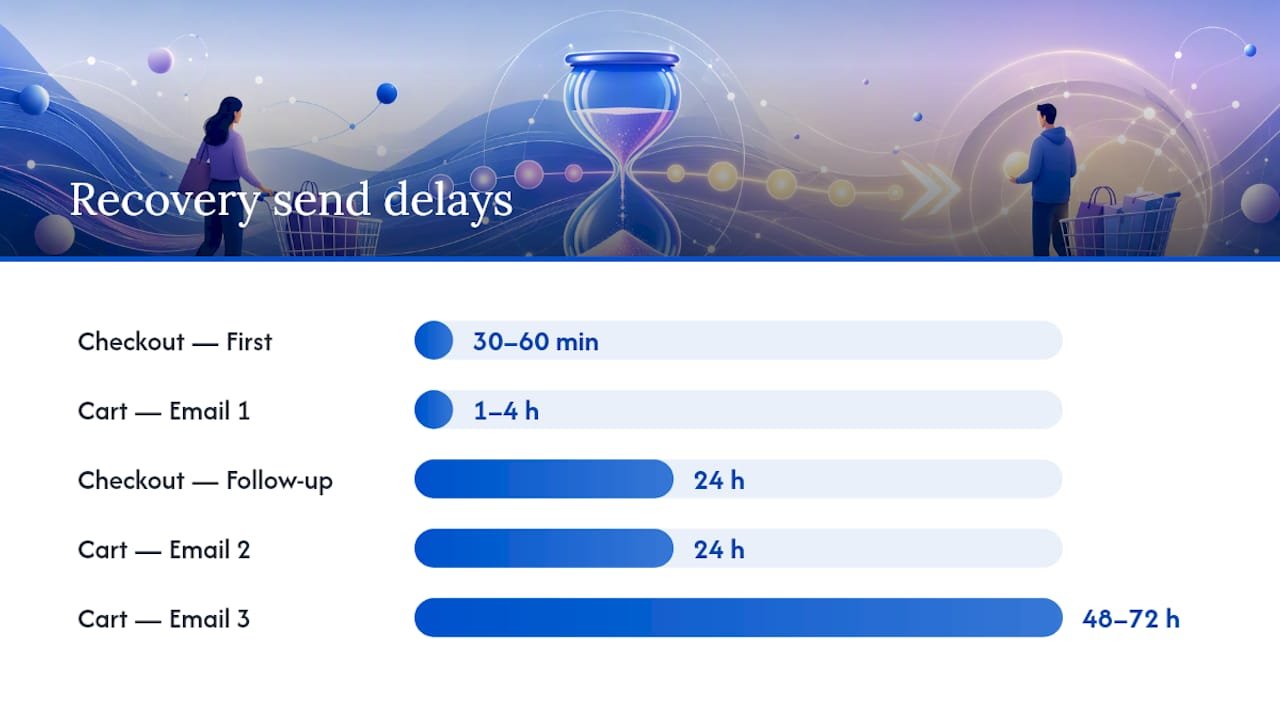
For cart abandonment (added to cart, never started checkout), a three-email sequence works well:
- Email 1, sent 1 to 4 hours later: a simple reminder with product images and a direct link back to their cart.
- Email 2, sent at 24 hours: reinforce with social proof, a review, or a bestseller badge.
- Email 3, sent at 48 to 72 hours: a graduated incentive, such as free shipping or a small discount, for shoppers who still haven’t converted.
This 1 to 4 hour, 24 hour, 48 to 72 hour pattern is the industry standard for good reason: it catches impulse buyers fast while still giving slower deciders a runway.
Checkout abandonment (details entered, payment never completed) deserves a faster, shorter flow. Send the first message at 30 to 60 minutes, then a follow-up at 24 hours if needed. These shoppers have already shown far higher intent, so a quicker flow targeting that higher-intent moment usually converts better than the standard cart sequence, no discount required for the first touch.
Pro Tip: Never lead with a discount in your first recovery message. Save the incentive for the final email in the sequence, otherwise shoppers learn to abandon carts deliberately, waiting for the coupon.
Once email alone plateaus, layering in SMS or WhatsApp for high-value carts can extend reach, but keep the cadence tight. Stacking channels on the same shopper within the same hour reads as spam and damages deliverability across your entire list, not just that one send.
Which apps and tools handle Shopify cart recovery?
Shopify’s own toolkit covers more ground than most merchants realise before they go shopping for add-ons. Shopify Messaging includes pre-built “recover abandoned cart” automation templates that automatically sync cart data into emails, pulling product images and prices without manual setup.
Beyond the native tools, four app categories cover most gaps:
- Email platforms (Klaviyo-style tools) for advanced segmentation and multi-step flows beyond Shopify’s built-in editor.
- Visitor identification tools that capture shoppers Shopify’s native tracking misses, since native tracking typically reaches only 14 to 15% of add-to-cart events, while dedicated identification tools can push that to 35 to 55% or higher.
- Multi-channel recovery apps combining email, SMS, and WhatsApp in one sequence.
- AI personalisation tools that tailor subject lines or offers per segment automatically.
When comparing options, check trigger rate, deliverability reporting, multi-channel support, and whether pricing and support work for your region rather than assuming a US-centric tool fits. Watch for red flags: platforms billing exclusively in US dollars with no local support, tools with no visitor identification feature at all, or vague deliverability reporting that hides open and click data. Providers such as 121 Group build the kind of Klaviyo and lifecycle email flows that fit into this category if you need integration help beyond a plug-and-play app.
How do you calculate Shopify’s cart abandonment rate?
Cart abandonment rate is calculated as (carts created minus completed purchases) divided by carts created, multiplied by 100. If 100 shoppers add items to a cart and 30 complete checkout, your abandonment rate is 70%, roughly in line with the 70 to 77% average most stores see.
Recovery rate uses a similar formula: recovered checkouts divided by total abandoned checkouts, within whatever attribution window you set (commonly 7 to 14 days from the abandonment event).
Set realistic targets using these ranges:
- Baseline abandonment: expect somewhere around 70%, not zero.
- Prevention impact: well-executed checkout fixes typically shave 5 to 15 percentage points off that baseline.
- Recovery impact: a solid recovery sequence can capture 10 to 30% of the revenue that would otherwise be lost entirely.
- Trigger/coverage rate: track what share of abandoners actually enter your recovery flow, this determines your ceiling more than message quality does.
Review these numbers monthly, and treat any single test (a subject line, a discount threshold) as needing at least a few weeks of data before you draw conclusions.
Soodo’s quick audit checklist and common pitfalls
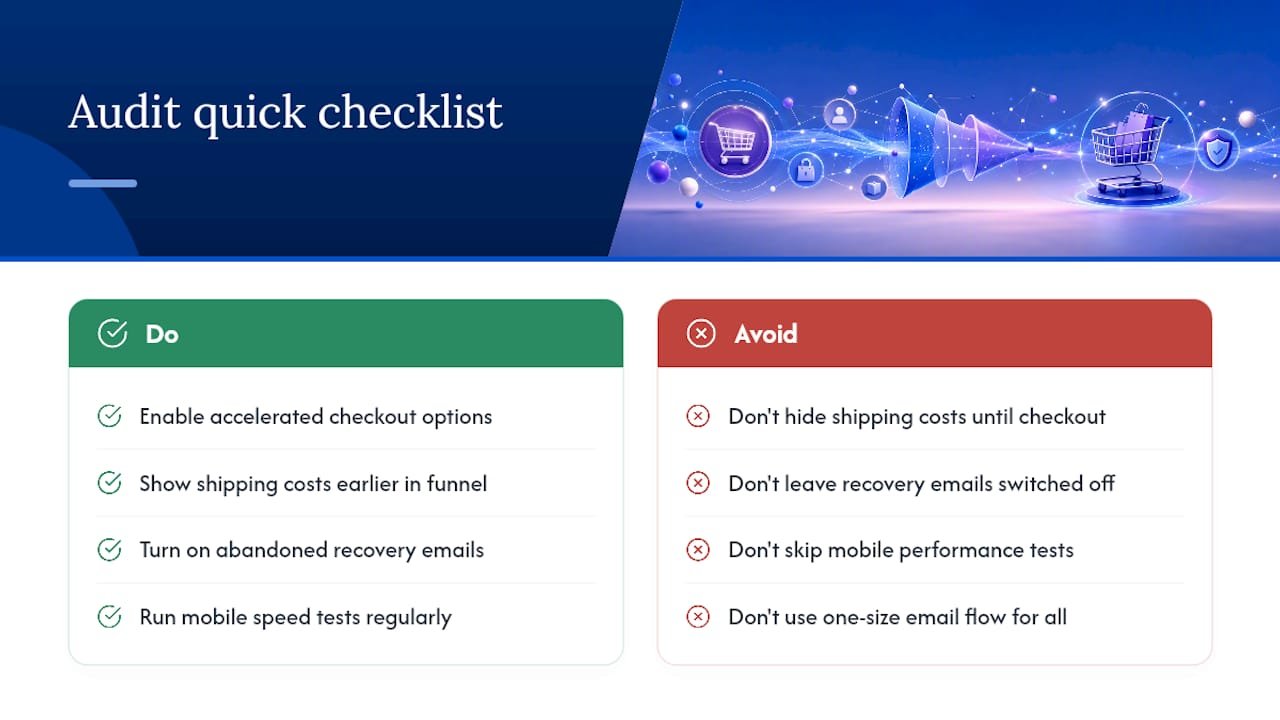
Across more than 100 Shopify projects, the same handful of gaps show up again and again during a first audit: no accelerated checkout enabled, shipping costs hidden until the final step, abandoned checkout emails switched off by default, no mobile speed testing, generic recovery copy with no urgency, missing trust badges near the buy button, no visitor identification tool, and a single one-size email flow used for both cart and checkout abandoners.
Most merchants fix the wrong end first.
What most cart abandonment advice gets backwards
Most guides on this topic treat prevention and recovery as competing priorities, pick one, master it, move on. That’s backwards. The merchants who see the biggest jumps in completed sales fix checkout friction and build recovery flows in the same sprint, because a leaky checkout with brilliant recovery emails is still leaking, just more slowly.
The more overlooked mistake is chasing email copy before checking reach. Fix coverage first, then optimise what you send.
If there’s one thing worth doing this week, it’s the payment event check most owners skip: open a handful of abandoned checkouts and see how many are genuine hesitation versus a card that simply failed. It reframes the whole problem in about ten minutes, and it costs nothing.
— Soodo
Want Soodo to handle the checkout fixes for you?
Most agencies hand you a generic checkout template and move on to the next client. Soodo takes a founder-led approach instead, built by someone who has run Shopify conversion work on real stores, not junior staff following a script.

A typical engagement starts with an audit against the checklist above (trigger coverage, checkout friction, payment options, mobile speed) followed by fixes and a measurement plan to track recovered revenue against your baseline. If your store just needs the checkout and recovery flows tightened, Shopify revamp covers exactly that, from checkout streamlining to accelerated payment setup; current prices are available on the pricing page. If you’re migrating from another platform and want cart recovery built in from day one, Platform migration is available; current prices are available on the pricing page. Get in touch through Soodo to scope a quick audit of your current checkout and recovery setup.
Sources
- Cart abandonment statistics — Stripe
- Recovering abandoned checkouts — Shopify Help
- How to improve your abandoned cart recovery rate — Shopify blog
- How Do You Recover an Abandoned Cart? Step-by-step guide — Attribuly
Choosing a Shopify cart drawer
What is a Shopify cart drawer, and which option should you pick?
A cart drawer is the slide-out panel that opens from the side of the screen when a shopper adds a product, instead of sending them to a separate cart page. It keeps browsing momentum alive, which matters most for stores where shoppers tend to add several items before checking out.
You have three real routes to get one: your theme’s native setting, a third-party app, or a custom Ajax build. Each suits a different stage of business.
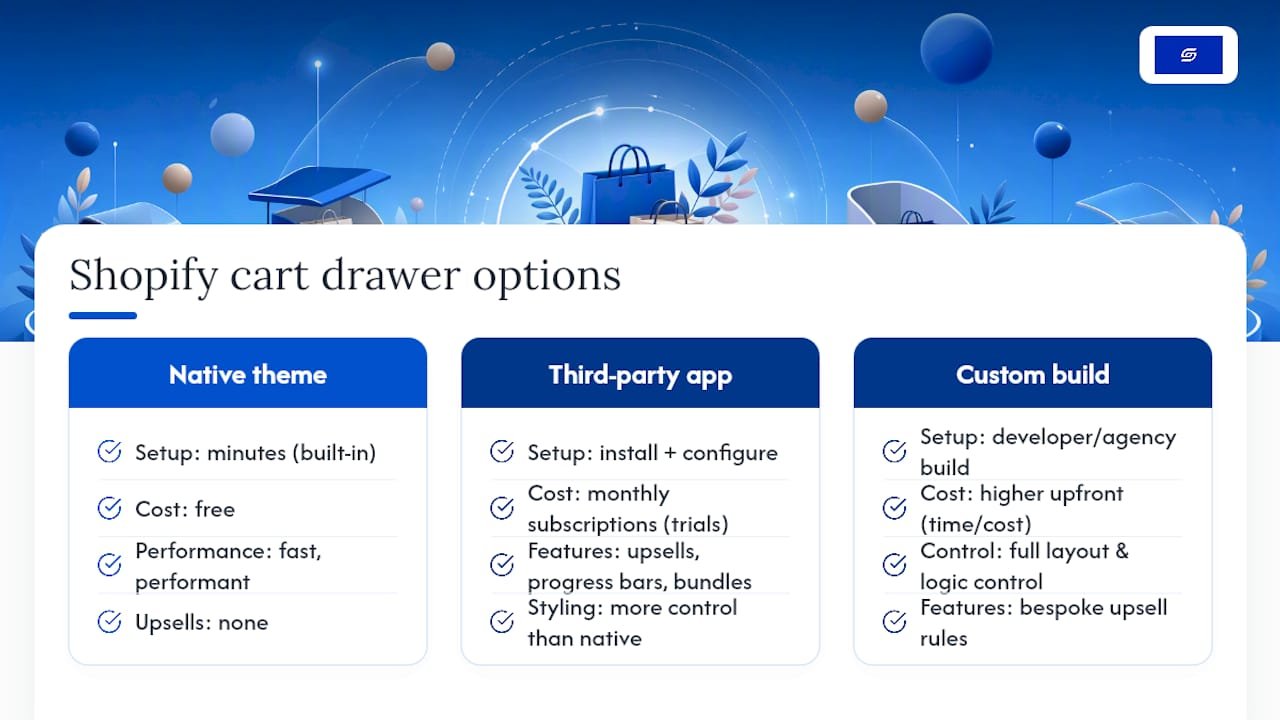
Native theme drawer. Most Online Store 2.0 themes, including Dawn, ship with a “Cart type” setting you can switch to “Drawer” in minutes. It is free, fast, and performant, but it has no upsells, no progress bar, and limited styling control.
Third-party app. Apps like Amp Slide Cart Upsell Drawer, iCart Cart Drawer Cart Upsell, and Monster Cart add upsell modules, free-shipping progress bars, and bundle prompts without touching code. Pricing runs on monthly subscriptions, and many list free tiers or trials before paid plans kick in.
Custom build. A developer or agency writes the drawer using Shopify’s Ajax cart endpoints, giving you full control over layout, speed, and exactly which upsell logic runs. It costs more upfront in time, but nothing runs that you did not choose.
A handful of low-cost apps like Advanced Cart Drawer list pricing as low as $2.99 a month, which suits a small catalogue that only needs a clean slide-out with no upsell logic. Stores chasing average order value gains do better with Amp Slide Cart Upsell Drawer, Kaching CartDrawer Cart Upsell, or Candy Rack, since all three build upsell and discount prompts directly into the drawer flow. Corner Cart Drawer & Free Gift and Oxify Cart Drawer suit merchants running timed promotions or gift-with-purchase campaigns rather than everyday upsells.
If your catalogue is small and simple, start with the native drawer and measure it before spending anything. If average order value is your goal, trial Amp Slide Cart Upsell Drawer or Monster Cart for two weeks. If your checkout involves complex order logic, multi-currency pricing, or integrations with systems like GoKwik, a custom build or an agency brief (Soodo) will serve you better long term than stacking apps. Ego Cart Drawer, Essent Cart Drawer, Cartly Slide Cart Drawer, and Upsell & Cross Sell — Selleasy are worth a look if you want a well-reviewed, straightforward alternative without deep feature stacking, and AOV.ai Cart Drawer is worth testing if you want AI-suggested upsells rather than fixed rules.
How do you actually build or install a cart drawer?
Each route has a distinct setup path and a realistic time estimate, so pick based on how much time you actually have this week, not how impressive the end result sounds.
- Theme editor route. Open Online Store, go to theme customisation, and look for “Cart” under theme settings. Switch “Cart type” to Drawer, then check the empty-state message, drawer colour, and whether cart notes display. This takes roughly 5 to 15 minutes and needs no code.
- App install route. Install your chosen app from the Shopify App Store, run its onboarding wizard, and set your upsell rules or progress-bar threshold. Test on mobile immediately afterwards, and check for theme conflicts (duplicate cart icons, broken animations) before publishing live. Most apps offer a free trial window before billing starts.
- Custom Ajax route. A developer posts to
/cart/add.jsto add an item, then issues aGETrequest to/cart.jsto re-read the full cart state, and renders the drawer from that response rather than trusting local counters. Building the drawer as a Liquid section, then updating it through the Section Rendering API, keeps it correct on first load. Removing a line item uses/cart/change.jswith quantity set to zero, since there is no dedicated remove endpoint. Budget 1 to 3 developer days depending on how many upsell rules or event hooks you need, plus time for keyboard focus and screen-reader testing.
Pro Tip: Always re-read /cart.js after every mutation instead of incrementing a counter locally. Local counters drift out of sync the moment a discount code, subscription item, or bundle rule changes the cart server-side, and that mismatch is one of the most common cart-drawer bugs merchants report.
When does a bespoke build justify hiring an agency?
Agency work earns its cost once your cart needs complex upsell logic, multi-currency pricing, or integration with external systems like a loyalty platform or freight calculator, situations where a stacked-app approach starts creating conflicts rather than solving them.
Soodo is a founder-led Shopify agency that has consulted on over 100 stores, including a documented conversion optimisation project for TAHAN. A typical scope runs audit, design, build, test, then iterate, built around your actual AOV data rather than generic templates.
Three questions that settle your route in five minutes
Ask yourself how fast you need this live. Minutes point you to the native theme drawer, days point to an app, weeks signal a custom build is worth the wait.
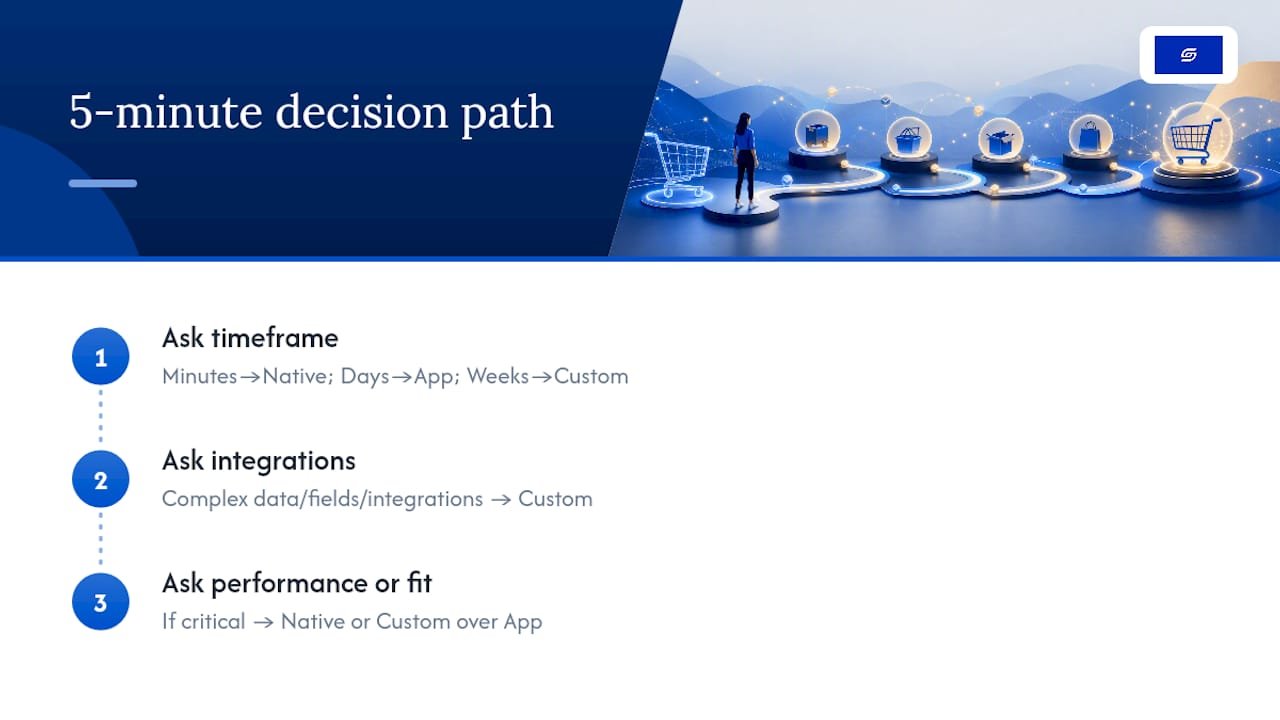
Ask whether your cart needs complex data, custom fields, or third-party integrations. A yes there rules out most no-code apps and points straight to custom development.
Ask whether site performance or exact brand fit is critical to your positioning. If it is, native or custom wins over an app every time, since every added script is a script your Core Web Vitals have to carry.
Cart abandonment in Singapore: what to fix first
Singapore shoppers compare prices across Shopee, Lazada and brand stores in seconds, so friction at the cart costs more here than in many markets.
- Offer PayNow. Many Singapore buyers prefer PayNow to typing card details. Shopify Payments does not list PayNow, so most stores add it through a gateway such as HitPay.
- Show delivery costs before checkout. State your free-delivery threshold in the cart and on product pages, so the total holds no surprises.
- Keep GST clear. If you are GST-registered, show whether prices include 9% GST so the final total matches what shoppers expect.
- Use a cart drawer that loads fast on mobile. Most Singapore traffic is on phones, so test the cart on a mid-range phone, not just a laptop.
If your cart and checkout need more than a few settings changes, a Shopify revamp redesigns them around how your customers actually buy.
FAQ
How do I fix cart abandonment on Shopify?
Start by enabling Shopify’s automatic abandoned checkout emails, then fix the biggest friction point, usually hidden shipping costs or a missing accelerated checkout option. Prevention fixes typically cut abandonment by 5 to 15 percentage points, while recovery emails claim back a further share of what’s left.
How do I recover an abandoned Shopify cart?
Find abandoned checkouts under Orders > Abandoned checkouts in your Shopify admin and send a recovery email directly, or set up an automatic three-email sequence at 1 to 4 hours, 24 hours, and 48 to 72 hours. Checkout abandoners (who entered payment details) respond better to a faster first message, sent within 30 to 60 minutes.
How do I reduce cart abandonment on Shopify?
Show total costs, including shipping, on the product page or cart rather than at the final checkout step, since unexpected costs are cited by roughly 40% of abandoners. Pair that with guest checkout, accelerated payment options, and mobile speed improvements for the biggest combined effect.
What does “cart abandonment” mean?
Cart abandonment happens when a shopper adds items to their cart or starts checkout but leaves without completing the purchase. Average rates sit around 70 to 77% across most Shopify stores, so some abandonment is normal, the goal is reducing it and recovering what you can.
Does Soodo help with Shopify cart abandonment specifically?
Soodo’s Existing Shopify Store Optimization service covers checkout streamlining, accelerated payment setup, and recovery flow configuration as part of a Shopify revamp, from SGD 3,000. Pricing for custom projects beyond that scope is available on request.
Recommended

Jessica Bong
Jessica Bong is the founder of Soodo, a Singapore Shopify agency that builds, revamps and migrates Shopify stores, with every store set up to be found in AI search (GEO). She has spent over 10 years in ecommerce and runs her own Shopify brand, Patch&Bagel. Jessica is also a WSQ-certified Shopify trainer at Equinet Academy.