

Shopify Integrations in Singapore: Xero, HubSpot, POS and More
Short answer: Most Singapore Shopify stores need a few core integrations: accounting such as Xero (with GST mapped correctly), a payment gateway for PayNow, a POS if you have a shop, and marketplace sync if you sell on Shopee or Lazada. The common problems are mismatched payouts, duplicate customers and stock that drifts. Soodo sets up integrations in every new Shopify store, from SGD 8,500, and every migration to Shopify, from SGD 6,000.
The Shopify integrations that matter most for Singapore ecommerce stores are a local payment gateway (HitPay, which enables PayNow QR, GrabPay and Atome), a fulfilment and shipping integration (Ninja Van or J&T), correctly configured analytics (GA4 or a tool like Triple Whale), and — for brands with physical retail — POS sync. Most integration failures come from poor implementation rather than bad apps, which is why evaluation and testing matter more than app selection.
You inherited a Shopify store that was built quickly and tested poorly. The analytics are unreliable. The POS does not sync cleanly with the online store. Click and collect works sometimes. And every time you raise a budget request for a proper rebuild or integration, you need hard numbers to justify it, to a board that remembers the last time someone promised to fix things.
If this is the situation you are managing, the conversation about Shopify integrations starts in a specific place: not which apps exist, but which ones actually hold up when they are under real operational load. And how do you know before you have committed?
Shopify published data in April 2026 showing that active app installs across its ecosystem climbed nearly 20% in a single year, with the platform paying out more than $1.3 billion to developers who build on it. The ecosystem is the largest in ecommerce. That is both an opportunity and a navigation challenge. More apps means more options and more ways to end up with the wrong one integrated into a store that is already fragile.
This article covers which Shopify integrations Singapore ecommerce operations need most, how to evaluate an app before you commit, and what the $1.3 billion ecosystem actually means for in-house ecommerce managers who need their integrations to work.
Why Does Shopify’s $1.3 Billion App Ecosystem Change the Integration Conversation?
The Shopify App Store now has more than 21,000 apps. In 2025, active app installs grew nearly 20% year-over-year, and Shopify paid out over $1.3 billion to developers. This scale matters for ecommerce managers in a specific way: the depth of specialist tooling available for Shopify now rivals or exceeds what enterprise platforms offer at ten times the cost. POS integrations, click and collect workflows, custom access control, SMS marketing, subscription management, data analytics, all of these have mature, actively maintained apps in the Shopify ecosystem.
The flip side: scale creates noise. Not all 21,000 apps are equal. Some are built by teams that have been in the ecosystem for over a decade, have 100,000-plus installs, and have processed billions in merchant revenue. Others are side projects that may not be actively maintained. For in-house ecommerce managers who need to justify every integration to finance and the board, the ability to distinguish between these matters more than the total number of apps available.
Which Integration Problems Actually Break Singapore Ecommerce Stores?
Most integration failures are not caused by a bad app. They are caused by a bad implementation, or by picking an app that was built for a different kind of store. Three patterns appear repeatedly in stores that have been built without proper QA.
Data that does not sync between systems: This is the most common problem for stores running POS alongside an online channel. Orders taken in-store do not update online inventory. Returns processed at the counter do not appear in the CRM. The analytics dashboard shows numbers that do not match the accounts team figures. This is not a Shopify problem. It is a configuration problem. But the damage is real: decisions get made on wrong data, and proving ROI to the board becomes harder when the numbers cannot be trusted.
Apps that conflict at checkout: Multiple apps touching the checkout, discounts, upsells, loyalty redemptions, can conflict in ways that do not show up during testing on desktop but break on mobile. If QA testing was not thorough before launch, this is where you find out at the worst time.
Apps that are not actively maintained: Shopify releases platform updates regularly. Apps that have not been updated to match the current API version start behaving unpredictably. An app with a 3.2-star rating and the last update 18 months ago is a risk, even if it worked when it was first installed.
Which Shopify Integrations Matter Most for Complex Ecommerce Operations?
For ecommerce managers running multi-channel operations, three integration categories carry the most operational weight.
POS and Omnichannel Retail
Shopify POS is the cleanest option for stores that sell both online and in physical retail locations in Singapore. When POS and the online store run on the same Shopify instance, inventory syncs natively, customer records are unified, and returns can be processed at the counter against an online order without a workaround. The complexity comes when a business already has a third-party POS system. In that case, middleware apps can sync inventory between systems, but they require careful scoping. The question to ask before implementing is: what is the expected sync frequency, and what happens to inventory accuracy during the sync window?
Click and Collect
Click and collect on Shopify can be handled natively for simple setups using Shopify’s built-in local pickup option. For more complex scenarios with multiple pickup locations, time-slot selection, and capacity controls, apps like Zapiet handle this well and are actively maintained within the Shopify ecosystem. The critical configuration question is how click and collect orders connect to your warehouse or fulfilment team. If someone picks up in-store but the order was flagged for delivery in the fulfilment system, that creates operational errors that erode customer trust fast.
Analytics and Data Integrity
Clean analytics is the foundation of every ROI conversation with the board. Shopify’s native analytics are reliable for direct metrics, orders, revenue, conversion rate by channel. For deeper analysis, Littledata and Triple Whale are the two most established analytics apps with clean Shopify integrations and accurate attribution modelling. The decision between them depends on whether your primary need is attribution accuracy or cohort-level reporting.
How Do You Evaluate a Shopify App Before You Commit?
The Shopify App Store includes enough information to make a reasonable pre-commitment assessment. The indicators that matter most: an app with 10,000-plus installs and reviews from the past 30 days is actively used and supported. An app with 200 installs and reviews from two years ago carries higher risk regardless of its star rating. Read the negative reviews and look at whether the developer responded. A developer who engages with problems publicly is far more likely to fix issues when they affect your store. Check the last update date: an app that was last updated more than six months ago may not be compatible with the current version of Shopify’s checkout. Most serious apps offer a 14-day trial. Use it to test the integration end-to-end in a staging environment before installing on your live store.
Which Local Integrations Matter Specifically in Singapore?
Singapore ecommerce has specific integration requirements that are not always covered by generic global app options.
Local payment gateways: HitPay is the most capable Singapore-native Shopify payment integration. It enables PayNow QR, GrabPay, Atome buy-now-pay-later, and major credit cards within a single integration. For Singapore consumers, PayNow has become an expected checkout option. Not offering it measurably affects completion rates.
Fulfilment and last-mile: Ninja Van, J&T Express, and SingPost all have Shopify integrations that allow automated label printing and tracking. For stores running same-day delivery, Lalamove and GrabExpress have Shopify-compatible API connections. The key configuration question is how these connect to your order management workflow.
GST compliance: Singapore merchants collecting GST need their invoicing and reporting to be accurate. Shopify’s native tax settings handle GST at the correct rate, but stores that have modified their checkout or applied custom discount logic should verify that GST calculations are being applied correctly after each major configuration change.
Multi-location inventory: For Singapore brands with both an online store and a physical retail presence, Shopify’s multi-location inventory feature handles stock accuracy across channels. This requires proper initial configuration to avoid the inventory sync problems that commonly appear in stores that were built quickly.
What Does This Mean for In-House Ecommerce Managers?
If you are managing a Shopify store you did not build, and you are working toward a rebuild or a major integration project, the challenge is not finding the right apps. The Shopify ecosystem has mature options for virtually every requirement you have.
The challenge is proving to the board that this time is different. That the integration will work. That the analytics will be clean. That the POS will sync. That the click and collect orders will route correctly. That six months from now, you will not be in the same meeting explaining why the platform still is not working properly.
The way you make that case is not by picking better apps on your own. It is by working with a development partner who tests before they deliver, who runs QA against your live checkout before launch, documents the configuration for every integration so you can manage it yourself, and is still available six months after launch when the edge cases appear. The answer to the risk of looking bad in front of the board is a process that catches problems before they become visible, not a faster build or a longer list of app names in a proposal.
Xero integration
Which Xero Shopify integration should you choose?
The right connector depends less on brand loyalty and more on how your store actually sells. Here’s how the main options stack up against real merchant needs.
The native Shopify integration by Xero suits most small-to-medium merchants. It’s included free with any Xero subscription, syncs daily summaries or per-sale transactions, and handles fees, refunds and taxes automatically as part of that sync. If you run one store, sell mostly online, and want something you can set up in an afternoon without touching a second piece of software, start here.
A2X earns its reputation with accountants for a reason: it builds settlement-based journals that mirror exactly how Shopify pays you out, and it handles cost of goods sold tracking in a way the native app doesn’t attempt. If your bookkeeper insists on seeing COGS by order, A2X is worth the extra subscription cost.
Synder works well for sellers running Shopify alongside other sales channels, since it isn’t built exclusively around one platform. It supports both per-order and summary modes and includes duplicate-order protection, which matters if you’ve ever had a sync double up a refund.
Amaka shows up frequently in Xero’s own partner documentation as a managed onboarding option. If you’d rather have someone configure the connection and mapping for you rather than clicking through settings yourself, Amaka’s partner-assisted approach removes that friction.
Beyond these four, the Shopify App Store lists smaller specialist syncs built around inventory and order-line detail rather than full accounting automation. These suit stores that need granular stock movement data in Xero more than they need polished financial reporting.
How do the main Xero Shopify connectors compare?
The native app wins on cost and simplicity every time, but it trades away some of the granular per-order reporting that accountant-favoured tools like A2X build their entire product around. If your sales volume is modest and your reporting needs are straightforward, that trade barely registers. Once you’re running thousands of orders a month with mixed currencies or need itemised COGS, the paid connectors start earning their subscription fee.
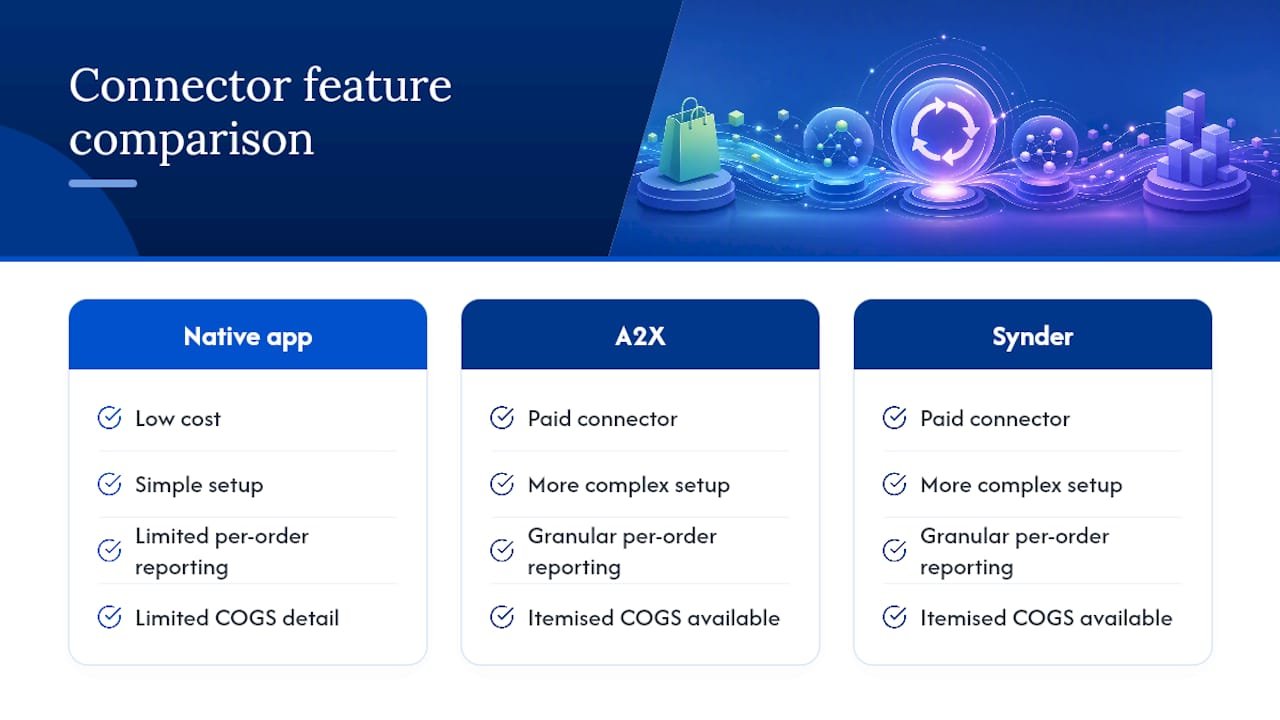
Pro Tip: Don’t choose based on price alone. A £20 a month connector that saves your bookkeeper three hours of manual matching every month pays for itself many times over.
Chart of accounts mapping: getting the postings right
A clean sync depends far more on account mapping than on which connector you’ve chosen. Set up a dedicated Shopify clearing account first. Gross sales post there before the net payout arrives, and you reconcile that clearing account against Shopify’s own payout reports rather than trying to match individual order dates against bank deposits.
Beyond the clearing account, create these accounts if they don’t already exist:
- Shopify sales (income) for gross product revenue.
- Shipping income (income), kept separate from product sales for cleaner reporting.
- Merchant fees (expense) to capture Shopify Payments or gateway charges.
- Refunds (contra-income), so returns don’t distort your top-line sales figure.
- Gift card liability (liability), since gift card sales aren’t earned revenue until redeemed.
- Tax liability (liability) for sales tax collected on orders.
- Cost of goods sold (expense), particularly important if you’ve chosen A2X for its COGS handling.
Daily summary mode posts these as consolidated daily totals, while per-sale mode itemises each transaction against the same accounts, which is why per-order connectors suit COGS-heavy businesses better. After your first sync, check that gross sales minus fees and refunds equals your net payout in the clearing account. If those numbers don’t tie out, the mapping needs adjusting before you trust anything downstream.
Fixing common Xero Shopify reconciliation problems
Most reconciliation issues trace back to one of three symptoms: payout totals that don’t match your bank deposit, duplicated orders inflating sales figures, or missing fees and taxes that leave your clearing account with a stubborn balance.
Work through these checks in order:
- Confirm which sync mode is active. A mid-month switch from summary to per-sale (or back) is a common, overlooked cause of mismatched totals.
- Check that transactions are posting to the clearing account rather than directly to your bank feed.
- Pick one payout and manually match it against its corresponding Xero journal or invoice entry, line by line.
- Re-run or re-import the specific problem day rather than the whole sync, which avoids creating fresh duplicates.
Pro Tip: When a discrepancy won’t resolve itself, gather the Shopify payout report, the Xero journal entries for that date, and a screenshot of your sync settings before contacting your accountant or the app’s support team. Half-diagnosed problems take three times as long to fix.
If discrepancies persist after these checks, or if you’re dealing with mixed currencies and jurisdiction-specific tax rules, that’s usually the point where professional review pays for itself. Note too that sales tax filing isn’t always fully automated across every jurisdiction, so some regions still require a separate export from Shopify.
HubSpot integration
Choose the right approach: native app, middleware, or custom API
Picking the right path saves you weeks of rework later. Start by listing exactly which objects and fields matter to your marketing and sales teams, because that list decides everything else.
- Standard objects only: if you just need customers, orders and products flowing into HubSpot for email and reporting, the native HubSpot Data Sync covers you.
- Metafields or custom properties: native sync won’t carry these, so you’ll need middleware or a custom build to map them into HubSpot.
- Two-way updates: the native integration is primarily one-way (Shopify to HubSpot), with two-way contact sync still in beta, so plan around that limitation rather than against it.
- Budget and developer time: native setup takes an afternoon; middleware takes days; a custom API project takes weeks and ongoing maintenance.
Native sync works well when your needs are standard: customer records, order history and basic product data feeding marketing automation and sales pipelines. Middleware earns its cost when you’re syncing metafields, need custom field mapping, or want more sophisticated error handling than the native app offers. A custom API build becomes necessary when you run multi-currency catalogues, bespoke checkout flows, or need near real-time two-way data outside what HubSpot currently supports. Most merchants we speak with overestimate how much customisation they need and underestimate how much the native sync already does well.
Step-by-step connection checklist for permissions, install and sync settings
Running through these steps in order avoids the majority of first-week sync problems.
- Confirm your permissions first. You need HubSpot Super Admin or App Marketplace access, and the Shopify account must be logged in as Store Owner, not a staff account.
- Install the app. Add it from the HubSpot Marketplace or the Shopify App Store, and approve every requested scope, including customers, orders, products and inventory, because skipping a scope is the most common cause of sync failure.
- Turn on the email filter. Enable “Only sync contacts with an email address” during configuration to cut down on duplicate contact records from guest checkouts.
- Set variant matching rules. Choose SKU as your matching field wherever possible, since HubSpot’s own guidance recommends SKU matching to stop duplicate product records forming.
- Understand sync timing. The first sync runs as a bulk import and can take a while depending on your catalogue size; after that, changes typically sync within about ten minutes.
- Test before going live. Where you can, trial the connection on a staging store or with a small batch of test orders before letting it touch your full customer list.
Pro Tip: Run your first sync overnight on a quiet day, then check contact and order counts the next morning before you build any workflows on top of the data.
If you’ve migrated platforms recently or imported contacts from another CRM, map out a deduplication plan before you flip the sync on. Skipping this step is the single biggest reason merchants end up with messy HubSpot databases in month one.
Troubleshooting: fixes for the most frequent post-install problems
Most sync issues trace back to one of a handful of causes, and each has a known fix.
- Sync stalls or fails entirely: re-check that every OAuth scope was approved during install; a single declined permission can quietly break the whole connection.
- Duplicate contacts pile up: enable “Only sync contacts with an email address” and run a deduplication pass, particularly if you had existing HubSpot contacts before connecting Shopify.
- Deals aren’t linked to contacts: this usually means your checkout flow has been customised in a way HubSpot doesn’t expect, since the integration relies on default checkout events to associate deals with the right contact record.
- Metafields are missing from HubSpot: this is expected behaviour, not a bug. Native sync doesn’t pull custom Shopify properties, so you’ll need middleware or a small custom app to push those fields across.
- You need two-way syncing: HubSpot currently offers this as a beta feature for contact sync only, so test it on a small segment before relying on it for your full database.
One data point worth planning around: after the initial bulk sync, HubSpot generally updates records within a short time of a change, which is fast enough for most marketing automation but not instant enough for inventory-sensitive workflows.
If you already have contacts imported from a previous system, community practitioners recommend staging the initial sync and testing with a small batch first, rather than letting a full historical import run against live marketing lists.
What syncs, what doesn’t, and how HubSpot matches and deletes records
Knowing exactly what crosses over, and what HubSpot does when records change on either side, prevents a lot of confusion down the line.
| Shopify object | HubSpot target | Matching rule |
|---|---|---|
| Customers | Contacts | Email address |
| Products | Products | SKU (recommended) |
| Product variants | Separate product records | SKU (recommended) |
| Orders | Deals | Associated contact via email |
| Carts / abandoned checkouts | Deal or contact activity | Associated contact via email |
Shopify metafields and other custom properties aren’t supported by the native sync, so anything stored there needs a separate mapping route if you want it in HubSpot. On deletion, the two systems don’t mirror each other automatically: deleting a contact in HubSpot won’t delete the matching customer in Shopify, and vice versa, so treat each platform’s records as independently managed once synced. For product variants specifically, matching by SKU avoids the duplicate product records that often appear when variants are matched by name alone.
Integrations for Singapore stores
- Accounting: map Shopify payouts, fees and 9% GST correctly in Xero so reconciliation is quick.
- Payments: PayNow usually comes through a gateway such as HitPay, which needs its own payouts mapped.
- POS: if you have a physical shop, keep stock in one place. See Soodo’s trusted POS partner on the partners page.
- Marketplaces: if you also sell on Shopee or Lazada, sync stock so you do not oversell.
Soodo connects these during every new Shopify store and migration to Shopify, so your systems work from day one.
Frequently Asked Questions
What are the most important Shopify integrations for Singapore ecommerce stores?
For most Singapore ecommerce operations, the critical integrations are: a local payment gateway such as HitPay for PayNow and GrabPay, a fulfilment and shipping integration such as Ninja Van or J&T, and clean analytics with GA4 correctly configured or a third-party tool like Triple Whale. Stores running physical retail alongside online should prioritise POS integration to keep inventory and customer data in sync.
Does Shopify POS work well in Singapore?
Yes, Shopify POS works in Singapore and supports local payment methods through compatible card readers. For stores selling both online and in-store, running both channels on the same Shopify instance keeps inventory, customer records, and reporting in one place. The main consideration is card reader hardware compatibility and whether local payment methods like PayNow need to be offered at the physical till.
How do I know if a Shopify app is reliable before installing it?
Look at the install count, the recency of reviews, and the developer’s response to negative reviews. Apps with 10,000-plus installs and reviews from the past 30 days are actively maintained. Check the last update date. Apps that have not been updated in over six months may not be fully compatible with Shopify’s current checkout. Always test in a staging environment during the trial period before installing on your live store.
What causes analytics to be unreliable on a Shopify store?
The most common causes are: multiple tracking scripts firing simultaneously from old installations that were never removed, GA4 set up incorrectly when migrating from Universal Analytics, and custom checkout modifications that break standard event tracking. Clean analytics requires auditing the current tracking setup, removing duplicate scripts, and verifying that key events such as add to cart, checkout started, and purchase are firing correctly.
How does click and collect work on Shopify for Singapore stores?
Shopify’s native local pickup option handles basic click and collect. Customers select a pickup location at checkout and receive a ready-to-collect notification. For more complex setups with time-slot booking, capacity limits, or multiple locations, apps like Zapiet provide this functionality with good Shopify compatibility. The most important configuration step is connecting click and collect orders to your operational workflow so staff know when to prepare an order and how to mark it collected.
Next Step for Singapore Ecommerce Managers
If you are managing a store where the integrations are not working reliably, the fix is not more apps. It is a clear audit of what is connected, what is conflicting, and what was configured correctly in the first place. Shopify’s ecosystem gives you access to properly maintained tools for every operational requirement a Singapore ecommerce team has. The gap between what is available and what is working in your store is almost always an implementation problem, not a product problem.
Soodo works with in-house ecommerce teams in Singapore to audit existing builds, scope integration projects properly, and deliver stores that have been tested before handover. If you want a second opinion on your current setup, what is working, what is not, and what a proper integration project would actually cost, reach out to Soodo.
If you are scoping the budget for integration or rebuild work, our Shopify development cost guide breaks down what projects cost in Singapore, and our guide to Shopify apps for Singapore ecommerce covers which app categories actually drive ROI. Shopify revamps with Soodo start from SGD 3,000 — see the store optimisation service for details.

Jessica Bong
Jessica Bong is the founder of Soodo, a Singapore Shopify agency that builds, revamps and migrates Shopify stores, with every store set up to be found in AI search (GEO). She has spent over 10 years in ecommerce and runs her own Shopify brand, Patch&Bagel, where every Soodo technique is tested first. Jessica is also a WSQ-certified Shopify trainer at Equinet Academy.