Headless Shopify Setup: Steps, Costs and When It Pays Off
A headless Shopify setup means Shopify keeps running products, cart, checkout and orders, while you build the storefront yourself and connect it through APIs. Technically, the first version is quick: install the Headless channel, create a storefront, pull data through the Storefront API and deploy. The hard part is everything after launch. This guide walks through the setup in order, then covers what catches brands out, and helps you decide whether a standard Shopify theme would serve you better.
TL;DR
- Headless separates your front end from Shopify’s back end. Shopify’s APIs handle the commerce underneath, and you build and host the storefront.
- The basic path: install the Headless channel, create a storefront to get access tokens, choose Hydrogen or a custom stack such as Next.js, then deploy.
- Tracking, caching, security and webhooks become your responsibility. Plan them before you write the first component.
- For most small and mid-sized brands, a well-built standard Shopify theme is faster to launch, cheaper to run and easier to maintain.
Table of Contents
- What a headless Shopify storefront actually is
- Before you start: five checks
- Step-by-step headless Shopify setup
- What catches teams out after launch
- What does headless cost in Singapore?
- Our view: most brands should earn headless first
- Where we can help
- FAQ
- Sources
What a headless Shopify storefront actually is
In a normal Shopify store, the theme renders pages and Shopify serves them. In a headless one, you write the storefront as a separate application. It asks Shopify for products, collections, prices and cart data, then shows them however you like. Shopify’s own documentation says the same storefront logic can power a website, a mobile app, a game, a livestream or a smart device.
The commerce engine does not change. Inventory, discounts, tax, payments and checkout still live in Shopify. What changes is who looks after the layer customers see.
Before you start: five checks
Most headless projects that go wrong were never needed in the first place. Ask these questions first.
- Can a theme do this? Modern Shopify themes cover custom sections, metafields, product bundles and fast mobile layouts. If your wish list fits there, stay there.
- Do you have engineers? Someone needs to own the code, deployments and incidents after launch.
- Is there a real channel need? An app, in-store screen or content-led experience tied to the catalogue is a stronger reason than “we want a custom look”.
- Have you fixed the basics? Slow pages are often caused by heavy apps and oversized images, not by the theme engine. Our guide to Shopify speed optimisation starts with real user data for exactly this reason.
- Is your budget ready for ongoing work? A headless store is never really finished.
If you answered no to the first, second or fifth question, a standard build is probably the better route. We say more on that in our view below.
Step-by-step headless Shopify setup
1. Install the Headless channel
In your Shopify admin, add the Headless sales channel from the Shopify App Store. According to Shopify, it is where you manage API credentials and permissions for your custom storefronts. Click Create storefront and Shopify generates a public access token and a private one.
Keep the two straight:
- Public token: safe to use in browser code, with limited, read-oriented access.
- Private token: server-side only. Never ship it in client code or commit it to a repository.
Shopify lets a store hold up to 100 active storefronts and access tokens, so create separate ones for staging and production rather than reusing a single token.
2. Choose your framework
You have two main routes.
| Hydrogen | Custom stack (for example Next.js) | |
|---|---|---|
| What it is | Shopify’s opinionated stack for headless commerce, built on Remix | Your own framework calling the Storefront API directly |
| Hosting | Oxygen, Shopify’s hosting, or your own | Any host you choose |
| Best for | Teams who want Shopify’s utilities, examples and conventions | Teams already invested in a framework, or building non-web channels |
| Trade-off | Less freedom, faster start | More freedom, more to assemble |
Hydrogen is also not limited to starter templates. Shopify documents how to add Hydrogen to an existing project that runs any framework with server code.
3. Create the storefront project
For Hydrogen, Shopify’s getting started tutorial covers creating the storefront, linking it to your store and deploying to Oxygen. At the time of the page we reviewed, it listed Node.js 22.12 or later (or 24.x) and the Hydrogen channel as prerequisites. Shopify has since moved older Hydrogen docs into a legacy section, so check the latest version of the tutorial before you begin, and plan a migration if your project uses an older release.
For Next.js or similar, you install the framework, add your store domain and tokens as environment variables, and write queries against the Storefront API. Shopify’s Storefront API guide is the starting point for both.
4. Build the core commerce flows
In order of priority:
- Product listing and product pages from GraphQL queries.
- Cart creation and updates through the Storefront API.
- Handoff to Shopify checkout.
- Search, filtering and collections.
- Customer accounts, if you need them.
Start with the thinnest version that can take an order. Then add the rest.
5. Deploy and test under load
You can deploy to Oxygen, or to a host such as Vercel. If you pick Vercel, a technical guide on Vercel deployment for headless Shopify compares Next.js and Hydrogen choices and covers environment configuration.
Test with realistic traffic and with your campaigns in mind. The Storefront API uses a time-based leaky bucket for rate limiting, and the same forum thread says it is not suited to high-concurrency events such as flash sales, because bot protection is unavailable and checkout creation is throttled. Your code needs retry logic with exponential backoff for throttled responses.
What catches teams out after launch
Tracking and attribution
This is the most common silent failure. Headless storefronts often break native Shopify tracking, because cookies and parameters such as _gcl_aw or _fbp can be lost when a shopper moves from your storefront to Shopify’s checkout domain. One practical walkthrough suggests capturing those values early and re-attaching them to the purchase event triggered by Shopify’s webhooks.
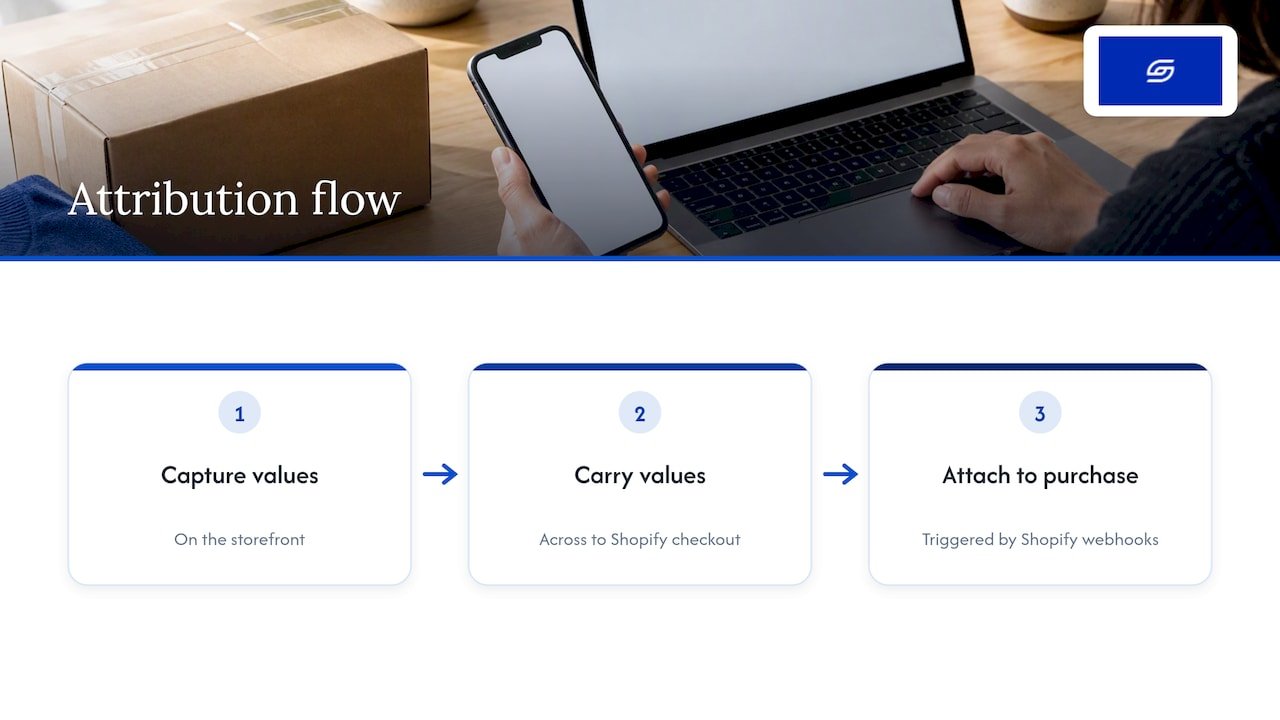
A sound approach is an event-first design. Instrument events in the browser, on the server and from Shopify webhooks using one shared event contract, with server-side tagging to cope with ad blockers, as this Next.js and Shopify guide recommends. If you run paid campaigns in Singapore, agree the tracking plan before development starts, not after your first week of strange ROAS numbers.
Caching and performance
A theme gives you Shopify’s rendering and caching for free. In headless, you own server-side rendering, CDN rules and cache invalidation. Done well, pages are fast. Done badly, shoppers see stale prices or out-of-stock products. If you are weighing the performance side, it is worth reading how caching approaches for Shopify stores differ from what a custom storefront needs, since theme-level plugins do not carry over to a hand-built front end.
Security
Verify the X-Shopify-Hmac-Sha256 header on every webhook payload, using your app’s secret, to stop spoofed requests. The same guide also warns against caching authenticated responses at the edge, and says to purge the cache explicitly when account data changes, so one customer never sees another’s data.
Ownership of everything else
Shopify’s developer community puts it bluntly: headless gives creative freedom but moves responsibility for performance, security and integrations to the brand. Features you took for granted in a theme, such as app blocks, theme editor changes by your marketing team and many app integrations, may need custom work.
What does headless cost in Singapore?
Published figures vary a lot, and we would treat any single number with caution. Singapore agency pages we reviewed put headless builds well above standard ones, with market-average quotes in the tens of thousands of Singapore dollars and timelines of roughly three to four months or more, against a standard Shopify build at a fraction of that cost and time. Boutique specialists are cheaper than large agencies, but the gap to a theme-based build remains wide.
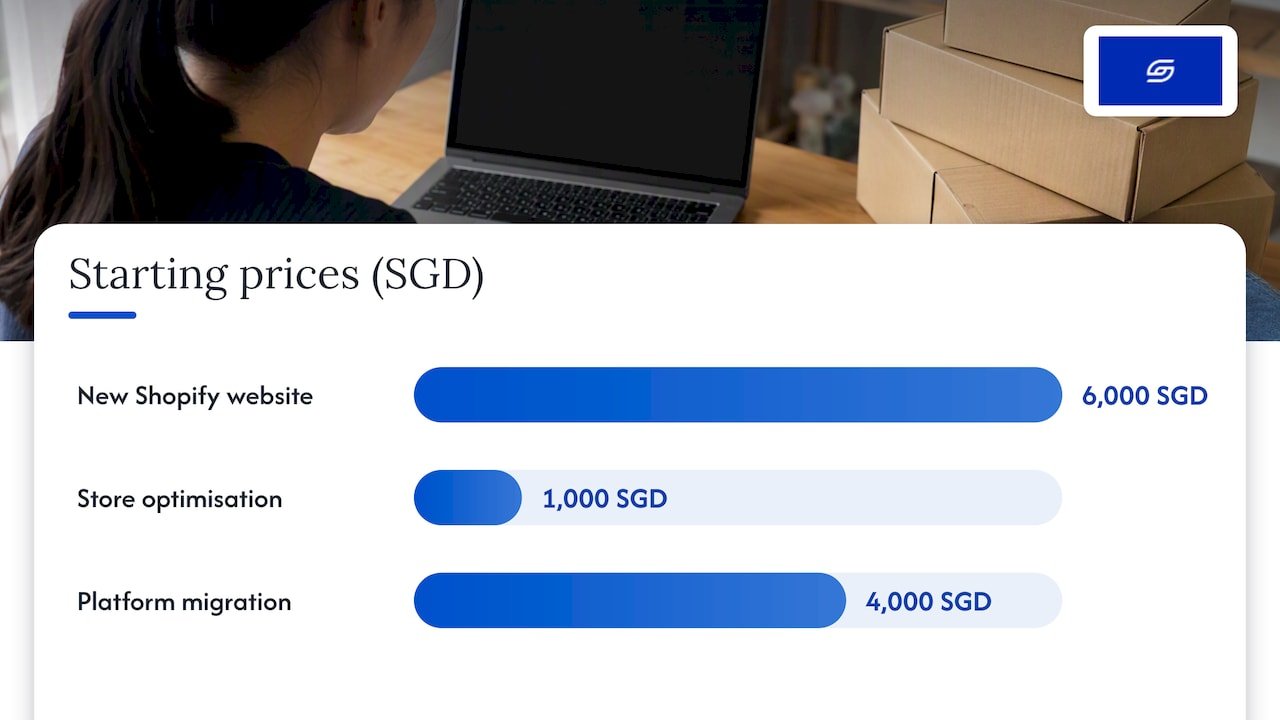
For comparison, here are our own published starting prices for theme-based work:
| Service | Starting price |
|---|---|
| New Shopify website development | from 6000 SGD, one-off |
| Existing Shopify store optimisation | from 1000 SGD, one-off |
| Platform migration | from 4000 SGD, one-off |
Headless engineering also carries running costs: hosting, monitoring, developer time for upgrades and a plan for when the original builder is unavailable. For a broader view of budgets, see our guide to Shopify pricing in Singapore.
Our view: most brands should earn headless first
We build and optimise Shopify stores for Singapore and Southeast Asian brands, and our work is led by a Shopify founder who has run stores, not by junior staff working from templates. That shapes our advice.
When a founder tells us they want headless, the real goal is usually one of three things: faster pages, a more distinctive design, or better conversion. A theme can usually deliver all three at a fraction of the cost and risk. Speed problems usually come from heavy apps and unoptimised media. Conversion problems usually come from weak product pages, unclear shipping information or a clumsy mobile checkout journey. Fixing those first gives you a measurable lift and a clear baseline.
Headless earns its place when you have a genuinely unusual experience, several channels fed from one catalogue, or an in-house engineering team that wants to own the front end. In that case, treat it as a product, with a roadmap, monitoring and budget for upkeep, not a one-off website project.
Our practical order of operations:
- Audit the current store with real user data.
- Fix speed, product pages and checkout friction.
- Measure the conversion lift.
- Only then ask whether a theme still limits you.
If the answer is yes, you will make the headless decision with evidence rather than hope.
— Soodo
Where we can help
If you are deciding between a theme and a headless build, we can review your store and tell you plainly which route fits your revenue, team and timeline. Our existing store optimisation starts from 1000 SGD and is a sensible first step. If you are moving from another platform, or need something unusual, our custom one-time projects cover bespoke needs. You also get direct WhatsApp support from the people doing the work. To start a conversation, get in touch through our site.
FAQ
Can I use Shopify for headless commerce?
Yes. Shopify supports it through the Headless sales channel and the Storefront API. You build the front end in a framework of your choice, and Shopify continues to run products, cart, checkout and orders.
Is headless Shopify worth it?
Only for specific cases: custom experiences a theme cannot deliver, multi-channel selling from one catalogue, or teams with the engineers to maintain it. For most small and mid-sized brands, a well-optimised standard theme gives faster launch, lower cost and easier upkeep.
Should I choose Hydrogen or Next.js?
Choose Hydrogen if you want Shopify’s conventions, examples and hosting on Oxygen. Choose Next.js or another framework if your team already works in it or you need full control over architecture and hosting. Either way, both talk to the same Storefront API.
Why did my ad tracking break after going headless?
Cookies and attribution parameters can be lost when shoppers move from your custom storefront to Shopify’s checkout domain. The fix is to capture those values early and send conversions server-side, using Shopify’s purchase webhooks. Plan this before launch rather than after.
Sources
- About headless commerce, Shopify developer docs
- Building with the Storefront API, Shopify developer docs
- Getting started with Hydrogen and Oxygen, Shopify developer docs
- Add Hydrogen to an existing project, Shopify developer docs
- Hydrogen and Storefront API board, Shopify Developer Community
- Vercel deployment for headless Shopify, theecommerce.dev
- Headless Commerce on Next.js and Shopify: Practical Guide, AI App Builder
- Accurate conversion tracking in Shopify with Stape and webhooks, Analytics RUSH
Recommended

Jessica Bong
Jessica Bong is the founder of Soodo, a Singapore Shopify agency that builds, revamps and migrates Shopify stores, with every store set up to be found in AI search (GEO). She has spent over 10 years in ecommerce and runs her own Shopify brand, Patch&Bagel, where every Soodo technique is tested first. Jessica is also a WSQ-certified Shopify trainer at Equinet Academy.