Shopify Product Badges: 3 Install Paths, App Blocks Are Safest
The quickest, safest way to add product badges on Shopify is to install a dedicated badge app that works through app blocks on Online Store 2.0, rather than editing theme code by hand. Strong picks from the current app store lineup include Product Labels & Badges by Lably, DECO Product Labels & Badges, Hoppy Trust Badges & Icons, Sami AI Product Labels & Badge, Labeler, and TA AI Product Labels & Badges. If you would rather have someone handle the install, design, and testing for you, we can set this up as part of a broader store optimisation project.
TL;DR:
- Before installing, confirm your theme supports Online Store 2.0 and app blocks or embeds; manual code installs risk leftover snippets after updates or removal.
- Choose Labeler for no code setup and live previews, Lably for templates and scheduling, or Hoppy when checkout trust signals matter most.
- Free plans can cover a small catalog and one simple label; paid tiers commonly cost $9 to $39 a month for automation, localization, or analytics.
- Test one badge change at a time, keep other site changes constant, and track add to cart and conversion; low traffic stores can compare periods.
Table of Contents
- Comparing the leading Shopify badge apps
- How badge apps integrate with your Shopify theme
- Design and targeting controls worth knowing
- What badge apps typically cost
- How to install and preview badges without breaking your theme
- How to choose the right badge app for your store
- Why some stores still bring in a developer for badges
- Badge usage patterns across Southeast Asian stores
- Running A/B tests on your badge strategy
- What actually matters when you add badges
- Want badges implemented without the trial and error?
- FAQ
- Sources
Comparing the leading Shopify badge apps
Each of these apps tackles the same job, flagging bestsellers, new arrivals, low stock, or trust signals, but they differ in depth and price. Product Labels & Badges by Lably leans on a large template library and scheduling tools, which suits merchants who want to plan seasonal badges in advance. DECO Product Labels & Badges follows a similar logic with tiered pricing tied to the number of active badges. Hoppy Trust Badges & Icons narrows its focus to checkout and payment reassurance rather than merchandising badges. Sami AI Product Labels & Badge and TA AI Product Labels & Badges both generate badge designs and copy automatically, with translation support built in for stores selling across languages. Labeler sits in between: straightforward enough for a first-time install, but with a CSS editor for merchants who want finer control.
- Easiest no-code setup: Labeler, thanks to its live preview and straightforward rule builder.
- Most customisable: Product Labels & Badges by Lably, for its template range and scheduling.
- Best for trust-focused checkout pages: Hoppy Trust Badges & Icons.
How badge apps integrate with your Shopify theme
Badge apps reach your storefront in one of three ways: app blocks, app embeds, or direct code edits. App blocks are the safest route. They render through the theme editor, so you drag them into a section without touching Liquid, and they’re a core part of theme app extensions. App embeds work similarly but sit in the background, often used for overlays like trust icons near the checkout button. Code edits, by contrast, mean the app writes directly into your theme files, which carries more risk if a theme update or uninstall leaves orphaned snippets behind.
Before installing, check two things:
- Your theme supports Online Store 2.0, since older themes may lack the
apps.liquidor_blocks.liquidwrapper that app blocks need, as Shopify’s developer documentation explains. - The app’s listing confirms app block or app embed support rather than “manual code install only.”
Pro Tip: If the theme editor shows “Apps not supported” when you try to add a block, your theme needs an update before the badge app will work cleanly.
Design and targeting controls worth knowing
Most badge apps give you control over both look and logic, and knowing which levers matter most saves time during setup, including adding the right ecommerce schema markup to improve product listing visibility.
- Visual controls: shape (ribbon, circle, rectangle), font, colour, position (corner overlays or inline), subtle animation, and hover tooltips for extra context.
- Targeting by tags: useful for manually curated badges like “Editor’s Pick” or “Limited Edition.”
- Targeting by inventory level: automatically flags “Low Stock” or “Sold Out” without manual updates.
- Targeting by collection or variant: lets a “New” badge apply only to a specific launch range or colourway.
- Scheduling: sets badges to appear and disappear automatically around sales or seasonal windows.
- Label groups and priority rules: stop multiple badges overlapping on the same product by deciding which one wins.
- Localisation: shows translated badge text to shoppers browsing in a different language, relevant for apps like Sami AI and TA AI that build this in.
What badge apps typically cost
Free plans are common but usually capped, often limited to a small number of active badges or products, which works fine for a small catalogue. Paid tiers unlock the features that scale with a growing store: advanced targeting rules, AI-generated designs, scheduling, and performance analytics, as several app store listings show.
- Free plans suit stores with a handful of products and simple badge needs, such as one “Bestseller” label.
- Paid tiers (commonly $9 to $39 a month) make sense once you need automated inventory-based badges or multi-language support.
- If you’re testing badges for the first time, start free and upgrade only when you hit a plan limit.
Soodo’s experience with Shopify builds suggests badge choice matters less than badge consistency: a well-designed badge that matches your brand colours and typeface tends to build more shopper trust than a generic one, regardless of which app renders it.
How to install and preview badges without breaking your theme
- Duplicate your live theme or work on a development store first, so nothing goes live untested, as Shopify’s own guidance recommends.
- Install the app and check its listing confirms app block or app embed support.
- Add the app block through the theme editor, or enable the app embed from the theme’s app embeds panel.
- Configure your targeting rules and preview the result on the duplicate theme.
- Test on both desktop and mobile views before publishing, since badge sizing often behaves differently on smaller screens.
- Monitor page load and conversion data for a week after launch to catch any issues early.
Pro Tip: Keep the duplicate theme live for a few days after launch. If a badge misbehaves, you can switch back instantly instead of troubleshooting on your storefront.
How to choose the right badge app for your store
The right choice depends on what you’re already using your theme for and how much control you want day to day.
- Confirm the app supports Online Store 2.0 and app blocks, not just manual code installs.
- Check that its design options (colours, shapes, fonts) can match your brand without extra CSS work, unless you want that control.
- Match targeting precision to your catalogue size: a 50-product store needs less automation than one with thousands of SKUs.
- Compare pricing against a free trial period so you can test before committing.
- Weigh implementation effort against your own time: an app with a live preview and simple rollback saves troubleshooting later.
| Criterion | Why it matters |
|---|---|
| Online Store 2.0 support | Avoids “Apps not supported” errors and manual code fixes |
| Design flexibility | Keeps badges on-brand rather than generic |
| Targeting precision | Matches automation to catalogue size |
| Pricing and trial | Lets you test before paying |
| Rollback ease | Reduces risk if something breaks post-launch |
Why some stores still bring in a developer for badges
We’ve seen plenty of merchants install a badge app successfully on their own, and for most catalogues that’s the right call. Where it gets trickier is when a store wants badges woven into a custom product page layout rather than dropped into a standard block, or when the goal is a proper A/B test comparing badge styles against conversion data rather than a guess. Our Pierzel product page optimisation work involved exactly this kind of layered change: badge placement alongside broader layout and copy adjustments, tested rather than assumed.
Our usual process for badge-related work follows a few consistent steps:
- Confirm the theme supports Online Store 2.0 before touching anything live.
- Install or adjust the badge app on a duplicate theme first.
- Polish the design to match the brand’s existing colours and type.
- Set up a basic A/B comparison where the catalogue size justifies it.
When a badge request turns into “redesign how products display,” that’s usually the point where agency input saves more time than it costs.
Badge usage patterns across Southeast Asian stores
Shoppers across Southeast Asian markets often browse on mobile first and compare multiple marketplace listings before landing on a brand’s own Shopify store, which puts more weight on badges that signal speed and certainty at a glance. “Ready to ship” or “Local stock” badges tend to matter more here than in markets where next-day delivery is assumed, since cross-border shipping times vary widely by category. Stores selling through both Shopify and marketplaces like Shopee or Lazada sometimes use badges to mirror trust cues shoppers already recognise from those platforms, such as verified seller marks or fast-shipping icons.
Multi-language support also plays a bigger role here than in single-language markets, since a badge written only in English can lose impact for shoppers browsing in Bahasa Melayu or Mandarin. Apps with built-in translation, like Sami AI or TA AI, handle this without requiring separate badge sets per language. For stores managing their own catalogue across borders, keeping badge logic simple, inventory-based “Low Stock” rather than a dozen manual tags, tends to hold up better as product ranges grow and teams change.
The common thread across stores we’ve seen in this region is restraint: two or three well-chosen badges that map to what shoppers actually check (stock, delivery speed, authenticity) outperform a cluttered mix of promotional labels competing for attention on the same thumbnail.
Running A/B tests on your badge strategy
Badges are easy to add but easy to get wrong, which makes testing worthwhile before you commit to one style across your whole catalogue. Start by testing one variable at a time: badge colour, wording, or placement, rather than changing all three at once, since mixed changes make it impossible to know which one moved the result.
Run the test long enough to cover a full buying cycle for your products rather than stopping after a few days, since early results often swing before settling. Split traffic evenly between the badge version and a control with no badge or a different design, and track add-to-cart rate alongside conversion rate, since a badge can lift clicks without lifting sales if it creates false urgency.
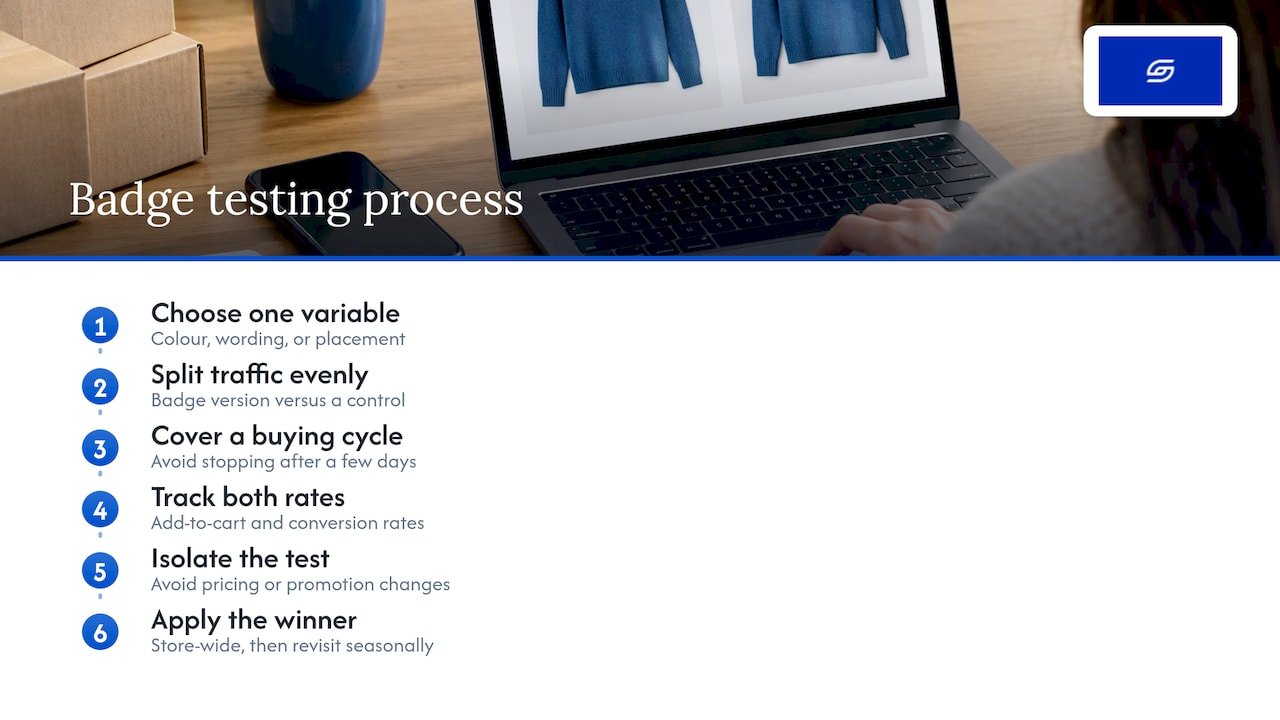
Keep the test isolated from other site changes during the same window. If you’re also adjusting pricing or running a promotion, you won’t know whether the badge or the promotion drove the shift. Once you have a winner, apply it store-wide and revisit it seasonally, since a badge that works well during a sale period may not perform the same way the rest of the year.
For stores with lower traffic, a formal statistical test may take too long to reach significance. In that case, a simpler before-and-after comparison over a few weeks, paired with a close look at add-to-cart data, gives a reasonable read without needing a dedicated testing tool.
What actually matters when you add badges
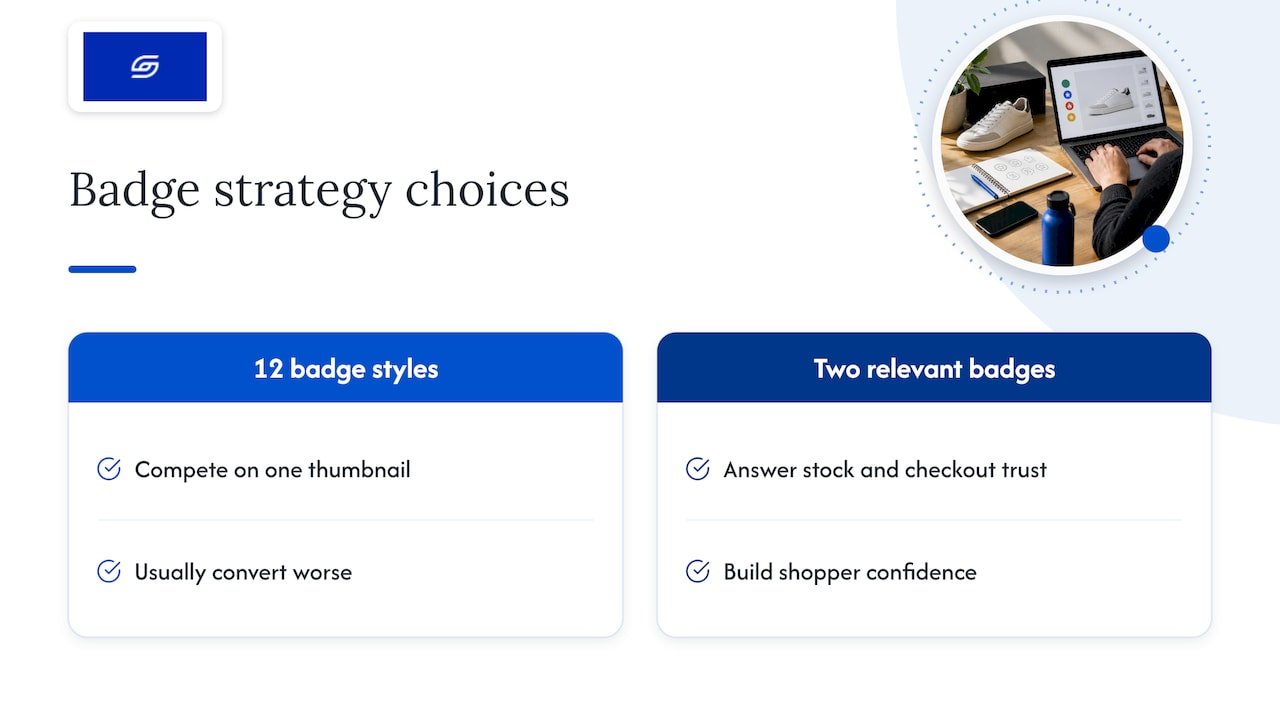
The badge app you pick matters less than most guides suggest. Nearly every option on the shortlist covers the basics: tags, inventory rules, app block support. What separates a badge that lifts confidence from one that gets ignored is restraint and fit, not feature count. We’d argue the conventional advice, “pick the app with the most templates”, gets the priority backwards. A store with twelve different badge styles competing for attention on one thumbnail usually converts worse than one with two badges that answer a shopper’s real question: is this in stock, and can I trust this checkout?
The bigger miss we see is treating badge installation as a one-off task rather than something to revisit. A “Low Stock” rule set up at launch with the wrong threshold, or a badge style that no longer matches a rebrand, sits quietly dragging on trust for months because nobody checks it. If you take one thing from this, it’s to treat badges as a small, ongoing part of your product page, worth a quarterly glance, not a set-and-forget install.
— Soodo
Want badges implemented without the trial and error?
If you’d rather skip the app comparisons and theme editor fiddling, we can handle the install, design matching, and testing as part of existing store optimisation work, from 1,000 SGD one-off. As a founder-led Shopify agency, we build badges theme-safely from the start rather than bolting them onto a layout that wasn’t designed for them, and for stores needing something custom beyond what an off-the-shelf app offers, that falls under our custom one-time projects.

Get in touch and we’ll take a look at what your current setup needs.
FAQ
Do product badges actually improve Shopify conversion rates?
Well-placed badges that answer a shopper’s real question, such as stock status or shipping speed, tend to support conversion more than purely decorative ones. The effect depends heavily on design consistency and restraint rather than the number of badges used.
Can I add badges without editing my Shopify theme code?
Yes, most modern badge apps use app blocks that you add through the theme editor, with no Liquid editing required. This only works if your theme supports Online Store 2.0.
Will a badge app slow down my store?
A well-built app using app blocks or embeds typically adds minimal load, but it’s worth checking page speed before and after installing, especially on image-heavy product pages. Our speed optimisation guidance covers how to monitor this.
How do I stop badges overlapping on the same product?
Most apps let you set label groups and priority rules so only the highest-priority badge shows when a product qualifies for more than one. Check this setting during setup rather than after badges go live.
Should I hire someone to set up badges or do it myself?
Self-install works well for most stores using a standard app and a few targeting rules. Agency help becomes worthwhile when badges need to fit a custom layout or you want a proper A/B test, which is the kind of work covered in our product page optimisation fixes.
Sources
Recommended

Jessica Bong
Jessica Bong is the founder of Soodo, a Singapore Shopify agency that builds, revamps and migrates Shopify stores, with every store set up to be found in AI search (GEO). She has spent over 10 years in ecommerce and runs her own Shopify brand, Patch&Bagel, where every Soodo technique is tested first. Jessica is also a WSQ-certified Shopify trainer at Equinet Academy.