
Choose the Right Shopify Cart Drawer in 5 Minutes
Most stores get the fastest, most reliable lift from a purpose-built app like Amp Slide Cart Upsell Drawer or qikify Slide Cart Drawer, since native theme drawers cost nothing but skip upsells, and custom Ajax builds win on speed and brand fit if you have developer time. Test one recommended app first, enable your theme’s native drawer as a free baseline, or brief an agency for a bespoke build, then track average order value and conversion rate for two weeks before deciding.
TL;DR:
- Native theme drawers are quick and free but lack advanced upsell features, making them suitable for simple stores with minimal customization needs.
- Third-party apps like Amp Slide Cart Upsell Drawer or Monster Cart offer built-in upsell modules and are ideal for stores aiming to increase average order value through straightforward implementation.
- Custom Ajax builds provide complete control over the drawer’s behavior and logic but require developer time and are justified only for complex systems or extensive integrations.
- Key conversion elements include a progress bar or reassurance message, editable quantities, a clear checkout button, focus trap, and lightweight scripts to ensure fast loading and accessibility.
- Choosing between app, native, or custom solutions depends on the store’s urgency, complexity, and performance priorities, with agencies like Soodo supporting tailored, data-driven designs.
Table of Contents
- What is a Shopify cart drawer, and which option should you pick?
- How do you actually build or install a cart drawer?
- What makes a cart drawer actually convert?
- When does a bespoke build justify hiring an agency?
- Three questions that settle your route in five minutes
- Soodo: how we help stores build conversion-first cart drawers
- Sources
- FAQ
What is a Shopify cart drawer, and which option should you pick?
A cart drawer is the slide-out panel that opens from the side of the screen when a shopper adds a product, instead of sending them to a separate cart page. It keeps browsing momentum alive, which matters most for stores where shoppers tend to add several items before checking out.
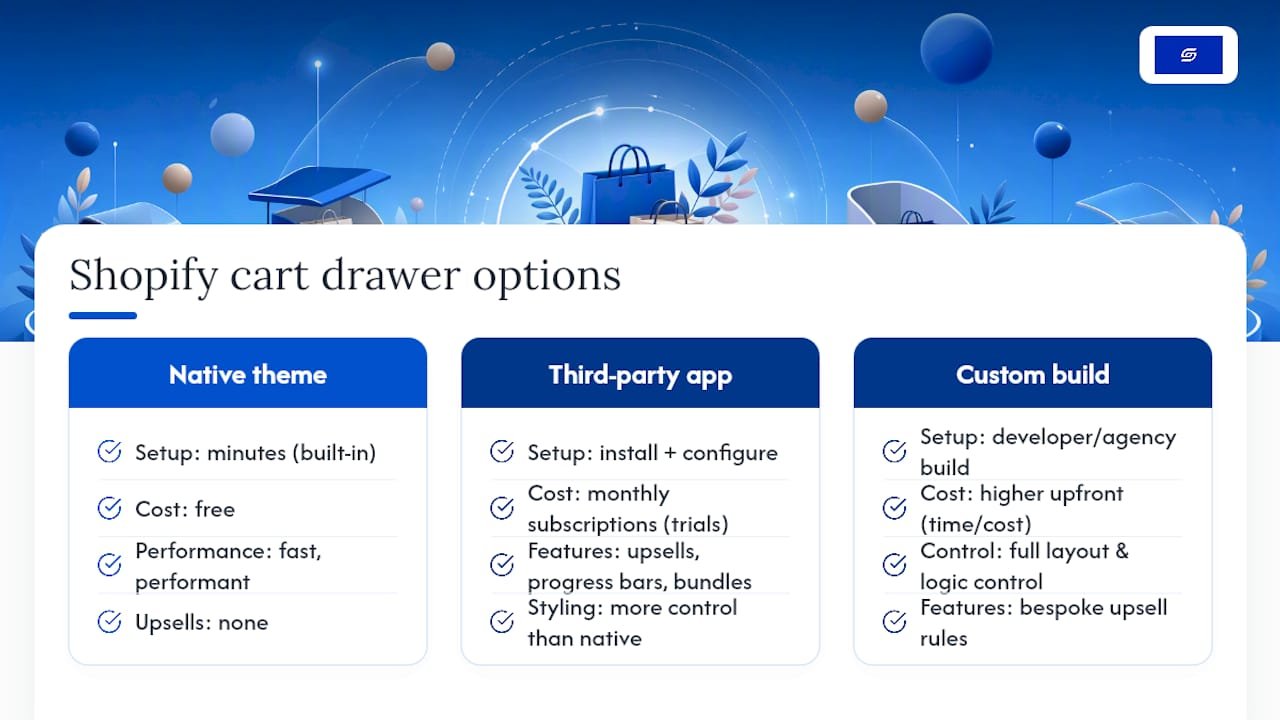
You have three real routes to get one: your theme’s native setting, a third-party app, or a custom Ajax build. Each suits a different stage of business.
Native theme drawer. Most Online Store 2.0 themes, including Dawn, ship with a “Cart type” setting you can switch to “Drawer” in minutes. It is free, fast, and performant, but it has no upsells, no progress bar, and limited styling control.
Third-party app. Apps like Amp Slide Cart Upsell Drawer, iCart Cart Drawer Cart Upsell, and Monster Cart add upsell modules, free-shipping progress bars, and bundle prompts without touching code. Pricing runs on monthly subscriptions, and many list free tiers or trials before paid plans kick in.
Custom build. A developer or agency writes the drawer using Shopify’s Ajax cart endpoints, giving you full control over layout, speed, and exactly which upsell logic runs. It costs more upfront in time, but nothing runs that you did not choose.
A handful of low-cost apps like Advanced Cart Drawer list pricing as low as $2.99 a month, which suits a small catalogue that only needs a clean slide-out with no upsell logic. Stores chasing average order value gains do better with Amp Slide Cart Upsell Drawer, Kaching CartDrawer Cart Upsell, or Candy Rack, since all three build upsell and discount prompts directly into the drawer flow. Corner Cart Drawer & Free Gift and Oxify Cart Drawer suit merchants running timed promotions or gift-with-purchase campaigns rather than everyday upsells.
If your catalogue is small and simple, start with the native drawer and measure it before spending anything. If average order value is your goal, trial Amp Slide Cart Upsell Drawer or Monster Cart for two weeks. If your checkout involves complex order logic, multi-currency pricing, or integrations with systems like GoKwik, a custom build or an agency brief (Soodo) will serve you better long term than stacking apps. Ego Cart Drawer, Essent Cart Drawer, Cartly Slide Cart Drawer, and Upsell & Cross Sell — Selleasy are worth a look if you want a well-reviewed, straightforward alternative without deep feature stacking, and AOV.ai Cart Drawer is worth testing if you want AI-suggested upsells rather than fixed rules.
How do you actually build or install a cart drawer?
Each route has a distinct setup path and a realistic time estimate, so pick based on how much time you actually have this week, not how impressive the end result sounds.
- Theme editor route. Open Online Store, go to theme customisation, and look for “Cart” under theme settings. Switch “Cart type” to Drawer, then check the empty-state message, drawer colour, and whether cart notes display. This takes roughly 5 to 15 minutes and needs no code.
- App install route. Install your chosen app from the Shopify App Store, run its onboarding wizard, and set your upsell rules or progress-bar threshold. Test on mobile immediately afterwards, and check for theme conflicts (duplicate cart icons, broken animations) before publishing live. Most apps offer a free trial window before billing starts.
- Custom Ajax route. A developer posts to
/cart/add.jsto add an item, then issues aGETrequest to/cart.jsto re-read the full cart state, and renders the drawer from that response rather than trusting local counters. Building the drawer as a Liquid section, then updating it through the Section Rendering API, keeps it correct on first load. Removing a line item uses/cart/change.jswith quantity set to zero, since there is no dedicated remove endpoint. Budget 1 to 3 developer days depending on how many upsell rules or event hooks you need, plus time for keyboard focus and screen-reader testing.
Pro Tip: Always re-read /cart.js after every mutation instead of incrementing a counter locally. Local counters drift out of sync the moment a discount code, subscription item, or bundle rule changes the cart server-side, and that mismatch is one of the most common cart-drawer bugs merchants report.
What makes a cart drawer actually convert?
Treat the drawer as a checkout waiting room, not a receipt. Shoppers open it expecting reassurance that their order is progressing, so give them one progress cue (a free-shipping bar works well), one relevant upsell, and a single clear checkout button rather than three competing calls to action.
Editable quantities and a visible remove option inside the drawer matter more than most merchants assume, since forcing shoppers to a separate cart page just to fix a quantity is friction you do not need. The server should always be the source of truth for pricing and stock, never a cached local value.
Mobile behaviour needs its own rules. Keep primary actions within thumb reach at the bottom of the screen, and think about how your drawer interacts with a sticky add-to-cart bar if you run one, since two competing sticky elements confuse shoppers on smaller screens.
Accessibility is not optional at this point in a build. A properly built drawer traps keyboard focus inside itself while open, marks the background content aria-hidden, closes on the Escape key, and gives its close button a real label rather than an icon alone.
Conversion research on cart-drawer design points to two elements doing most of the heavy lifting: a free-shipping progress bar and a single, well-targeted upsell. Add more than that and you risk slowing the drawer down and diluting the one offer that would have worked.
- Progress bar or reassurance message, not three.
- Editable quantities and a visible remove control.
- One relevant upsell, tested, not five competing ones.
- Focus trap,
aria-hidden, Escape to close, labelled close button. - Lightweight scripts only; heavy widget stacks slow the whole page down.
When does a bespoke build justify hiring an agency?
Agency work earns its cost once your cart needs complex upsell logic, multi-currency pricing, or integration with external systems like a loyalty platform or freight calculator, situations where a stacked-app approach starts creating conflicts rather than solving them.
Soodo is a founder-led Shopify agency that has consulted on over 100 stores, including a documented conversion optimisation project for TAHAN. A typical scope runs audit, design, build, test, then iterate, built around your actual AOV data rather than generic templates.
Three questions that settle your route in five minutes
Ask yourself how fast you need this live. Minutes point you to the native theme drawer, days point to an app, weeks signal a custom build is worth the wait.
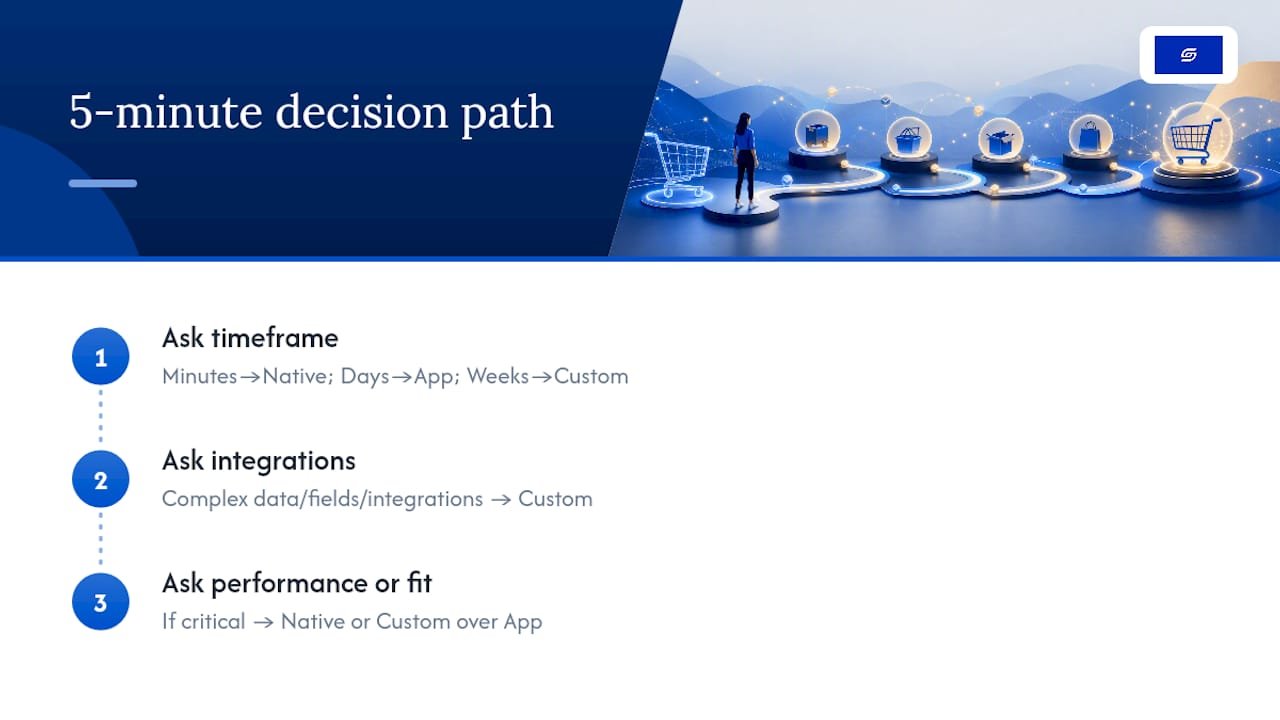
Ask whether your cart needs complex data, custom fields, or third-party integrations. A yes there rules out most no-code apps and points straight to custom development.
Ask whether site performance or exact brand fit is critical to your positioning. If it is, native or custom wins over an app every time, since every added script is a script your Core Web Vitals have to carry.
Soodo: how we help stores build conversion-first cart drawers
If your store has outgrown the trial-and-error of stacking cart-drawer apps, Soodo builds the drawer around your actual sales data instead of a generic template, so every upsell rule and progress-bar threshold reflects what your shoppers actually respond to, not a default setting borrowed from someone else’s store.

For stores already live and needing a conversion-focused upgrade, Existing Shopify Store Optimization is the right starting point. For a full rebuild where the cart and checkout experience gets designed from scratch, New Shopify Website Development covers that scope instead. If you are weighing a platform switch alongside the redesign, platform migration work starts from S$4,000.
When you brief Soodo, include your current average order value, what your checkout drop-off looks like today, and concrete examples of the drawer behaviour you want (a specific upsell rule, a progress-bar threshold, an integration you need supported). Browse the portfolio for more build examples, then get in touch to scope your project.
— Soodo
Sources
- How to Build an AJAX Cart Drawer in Shopify (the 2026 Way)
- Amp Slide Cart Upsell Drawer – Lift AOV (Shopify App Store)
- Dawn cart-drawer snippet (Shopify / GitHub)
FAQ
What is a cart drawer on Shopify?
A cart drawer is a slide-out panel that opens over the current page when a shopper adds a product, showing cart contents without a full page reload. It keeps shoppers browsing instead of interrupting them with a separate cart page.
How do I change the cart drawer in Shopify?
Open your theme editor, go to theme settings, and look for a “Cart type” option, then select “Drawer” if your theme supports Online Store 2.0. If you need upsells or a progress bar on top of that, you will need an app or a custom build, since native drawers do not include those features.
What is the best cart drawer app for Shopify?
There is no single best app: it depends on what you need. Amp Slide Cart Upsell Drawer and qikify Slide Cart Drawer suit stores wanting fast upsell setup, Monster Cart suits stores wanting several conversion widgets at once, and Advanced Cart Drawer suits a small catalogue wanting a low-cost, simple option starting around $2.99 a month.
What is a cart drawer, exactly, versus a cart page?
A cart drawer slides in over the current page; a cart page replaces it entirely with a dedicated URL. Drawers suit browse-heavy stores with several items per order, while cart pages tend to suit complex, bulk, or B2B order flows where shoppers need more space to review.
Should I use an app or hire a developer for my cart drawer?
Use an app if you need upsells or a progress bar live quickly and do not mind a small monthly fee and added scripts. Hire a developer or an agency like Soodo if your cart needs custom logic, multi-currency handling, or integrations that off-the-shelf apps cannot support cleanly.
Recommended

Jessica Bong
Jessica Bong is the founder of Soodo, a Singapore Shopify agency that builds, revamps and migrates Shopify stores, with every store set up to be found in AI search (GEO). She has spent over 10 years in ecommerce and runs her own Shopify brand, Patch&Bagel, where every Soodo technique is tested first. Jessica is also a WSQ-certified Shopify trainer at Equinet Academy.