

Operations First Runbook for Store Owners Moving from BigCommerce to Shopify
Most BigCommerce stores should migrate using an API-connected app like Matrixify, validated with a staging dry run, unless you run complex B2B pricing, subscriptions, or ERP integrations, where agency-led migration earns its cost. Your first move today: export your full product CSV and run a test import before you touch anything else. Skip the 301 redirect map and content freeze, and you risk losing a significant portion of your organic traffic within months.
TL;DR:
- Migration tools like Matrixify work well for most stores but may require an agency if you have complex B2B pricing, subscriptions, or ERP integrations.
- It is crucial to export and review your full product, customer, and order data before import, especially paying attention to variant limits and custom fields.
- A thorough redirect map based on your top traffic pages must be implemented to prevent significant organic traffic loss within six months.
- Conduct a staged dry run with full QA, including checkout and analytics testing, to catch issues early and avoid disruptions post-launch.
- Complex catalogs with custom workflows or low risk tolerance should consider professional agency support to ensure smooth migration and SEO preservation.
Table of Contents
- How do you plan a BigCommerce to Shopify migration?
- How do you export data from BigCommerce?
- What’s the right order to import data into Shopify?
- How do you protect SEO rankings during migration?
- What should you monitor in the first 72 hours after launch?
- What has Soodo learned from real BigCommerce migrations?
- The runbook mindset most migration guides miss
- When should you hire an agency for your Shopify migration?
- Where to go for platform-specific migration details
- Sources
- FAQ
How do you plan a BigCommerce to Shopify migration?
Every successful migration starts with matching your store’s complexity to the right method, not the other way round. Get this wrong and you’ll either overpay an agency for a simple catalogue swap or watch a DIY CSV import collapse under variant limits and custom fields it was never built to handle.
Choosing your migration tier
Migration methods generally split into three tiers, and Shopify’s own enterprise migration guidance confirms the same structure most experienced agencies use:
- Manual CSV migration suits small catalogues (under 500 SKUs), no subscriptions, and straightforward variant structures. It’s slow but cheap, and you control every field.
- Migration app (Matrixify and similar tools) works for most mid-sized stores. These connect via the BigCommerce API and can move products, collections, discounts, customers, and order history in one pass, plus assist with URL mapping for redirects.
- Agency-led migration becomes worth the spend once you’re running B2B tiered pricing, ERP integrations, multi-store setups, or subscription billing that a generic app simply won’t map correctly.
Budget accordingly. Simple direct-to-consumer migrations typically run $15,000 to $30,000 across two to eight weeks, mid-market projects land between $30,000 and $60,000 over 12 to 18 weeks, and enterprise builds with ERP or custom B2B logic can exceed $75,000 and run 16 weeks or longer.
Inventory everything before you touch a single export
Walk through every data type your store holds and flag anything that won’t translate cleanly:
- Products, variants, and custom option sets, especially anything using BigCommerce’s modifier fields.
- Customer accounts, order history, and any loyalty point balances.
- Metafields, custom fields, and structured content tied to product pages.
- Subscription or recurring billing data, if you run one.
- Multi-storefront configurations, since Shopify handles multi-store differently to BigCommerce.
Watch for BigCommerce’s higher variant ceiling. Stores with products carrying more than 100 variants will need rework, because Shopify caps variants per product lower than BigCommerce allows. Flag these early rather than discovering them mid-import.
Setting your freeze window and rollback rules
Treat this like a software release, not a weekend project. Plan a content freeze window, run full staging QA across checkout, third-party logistics, and email flows, then use a dry run to catch mapping errors before you commit to cutover. Define your rollback criteria in writing before launch, not during a crisis: what error rate or downtime triggers a reversal, and who has authority to call it.
Loop in stakeholders beyond your dev team. Finance needs advance notice for payment gateway testing, fulfilment needs to know order processing pauses during freeze, customer support needs scripts for the inevitable login questions, and marketing needs to pause promotional sends during the transition window.
Pro Tip: Run your dry run on a Tuesday or Wednesday, never a Friday. If something breaks, you want your whole team available to fix it, not scattered for the weekend.
How do you export data from BigCommerce?
Getting clean exports out of BigCommerce is where most DIY migrations either save money or quietly create weeks of rework. The goal isn’t just moving data, it’s moving data in a shape Shopify can actually use.
Run these exports in order:
- Products, including image URLs, not just image files, since broken image links are the single most common post-migration complaint.
- Customers, with full order history attached where your export tool supports it.
- Orders, particularly the last 12 to 24 months if your BigCommerce plan limits historical export.
- Pages and blog content, exported separately since most tools treat these as distinct from product data.
- Metafields and custom fields, documented manually if your export tool doesn’t capture them natively.
- Discounts and active promotions, so your pricing logic doesn’t silently reset on launch day.
- Files and downloadable assets, if you sell digital products or attach spec sheets to listings.
Before you import anything, document every custom field and option set on paper or in a spreadsheet. This sounds tedious. It saves you from the far more tedious job of reverse-engineering a broken product page three weeks after go-live.
Flag products that exceed Shopify’s limits now:
- Products with more than 100 variants (Shopify’s ceiling is lower than BigCommerce’s).
- Products using complex modifier logic BigCommerce supports natively but Shopify handles through apps.
- Bundled or kitted products, which often need manual rebuilding rather than direct import.
If you’re using an app-based migration, this is also when you generate API credentials from your BigCommerce store settings, since Matrixify and comparable tools authenticate through the API rather than a flat file upload. Run a small sample export first, 50 products is plenty, before pulling your entire catalogue. This surfaces formatting problems while the fix is a five-minute edit, not a full re-export.
Image handling deserves its own checklist item. Confirm every exported product includes a working image URL, not a relative path that only resolves on BigCommerce’s own CDN. Images imported through most migration tools land in Shopify’s own file storage, and internal content that still references the old BigCommerce CDN needs manual updating, since those links won’t redirect on their own.
What’s the right order to import data into Shopify?
Import sequence matters more than most store owners expect, and getting it wrong creates orphaned records that are painful to untangle later. Shopify’s own migration documentation recommends a specific order: products first, then collections, then pages, then customers, and finally orders.
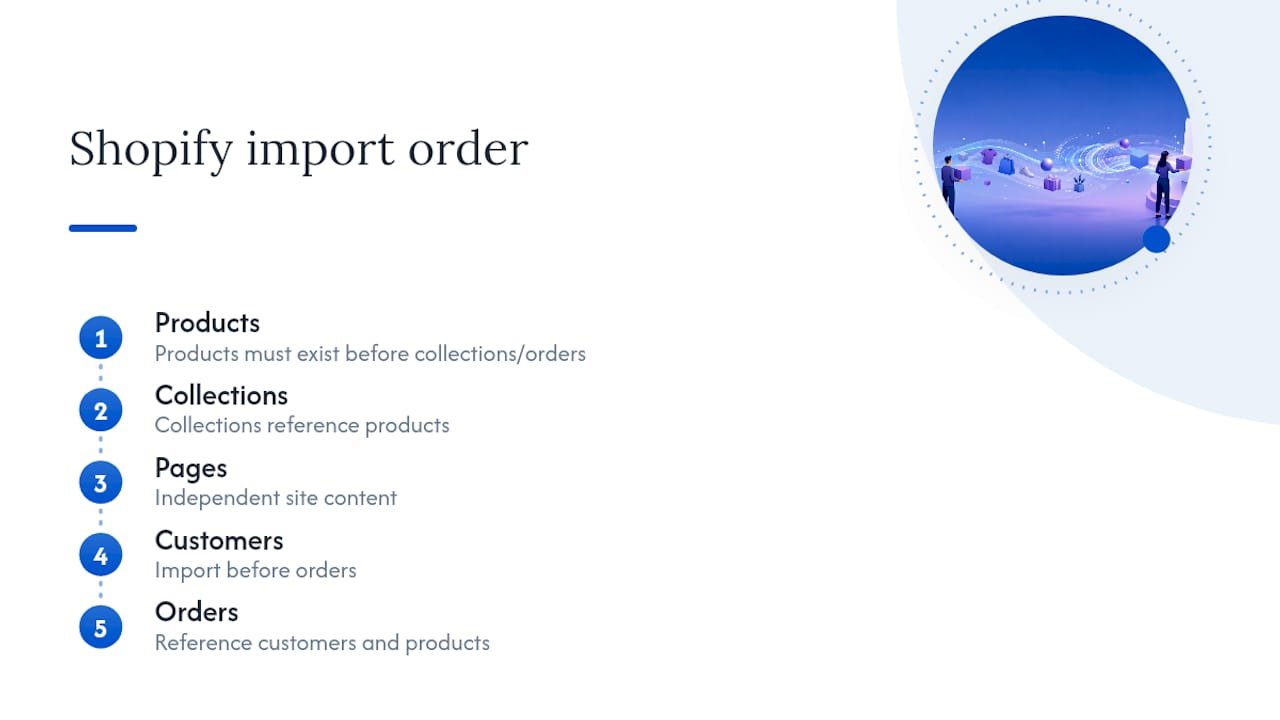
The logic is straightforward. Collections reference products, so products need to exist first. Orders reference both customers and products, so those two must land before order history goes in. Import out of sequence and you’ll spend hours reconciling broken references that a correct order would have avoided entirely.
Running the dry run in Matrixify
If you’re using Matrixify, the workflow follows a specific pattern worth understanding before you start:
- Upload your BigCommerce API credentials to connect the app.
- Run a dry run rather than a live import.
- Matrixify generates an Import_Result.xlsx file and a separate images folder for your review.
- Inspect the result file line by line, checking for failed rows, mismatched fields, and skipped images.
- Correct any errors directly in the Excel file.
- Run the final import once the corrected file passes your review.
This dry-run step is not optional, whatever the time pressure. It’s the difference between catching a broken variant mapping on a test file and discovering it live, with real customers hitting a product page that shows the wrong price.
Fields that commonly break
A handful of fields fail more often than others, and knowing which ones lets you check them first rather than discovering problems by accident:
- Variant mapping, especially where BigCommerce’s option sets don’t translate cleanly to Shopify’s variant structure.
- Metafields, which often need manual remapping since BigCommerce and Shopify use different field architectures.
- Image alt tags, frequently dropped during transfer and worth restoring for both accessibility and SEO.
- Customer group pricing, since Shopify handles tiered and B2B pricing differently and may need Shopify Functions or a third-party app to replicate complex quoting.
If you’re running B2B logic, map your quoting and tier-pricing workflows on paper before you commit to a destination structure. Shopify Plus has strengthened native B2B features considerably, but multi-layered pricing tiers still often need extra configuration to match what BigCommerce handled out of the box.
Validating before you go live
Run these checks on staging, never on the live store:
- Sample-check 20 to 30 products across different categories for correct pricing, images, and variant options.
- Confirm inventory counts match per location if you run multiple warehouses or pickup points.
- Complete a full checkout smoke test, from cart to payment capture to order confirmation email.
- Test at least one refund and one partial fulfilment to confirm your operational workflows still function.
Pro Tip: Have someone outside your dev team run the checkout test. They’ll click things your developer never would, and that’s exactly the point.
For a broader staging checklist covering analytics, third-party apps, and integrations, Soodo’s Shopify store creation checklist is a useful reference to run alongside your own QA.
How do you protect SEO rankings during migration?
SEO is where most DIY migrations lose real money, and it’s entirely preventable with a proper redirect map. Skip it, and you’re looking at a 20% to 60% loss in organic traffic for up to six months, a range wide enough that “we’ll fix it later” is not a real strategy.
Build your redirect map in this order:
- Crawl your live BigCommerce site with a tool like Screaming Frog and export the complete URL list, every product, collection, and blog post.
- Pull your top 200 pages by traffic from Google Search Console and prioritise those first, since ranking recovery depends heavily on getting your highest-value pages redirected correctly before anything else.
- Map URL patterns systematically. BigCommerce’s
/categories/structure typically becomes Shopify’s/collections/, and product URLs need their own mapping logic since the two platforms format them differently. - Bulk-import your finished redirect map into Shopify rather than entering redirects one by one, which is unmanageable past a few dozen URLs.
- For high-traffic pages where timing is critical, consider edge-level redirects that resolve faster than Shopify’s native redirect handling.
The stakes are real: a botched redirect strategy on even a modest catalogue can mean losing 20 to 60% of organic traffic for half a year. For a store doing meaningful revenue through organic search, that’s not a rounding error, it’s a quarter or two of lost customer acquisition.
Preserve your meta titles, meta descriptions, and structured data during the transfer, since these frequently get stripped or reset to generic defaults by import tools that weren’t built with SEO in mind. Check every migrated product page for its original title tag rather than assuming the migration tool preserved it.
Image URLs need the same attention. If your content team referenced the BigCommerce CDN directly in blog posts or landing pages, those links need manual updating post-migration, since they won’t redirect automatically the way page URLs do.
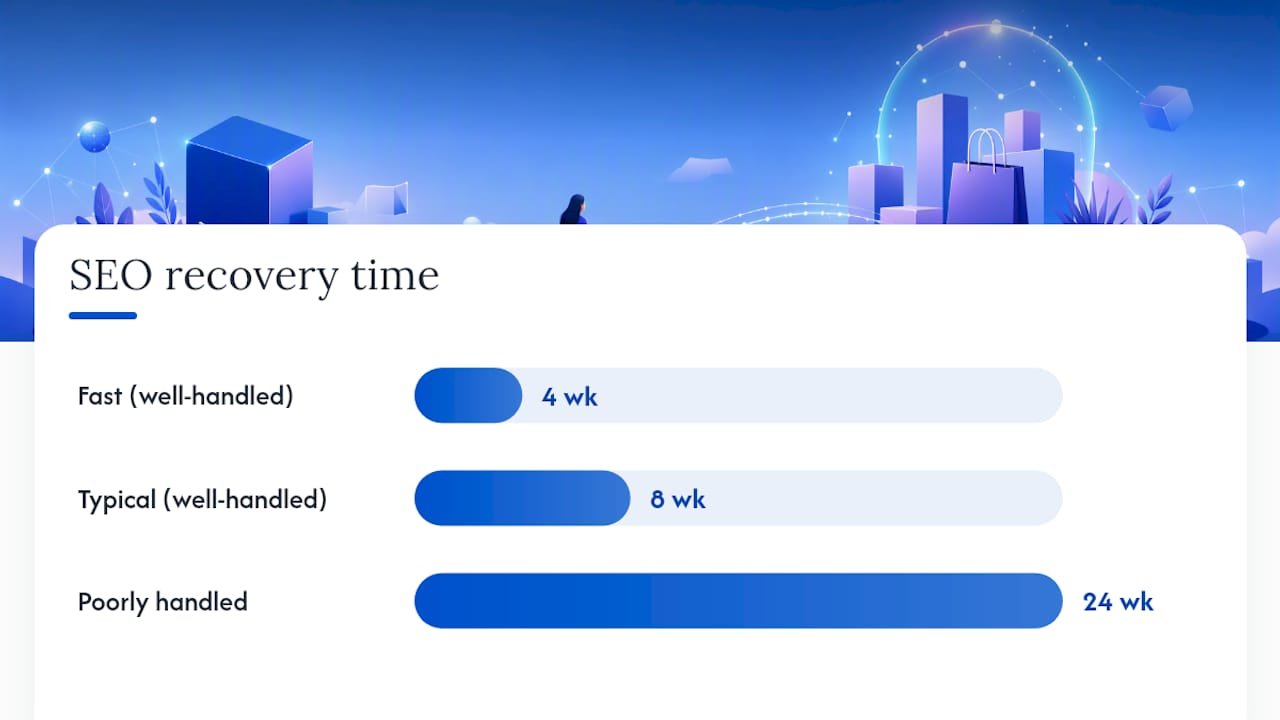
Once you’re live, submit your new sitemap to Search Console immediately and use URL Inspection to request indexing for your priority pages. Handled correctly, most well-executed migrations see SEO recovery within four to eight weeks. Handled poorly, that six-month traffic dip becomes the defining story of your migration.
What should you monitor in the first 72 hours after launch?
The first three days after cutover decide whether your migration was a success story or a support-ticket avalanche. Build a checklist and assign owners before launch day arrives, not while you’re firefighting.
Run these checks within the first few hours:
- Test your redirect map with a spot-check tool across 20 to 30 URLs, prioritising your highest-traffic pages.
- Crawl the live site again and compare against your pre-launch crawl for unexpected 404s.
- Confirm Google Search Console shows your new sitemap submitted and indexing has begun.
- Place two or three real test orders, checking payment capture and shipping label generation end to end.
- Verify GA4 is firing correctly, including server-side events if you use them, and confirm ad pixels and UTM parameters still attribute correctly.
Assign clear roles for the 72-hour window: one person owns customer-facing communications, one owns technical monitoring, one owns fulfilment continuity. Since BigCommerce doesn’t expose password hashes in a form Shopify can import, every customer needs a password reset, and this should go out as a planned email campaign rather than a surprise that floods your support inbox on launch morning.
If you run subscriptions, reconcile your billing cycle immediately, ideally scheduling the cutover itself during a gap between billing runs to avoid double-charging customers.
Pro Tip: Draft your rollback email before launch day, not during a crisis. Having it ready means you can act in minutes if something genuinely breaks, rather than losing an hour to panic-writing customer comms.
What has Soodo learned from real BigCommerce migrations?
The gap between a clean migration and a messy one almost always comes down to edge cases nobody planned for. Variant structures that looked simple in BigCommerce turn into a genuine rebuild once Shopify’s variant limits kick in. Password resets, if not planned as a proper comms campaign, generate a support queue that dwarfs anything else launch week throws at you. Subscription billing cutovers timed against the wrong point in a billing cycle create double-charges that erode trust fast.
Soodo’s work on the Maison Curio migration reinforced a pattern seen across complex catalogue moves: the projects that go smoothly are the ones where variant rework and ERP mapping get solved on paper weeks before a single file gets exported.
A staging QA pass isn’t a formality, it’s the only reliable filter between “we caught it before launch” and “a customer found it for us.” Every migration Soodo runs treats the dry run as non-negotiable, not a nice-to-have step to skip when the timeline gets tight.
A compact staging checklist worth borrowing: full checkout smoke test, sample order refund, variant spot-check across 20+ products, redirect map validation, and a named sign-off owner before cutover.
The runbook mindset most migration guides miss
Most migration content treats this as a checklist of menu clicks: export here, import there, done. That framing misses what actually determines success, which is treating the whole project as an SEO and conversion event, not a data-transfer task.
The conventional advice underrates two things. Second, a dry run isn’t a courtesy step for cautious teams, it’s the only mechanism that catches variant mapping failures and metafield errors before customers do.
If you’re deciding where to spend your limited migration hours, spend them on the redirect map and the staging dry run before you touch theme customisation. A beautiful new storefront built on broken URLs and unmapped variants will still lose you traffic and orders in week one. Get the operational bones right first, then make it look good.
— Soodo
When should you hire an agency for your Shopify migration?
Complex catalogues, subscription billing, ERP integrations, or B2B tiered pricing are the clearest signals that agency-led migration will save you more than it costs. If your risk tolerance is low, because a botched launch means real revenue loss during peak season, that’s another strong argument for managed support over a DIY app-only approach.
Some agencies run migration engagements built around exactly this operational discipline: full data audit, staged dry runs, redirect mapping tied to relevant Search Console data, and conversion-focused rebuilds rather than a like-for-like theme copy.
If your store fits the mid-market or complex-B2B profile covered above, a scoped conversation costs nothing and saves you from guessing at your own risk exposure. Get in touch through Soodo’s Shopify migration and custom projects page to talk through your catalogue, your timeline, and whether a managed migration makes sense for your specific setup.
Where to go for platform-specific migration details
For the exact operational sequencing behind this runbook, consult Shopify’s own enterprise migration guide. For app-specific dry-run steps, Matrixify’s tutorial walks through credential setup and result inspection in detail. For Store Importer specifics and general platform migration options, the Shopify Help Center remains the authoritative reference.
Sources
- How to Migrate from BigCommerce to Shopify (2026 Guide) — Shopify enterprise blog
- Migrate your BigCommerce store to Shopify – Matrixify App
- How to Migrate from BigCommerce to Shopify in 2026: A Complete Operational Guide — Ecommerce Times
- Shopify Help Center | Migrate to Shopify
FAQ
How long does a BigCommerce to Shopify migration take?
Simple direct-to-consumer stores typically take two to eight weeks, mid-market projects run 12 to 18 weeks, and complex enterprise or B2B migrations can take 16 weeks or longer.
Will I lose my SEO rankings after migrating?
Not if you build a proper 301 redirect map.
Can I migrate customer passwords from BigCommerce to Shopify?
No, BigCommerce doesn’t expose password hashes in an importable form, so every customer will need to reset their password after launch, best handled as a planned email campaign.
What’s the right import order for Shopify?
Import products first, then collections, then pages, then customers, and finally orders, since collections and orders both reference records that need to exist beforehand.
Should I use Matrixify or hire an agency?
Matrixify and similar migration apps suit most mid-sized catalogues without complex B2B pricing or subscriptions; agencies like Soodo earn their cost when you’re dealing with ERP integrations, tiered B2B pricing, or subscription billing that generic tools can’t map correctly.
Recommended

Jessica Bong
Jessica Bong is the founder of Soodo, a Singapore-based Shopify development and CRO agency. She built and scaled her own eCommerce brand before starting Soodo, and has since audited 60+ Shopify stores. Jessica also teaches eCommerce at Equinet Academy. Her hands-on experience running a live brand gives Soodo an edge most agencies lack.


