Shopify Product Options and Variants: Building Complex Products in Singapore
Short answer: Shopify now allows up to 2,048 variants per product, but many themes, apps and integrations still struggle with large variant counts. For complex products, combine variants for stock-tracked choices with option apps or metafields for personalisation. Soodo plans product structure in every new Shopify store, from SGD 8,500, and untangles it in a Shopify revamp from SGD 3,000.
Use native variants for inventory-tracked choices such as size or colour, and bring in metafields plus a product-options app when you need richer customisation like file uploads, conditional logic or formula-based pricing. Shopify’s own variant model caps you at three option types, which is fine for simple catalogues but breaks down fast for configurable products. The right fix depends on whether a choice affects stock and SKUs, or simply changes how a product looks or is priced.
TL;DR:
- Reserve variants for choices that need separate SKUs, stock counts, or tax codes; Shopify allows three option types and 2,048 variants per product.
- Use metafields or metaobjects for shared values repeated across products, while line item properties handle customer text, artwork uploads, and other order specific details.
- Choose an options app for conditional fields, multi step forms, formula based pricing, or uploads, and confirm selections reach checkout and support your sales channels.
- Before bulk imports, back up products, test a representative batch through fulfilment, and check variant IDs, since changed option values can disrupt connected systems.
- Keep configuration brief: reveal choices progressively, show a running price, and test a small product group before expanding based on cart abandonment.
Table of Contents
- Mapping your requirements to the right technical approach
- Shopify native variants vs metafields: a decision checklist
- Structuring option data so it scales across your catalogue
- App features that handle conditional logic, pricing and uploads
- Migrating a large catalogue without breaking your integrations
- How we approach maintainable complex-product builds
- Prioritise conversion, not options
- How Soodo helps you build options that actually convert
- FAQ
- Sources
Mapping your requirements to the right technical approach
Before touching your product pages, work out what each option actually needs to do. Not every choice deserves a variant, and treating all of them the same way is where most stores run into trouble.
- Native variants suit inventory-tracked SKUs with a small number of axes, such as size and colour on apparel.
- Metafields and metaobjects work best for reusable option lists and validated inputs you want to manage centrally, like a shared colour palette or material list.
- Line-item properties cover free-text fields attached to the cart line, such as engraving text or a customer’s uploaded artwork.
- Product-options apps and configurators take over when you need conditional logic, price calculators, multi-step flows or heavier interface work than Shopify’s defaults support.
Shopify’s own documentation on adding variants is explicit that variants and custom product information are separate systems: variants carry inventory and pricing, while line-item properties or an app handle descriptive, non-inventory fields. Mixing the two up is the most common reason a “simple” options setup turns messy. If you are only adding a handful of choices, variants will do the job. Once you are juggling conditional pricing, uploads, or option sets that repeat across hundreds of products, a dedicated app and a proper data model save far more time than they cost.
Shopify native variants vs metafields: a decision checklist
Shopify limits products to three option axes and caps the total at 2,048 variants per product, a hard ceiling that matters the moment you stack colour, size and material together on a large range. If you are already brushing against this limit, our guide to the Shopify variant limit covers the theme and API fixes worth checking before you commit to a rebuild.
Run through this before deciding how to structure a product:
- Does each choice need its own SKU, stock count or tax code? If yes, it belongs in variants.
- Does the choice change the price in a fixed, predictable way? Variants or a simple price add-on handle this cleanly.
- Do you need file uploads, proofs, or free-text input attached to the order? That is a line-item property or app territory, not a variant.
- Will the same option values (colours, sizes, materials) repeat across dozens or hundreds of products? If so, metafields and metaobjects keep that data consistent.
Shopify’s guidance on adding variants with metafields confirms that connecting variant options to category or product metafields lets you edit a value once and have it update everywhere it is used, which is the real advantage once your catalogue grows past a handful of products.
Pro Tip: Treat metafields as your single source of truth for option metadata; it removes the guesswork when a value changes mid-season.
Structuring option data so it scales across your catalogue
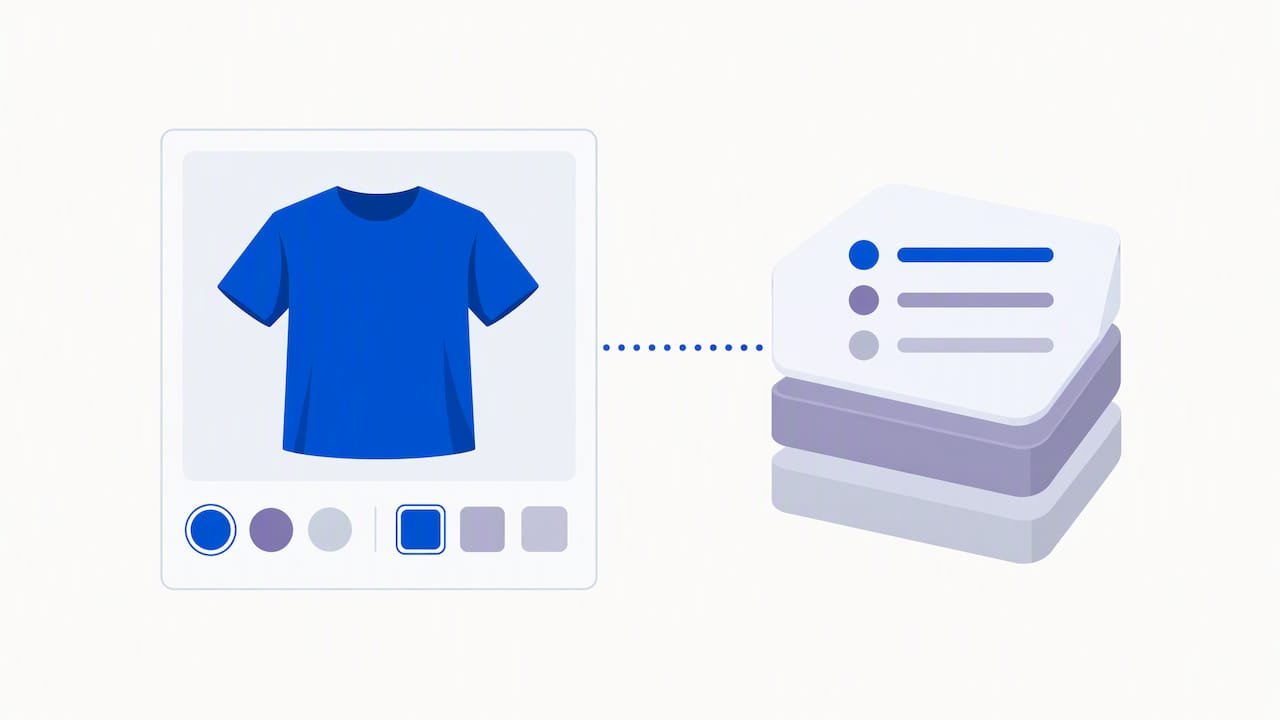
A configurator or set of variants is only as maintainable as the data behind it. Spend time here before you touch bulk imports, because fixing a bad data model after launch is far more disruptive than building it correctly the first time.
- Create metafield definitions with the correct content type for each field, whether that is single-line text, a number, a file reference, a list, or a metaobject reference.
- Use metaobjects or category metafields as a central registry for shared values like colours, materials or dimensions, rather than retyping them on every product.
- Build option templates or sets that apply the same structure across many products, so adding a new size run or finish does not mean rebuilding the option list from scratch.
- Pin critical values, such as SKU prefixes or price modifiers, before running any bulk import, so nothing shifts unexpectedly during the process.
This approach mirrors what Shopify recommends for connecting variants to metafields: centralise the values once, then reference them everywhere they are needed rather than duplicating entries product by product.
Pro Tip: Build your option templates on a handful of representative products first; it is far easier to spot a structural problem on five products than on five hundred.
App features that handle conditional logic, pricing and uploads
Once your options need to react to each other, the native Shopify toolkit runs out of road and a dedicated app earns its keep. Apps built for this purpose, such as Dynamic Product Options, typically bundle conditional show and hide logic, multi-step forms, formula-based pricing and file uploads into one configurable interface, which replaces a lot of custom development that would otherwise fall to a developer.
The features worth looking for include:
- Conditional show and hide logic, so a fabric choice only appears once a product type is selected.
- Multi-step forms that break a complex configuration into smaller, manageable screens.
- Formula or dimensional pricing for products priced by size, area or quantity rather than a flat rate.
- A clear distinction between add-ons and variant-level upcharges, so pricing logic stays predictable.
- File uploads with a live preview, useful for personalised or printed goods.
On the integration side, check how an app surfaces selections to the cart and checkout, whether it supports POS or draft orders, and whether it uses Shopify Functions for add-on pricing rather than a workaround that breaks at checkout. Keep the customer-facing path short: progressive disclosure, where one choice reveals the next, and a running price summary both reduce the chance a shopper abandons a complicated form partway through.
Migrating a large catalogue without breaking your integrations
Bulk changes to product options carry real risk if you skip the preparation. Shopify’s own documentation on using CSV files notes that changing a product’s handle or option values during an import can generate new variant IDs, which quietly breaks anything downstream that references the old ones, from your warehouse system to your analytics.
A safer rollout looks like this:
- Export and back up your current catalogue before changing anything.
- Create your metafield definitions and confirm the content types and validations are correct.
- Migrate a small, representative sample of products first.
- Place test orders and run them through fulfilment to confirm nothing breaks downstream.
- Roll out the remaining catalogue in batches, checking variant IDs against your integrations after each one.
For anything beyond a few hundred SKUs, or where your store connects to an ERP, a warehouse system or a POS, it is worth scripting the changes or bringing in developer support rather than editing CSVs by hand. Our Shopify store creation checklist is a useful reference for the testing steps around cart, checkout and third-party integrations before you go live.
Pro Tip: Always test a sample batch through to fulfilment before running the full catalogue; a variant ID mismatch is far cheaper to fix on ten products than on ten thousand.
How we approach maintainable complex-product builds
When we take on a store with complex product options, we work through the same phases every time: discovery, data modelling, prototype, staging, QA, then handover. Discovery is where we map which choices genuinely need variants versus metafields versus an app, because that decision shapes everything downstream. The data model comes next: metafield definitions, option templates and a structure that survives catalogue growth rather than one that needs rebuilding every season.
Our founder-led approach means the person modelling your product data has operator experience, not just technical familiarity. That matters most during migrations, where a rushed variant restructure can quietly break fulfilment or reporting without anyone noticing until orders start failing. If your catalogue is pushing past Shopify’s native limits or you are planning a platform migration, it is worth getting a proper data model in place before you touch a CSV.
Prioritise conversion, not options
The instinct to add more configuration is rarely the right one. Every extra step, upload field or conditional choice is a chance for a shopper to hesitate, so the question is never “can we build this option” but “does it move the sale forward”.
Three checks are worth running before you add anything: does this option solve a real customer problem, does it add a step without adding clarity, and could you test it on a handful of products before rolling it out everywhere. When in doubt, launch the simpler version first and watch how shoppers actually behave in their cart before committing to a full configurator. Tracking abandonment at each step tells you more than any amount of internal debate about what customers prefer.
— Soodo
How Soodo helps you build options that actually convert
If you are weighing up a new Shopify build, a migration, or an overhaul of an existing product catalogue, this is exactly the kind of project we take on. Our New Shopify Website Development service covers data modelling and configurator implementation from the ground up, while Shopify revamp is the right fit if your current options setup is slowing down checkout or confusing shoppers.

For stores moving platforms with a complex catalogue already in place, our platform migration service handles the data model, staging and testing steps covered above, and custom one-time projects suit bespoke configurator builds that need developer involvement. Every engagement includes staging, QA and 6 months of post-launch fixes, so nothing goes live untested. Get in touch through our new website development page to talk through what your catalogue needs.
The Shopify variant limit
What is the Shopify variant limit today?
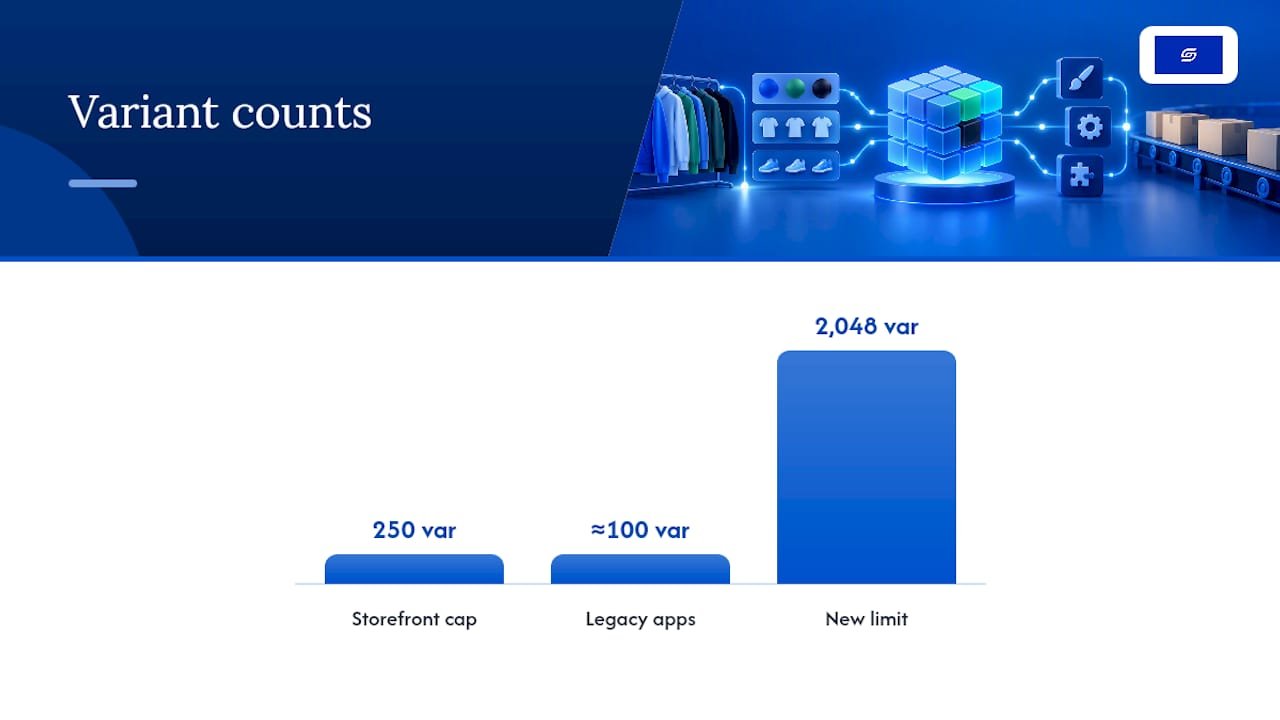
Shopify raised the product variant limit to 2,048 for every merchant, replacing the old ceiling of 100. The rule on options hasn’t changed. You still get a maximum of three options per product (think size, colour, material) and the variant count is simply every combination of the values you set within those three options.
The developer changelog confirms the 2,048 figure but flags a real catch: apps that haven’t moved onto in-support GraphQL product models can behave unpredictably once a product crosses the old thresholds. A few numbers worth keeping on a sticky note:
- 2,048 variants per product, maximum.
- Three options per product, maximum, unchanged.
- 250 items maximum returned by Liquid’s
product.variantson the storefront. - There is a ceiling on inventoryQuantities in a single bulk mutation to keep bulk operations reliable.
- 10,000 new variants per 24 hours for stores holding over 500,000 total variants.
Shopify’s own rationale for the increase centred on merchants selling configurable products (furniture, apparel with size and colour and finish, made-to-order goods) who kept hitting the 100-variant wall artificially. The platform also reports that product creation times and admin performance improved after the back-end rework that made the higher limit possible.
Why the higher limit still catches stores out
Raising the ceiling didn’t automatically raise every piece of software built underneath it. Themes, apps, and custom integrations were largely written assuming variant counts stayed low, and a lot of that code is still running on live stores.
The clearest failure mode is on the storefront. Any theme snippet that loops through product.variants or dumps product | json onto the page will only ever see the first 250 variants, because that’s the hard cap Shopify enforces to keep pages rendering quickly. Push past that with a 400-variant product and customers may see missing options, incorrect stock, or a picker that simply stops responding.
Apps are the second problem. Older tools built on REST Admin APIs were often designed around a soft assumption of roughly 100 variants or fewer, and migrating to 2,048 requires vendors to rebuild against GraphQL. Until they do, expect:
- Inventory sync tools that time out or truncate variant lists.
- Bulk editors that silently cap edits at the old limit.
- Product feed apps (for marketplaces or ad platforms) that miss variants beyond their old assumption.
Slow product creation in the admin, laggy variant tables, and storefronts quietly showing stale availability are all symptoms of the same root cause: something in your stack was never tested against a high-variant product.
Pro Tip: Before you add a single extra variant, open your theme’s product template and search for “variants” and “json” across every file. If you find a raw loop over the full array, that’s your first fix, not an afterthought.
Getting your APIs and integrations ready
Technical teams should treat the jump to 2,048 variants as a migration project, not a settings change. A structured pass through your stack catches problems before customers do.
- Audit every app and private integration. For each one, confirm whether it uses GraphQL product models that are in support, or ask the vendor directly if it isn’t obvious. Anything still calling legacy REST endpoints for variants needs a plan, whether that’s an update, a replacement, or a workaround.
- Test the mutations you’ll actually use. Run
productVariantsBulkCreateandproductVariantsBulkUpdatein a staging environment with a realistic payload, not a five-variant sample. Watch howinventoryQuantitiesbehaves as the batch grows. - Roll out behind a flag. Enable high-variant products for a small segment first, then watch error rates, rate-limit responses, and mutation rejections before switching everything on. A full audit of custom apps and integrations before go-live saves far more time than firefighting after launch.
Keeping storefront pages fast with hundreds of variants
The instinct to render every variant up front is exactly what breaks pages once a product has 300 or 500 combinations. Shopify’s guidance is blunt: stop fetching the full set, and fetch only what the shopper is currently looking at.
That means retiring any pattern built on product.variants or product | json for high-variant products, and replacing it with selective, on-demand fetching. In practice, that looks like:
- Using the
option_valuesURL parameter to request only the variant matching the shopper’s current selection. - Rendering variant state through
product_option_valuerather than looping the whole array. - Calling the Section Rendering API to refresh price, stock, and media as options change, instead of reloading everything.
- Lazy-loading variant images and media so the initial page weight doesn’t scale with variant count.
- Using category metafields for shared attributes such as colour swatches, so you’re not duplicating the same data across hundreds of variant rows.
Pro Tip: If your page still feels sluggish after switching to deferred loading, check your caching layer next. Tools covered in guides like this roundup of Shopify caching plugins can shave real seconds off repeat visits to variant-heavy pages.
Complex products for Singapore stores
- Use variants for choices you stock (size, colour). Use option fields for personalisation, such as engraving or custom text.
- Check your integrations (marketplace sync, POS, accounting) before you add hundreds of variants.
- Show prices in SGD for each option so the total is never a surprise.
- Test on mobile. Long option lists are hardest to use on a phone.
Soodo maps catalogue structure before building a new Shopify store, and restructures messy catalogues during a migration to Shopify.
FAQ
What is the Shopify variant limit for product options?
Shopify allows up to three option types per product, such as size, colour and material, with a combined cap of 2,048 variants. Once you need a fourth option or more combinations than that, metafields, line-item properties or a product-options app become necessary, as explained in Shopify’s guide to adding variants.
How do metafields help manage complex product customisation?
Metafields let you store structured, reusable option data, such as a shared colour list, that updates across every connected product when you change it in one place. Shopify’s documentation on adding variants with metafields confirms this centralised approach reduces manual edits and errors as a catalogue grows.
When should I use a product-options app instead of native variants?
Reach for an app once you need conditional logic, multi-step forms, formula-based pricing or file uploads, none of which native variants support. Apps such as Dynamic Product Options bundle these features together, which typically replaces custom development for configurable products.
Will changing product options break my existing integrations?
Changing option values during a CSV import can generate new variant IDs, which may disrupt connections to your warehouse, ERP or analytics tools if they reference the old IDs. Shopify’s CSV import documentation recommends staging a sample migration first and checking downstream systems before rolling out the full catalogue.
How can I keep complex product options from slowing down my store?
Keep the selection path short using progressive disclosure, so shoppers see one decision at a time rather than a long form, and lean on an app only for the logic variants cannot handle. Pairing this with product page optimisation and attention to load speed keeps a configurable product from feeling slower or more confusing than a simple one.
Sources
Recommended

Jessica Bong
Jessica Bong is the founder of Soodo, a Singapore Shopify agency that builds, revamps and migrates Shopify stores, with every store set up to be found in AI search (GEO). She has spent over 10 years in ecommerce and runs her own Shopify brand, Patch&Bagel. Jessica is also a WSQ-certified Shopify trainer at Equinet Academy.