
Protect SEO in 60 days after Magento to Shopify migration
Short answer: If you run under 500 SKUs with simple products and no custom checkout logic, a migration app will do the job in days. If you have configurable products, custom pricing rules, or over 100 variants per SKU, hire a partner. Either way, the three risks that sink a Magento to Shopify migration are missing redirects, variant caps, and checkout logic that simply won’t port. Start with an audit before you touch a single export file.
TL;DR:
- Missing redirects and improper URL mapping can cause significant traffic loss if not addressed before launch.
- Shopify’s option and variant caps often require splitting or restructuring products, especially for highly configurable items.
- Custom checkout logic and promotions from Magento need rebuilding in Shopify Functions, which incurs additional development costs.
- Auditing product variants, images, metafields, customer data, and URL rewrites upfront is essential to avoid scope creep and delays.
- A small, simple store can migrate within weeks using an app, while complex catalogs need six to twelve weeks involving a partner and custom development.
Table of Contents
- Which migration method suits your store: manual CSV, app, or a partner?
- Pre-migration audit: the exact inventory you must export and validate
- Data migration sequence: products, then customers, then orders
- Handling configurable products and Shopify’s variant limits
- Custom checkout, promotions, and Shopify Functions: scope and budget
- SEO protection: build a 1:1 redirect map before you launch
- Testing and launch checklist: dry runs, cutover, and smoke tests
- Post-launch monitoring: what to watch during the first 60 days
- What Soodo has learned from real Magento migrations
- How Soodo handles your Magento to Shopify migration
- Sources
- FAQ
Which migration method suits your store: manual CSV, app, or a partner?
A manual CSV export and import works for straightforward catalogues, small order histories, and stores without integrations to preserve. It’s cheap but slow, and someone has to manually reconcile mismatched fields.
A migration app (Matrixify is the most commonly used for Magento to Shopify data migration) automates product, customer, and order transfer. Apps are genuinely useful, but they are never entirely hands-off: they can flatten complex Magento option structures, so a dry run to validate mappings before the live transfer is non-negotiable.
Professional agency-led migration becomes necessary once complexity outgrows what an app can safely handle. Decide based on:
- SKU and variant count — thousands of configurable products with deep attribute sets need remodelling, not just transfer.
- ERP and integration depth — connected accounting, warehouse, or POS systems need custom mapping.
- Custom checkout rules — tiered pricing, customer-group discounts, or bespoke promotions require rebuilding, not exporting.
- Timeline and budget — a rushed deadline with a complex catalogue almost always needs specialist hands.
For catalogues running past 100,000 SKUs, multiple storefronts, or heavily customised ERPs, a custom ETL pipeline built on Magento’s REST API and Shopify’s Admin GraphQL API is often safer than repeated ad-hoc app imports.
Pre-migration audit: the exact inventory you must export and validate
Your audit determines your budget and your timeline, not the other way round. Skip it and you’ll discover your scope creep three weeks into the build.
Export and validate the following before writing a single line of migration code:
- Products, including full option and variant counts per SKU
- Images, mapped to their correct product and variant
- Metafields and custom attributes used for filtering, merchandising, or display
- Customer records, including addresses and order history links
- Order history, with statuses, refunds, and line-item detail
- Live URLs and Magento URL rewrites, pulled from Google Search Console and your Magento admin
- Installed modules and extensions, flagged for Shopify equivalents or custom rebuilds
- ERP, accounting, and fulfilment connectors currently wired into Magento
Magento’s catalogue data model is the strongest single predictor of how hard this gets. Unclean or heavily customised attribute structures cost real time and real money to untangle. Flag anything approaching Shopify’s variant caps, any custom checkout module, and any multi-store or multi-currency configuration early. These three items alone tend to separate a two-week project from a two-month one.
Pro Tip: Run your audit as a spreadsheet with a “risk” column, scored high, medium, or low. It turns an abstract worry into a prioritised task list your developer can actually quote against.
Data migration sequence: products, then customers, then orders
Import order matters more than most store owners expect. Get the sequence wrong and you’ll spend days untangling broken references.
- Products first — they carry the SKUs, variants, and metafields everything else depends on.
- Customers second — once products exist, customer accounts and their order history links can attach correctly.
- Orders last — order line items need both products and customers already in place to reconcile properly.
Shopify’s own enterprise migration guidance backs this sequencing, and pairs it with a firm recommendation to run dry runs before the live migration. In a dry run, spot-check variant counts against your Magento source, confirm image paths resolved correctly, and verify metafields carried their values, not just their labels.
One detail catches almost every store owner off guard: customer passwords cannot transfer between platforms. Plan an email campaign prompting customers to reset their password on first login, timed to launch day, so nobody hits a locked account and assumes your new store is broken.
Handling configurable products and Shopify’s variant limits
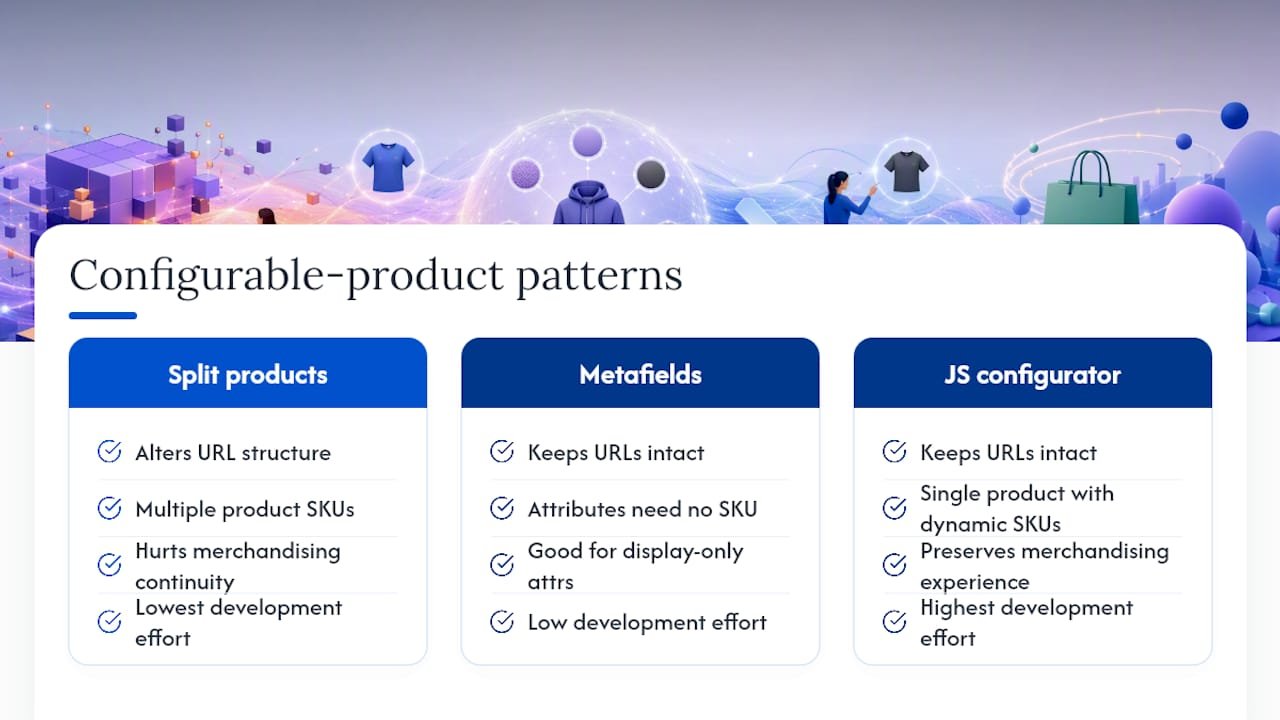
Shopify caps every product at three options and 100 variants total. A Magento configurable product with, say, five sizes across six colours and three materials will simply fail to import cleanly once it crosses that threshold.
You have three realistic patterns. Splitting the parent into multiple Shopify products (one per colour, for instance) is the simplest fix but changes your URL structure and merchandising. Metafields work well for attributes that inform display but don’t need their own SKU, like material composition. A JavaScript-based configurator handles genuinely complex combinations, at the cost of custom development.
Pro Tip: Test your chosen pattern in a development store before committing. Rebuild the ten highest-revenue products first and check inventory behaviour, not just how the page looks, because stock sync is where these patterns usually break.
Custom checkout, promotions, and Shopify Functions: scope and budget
Magento checkout customisations do not port to Shopify. That’s the uncomfortable truth most migration guides gloss over.
Shopify Scripts, the old way of customising checkout logic, are being retired. Anything you built in Scripts needs redeveloping in Shopify Functions, which run in a WebAssembly-compatible language rather than a simple settings panel. Budget this as genuine development work, not configuration.
Common logic that needs rebuilding as Functions includes:
- Tiered pricing based on quantity breaks
- Customer-group-specific pricing (wholesale versus retail)
- Stacked or conditional discount rules
- Custom shipping rate logic tied to product attributes
Legacy custom modules and checkout logic are consistently the biggest source of launch-day surprises when they aren’t audited early. If your rules are extensive, Shopify Plus is usually the right tier, since it unlocks the checkout customisation depth these Functions need.
SEO protection: build a 1:1 redirect map before you launch

Losing organic traffic is the single most avoidable mistake in a Magento to Shopify migration, and it’s almost always a redirect failure, not a Shopify problem.
Start by exporting every indexed URL from Google Search Console alongside your full Magento URL rewrite table. Cross-reference the two, because Search Console often surfaces old URLs your rewrite table has already forgotten about.
- Build the redirect matrix — one row per old URL, mapped to its new Shopify equivalent, no exceptions.
- Import redirects through Shopify’s URL redirect tool or a bulk app, checking for chains (A to B to C) that dilute link value.
- Migrate on-page metadata — titles, meta descriptions, and structured data (product schema, review schema) need to transfer with the content, not get rebuilt from scratch.
- Resubmit your sitemap in Google Search Console immediately after launch.
- Validate your top pages manually — pull your 50 highest-traffic URLs and click through every redirect yourself before announcing launch.
A recommended active monitoring window of 60 days after launch gives search engines time to recrawl and re-rank your migrated pages. Check Search Console daily for the first two weeks specifically, watching for a spike in 404s or a sudden drop in impressions on pages you know still exist. For a deeper redirect-sequencing framework, SEO-focused migration guidance is worth reading alongside your own matrix, and Soodo’s own store creation checklist covers the pre-launch validation steps that catch redirect gaps before they cost you traffic.
Testing and launch checklist: dry runs, cutover, and smoke tests
Treat launch day as a sequence, not an event. Rushing the cutover is where most migration horror stories start.
- Run full dry runs in a Shopify development store, testing real checkout scenarios, not just product pages.
- Freeze content on Magento a few days before cutover so nothing changes mid-migration.
- Export the final delta (orders and customers created since your last full export).
- Import redirects, then flip DNS once everything else is confirmed live.
- Run smoke tests immediately — place a real payment, open your top five product pages, and load your main collections.
- Monitor for the first hours — check analytics tracking fired correctly, confirm SSL is active, and scan error logs for anything unexpected.
Post-launch monitoring: what to watch during the first 60 days
Reconciliation is where hidden labour costs surface. Manually matching orders, inventory, and accounting records can eat 10 to 15 hours a week unless you’ve planned automated integrations in advance.
During your 60-day watch window, prioritise:
- Daily Search Console checks for crawl errors and impression drops
- Conversion rate and cart abandonment trends against your Magento baseline
- Refund and chargeback volume, which often spikes briefly post-migration
- Inventory sync accuracy between Shopify and any connected fulfilment or accounting system
Loop in accounting, fulfilment, and IT early rather than discovering a reconciliation gap in week six. Automation tools reduce this workload considerably. Soodo’s integrations guidance for Singapore stores covers what actually holds up under real order volume.
What Soodo has learned from real Magento migrations
Every migration we run surfaces the same pattern: the client underestimates how much of their Magento checkout logic is genuinely custom. Our Maison Curio migration is a good example. What looked like a straightforward catalogue transfer turned into a full pricing-rule rebuild once we audited the checkout.
Our standard structure never changes: audit, dry run, staging, cutover, then a 60-day watch. Skipping any one of those steps is where migrations go wrong.
— Soodo
How Soodo handles your Magento to Shopify migration
Soodo runs migrations the way we build stores: founder-led, hands-on, and scoped around what your catalogue actually needs, not a generic template. Our migration and custom Shopify project service starts from SGD 6,000 and covers the full audit, data mapping, redirect matrix, Shopify Functions rebuilds where your checkout logic demands it, and 6 months of post-launch fixes.

Consulted on many Shopify stores across Singapore and Southeast Asia, so most of the surprises a Magento catalogue can throw at a migration are seen before they hit yours. If your store also needs a rebuilt storefront rather than a like-for-like transfer, our new Shopify website development service starts from SGD 8,500. Get in touch through the migration project page for an audit and a fixed quote before you move a single SKU.
Sources
- Magento to Shopify migration
- Magento to Shopify migration 2026 playbook
- Magento to Shopify migration (Shopify enterprise blog)
- How to Migrate from Magento to Shopify
FAQ
How long does a Magento to Shopify migration take?
A small catalogue with simple products can migrate in one to two weeks using an app. Complex catalogues with custom checkout logic and configurable products typically need six to twelve weeks with a partner handling data mapping and Shopify Functions development.
Will I lose my SEO rankings during migration?
You will if you skip the redirect map. Building a complete 1:1 redirect matrix, migrating metadata, and running a 60-day active monitoring window after launch protects most of your existing rankings.
Can Shopify handle all my Magento configurable products?
Not directly. Shopify caps products at three options and 100 variants total, so products exceeding that need splitting into separate SKUs, moving attributes to metafields, or a custom configurator.
Do customer passwords transfer to Shopify?
No. Passwords cannot migrate between platforms, so plan a post-launch email prompting every customer to reset their password on first login.
What does a Magento to Shopify migration cost with Soodo?
Soodo’s platform migration service starts from SGD 6,000, scoped after an audit of your catalogue, integrations, and checkout logic. Complex custom checkout rebuilds using Shopify Functions are quoted separately based on scope.
Recommended

Jessica Bong
Jessica Bong is the founder of Soodo, a Singapore Shopify agency that builds, revamps and migrates Shopify stores, with every store set up to be found in AI search (GEO). She has spent over 10 years in ecommerce and runs her own Shopify brand, Patch&Bagel. Jessica is also a WSQ-certified Shopify trainer at Equinet Academy.