Shopify B2B Features: 3 Catalogues and When Merchants Need Plus
Shopify supports B2B commerce natively: companies, catalogues, net payment terms, quantity rules and quick order workflows are available on most plans, while direct company-level catalogue assignment, deposits and partial payments remain Plus-only. For most merchants moving wholesale online, that single distinction decides how far a standard plan will take you before you need to budget for Plus.
TL;DR:
- Shopify supports up to three active catalogues on basic plans, but unlimited catalogues (up to 25 per location) are only available on Shopify Plus.
- Payment options like percentage deposits and partial payments are exclusive to Plus, while net payment terms are available on all plans.
- Properly structuring company, location, and contact data from the start reduces later rework and ensures accurate tax, pricing, and shipping management.
- Most B2B features, such as gated accounts and volume pricing, are available across plans, but advanced catalogue assignment and custom checkout options require Plus.
- Using a blended store is sufficient for most merchants, but a dedicated B2B store becomes worthwhile only if wholesale inventory and branding need to be completely separate.
Table of Contents
- What “B2B on Shopify” actually includes
- Catalogues and pricing: volume breaks and quantity rules
- Net terms, deposits and draft orders: how B2B payment works
- Companies, locations and contacts: the B2B identity model
- Blended versus dedicated store: picking the right setup
- Connecting Shopify B2B to your ERP, CRM and custom tools
- Which B2B features vary by Shopify plan
- Setting up B2B on Shopify: a practical checklist
- Where Shopify B2B hits limits
- Lessons from hands-on Shopify B2B implementation
- Security and compliance for B2B transactions
- Tax and VAT settings for B2B buyers
- Shipping and logistics for B2B orders
- Managing large orders and approval workflows
- Multi-currency and international B2B selling
- How we’d approach a Shopify B2B project
- Getting your Shopify B2B setup right
- FAQ
- Sources
What “B2B on Shopify” actually includes
Shopify’s B2B toolkit isn’t one feature. It’s a cluster of capabilities that touch four different parts of the business: who buys, how they see prices, how they pay, and how staff manage the back end.
Breaking it down this way helps you see where the gaps actually sit:
- Storefront and accounts: B2B buyers log into gated customer accounts that show their negotiated pricing, order history and company details, often rendered through the Trade theme or a customised version of it.
- Pricing and catalogue control: catalogues assign specific products, price lists and quantity rules to specific companies or markets.
- Checkout and payments: B2B orders can run on net payment terms rather than instant card payment, with draft orders used for anything that needs manual adjustment.
- Order management: company admins can place orders on behalf of their location, track order history and reorder from past purchases using quick order lists.
- Staff and sales roles: staff accounts can be scoped to manage specific companies, useful when a sales rep owns a set of accounts.
- Automation: Shopify Flow can trigger workflows off B2B-specific events, such as a new company being approved or an order exceeding a set value.
The Trade theme (or any theme adapted for B2B) typically surfaces a quick order list, letting a buyer search a full catalogue by SKU and add dozens of line items in one pass rather than clicking through individual product pages. That single UX change matters more than it sounds: wholesale buyers are reordering known products, not browsing, and a quick order grid can be the difference between a five-minute reorder and an abandoned one.
Catalogues and pricing: volume breaks and quantity rules
Catalogues are the mechanism that controls what a company sees and what they pay for it. Each catalogue bundles a set of products with a pricing adjustment (fixed price, percentage discount, or a straight price list) and can carry its own quantity rules, such as minimum order quantities or volume price breaks that lower the unit price at set thresholds.
When a company qualifies for more than one catalogue, Shopify applies the lowest eligible price across them automatically, which means catalogue design needs discipline. Overlapping catalogues with conflicting discounts will quietly erode your margin if nobody’s checking which price actually wins.
There’s an important assignment distinction here. On Basic, Grow and Advanced plans, catalogues are assigned at the market level, covering groups of companies within that market. On Shopify Plus, catalogues can be assigned directly to individual companies or even specific company locations, which is what makes location-specific pricing (say, a different rate for a buyer’s warehouse versus their head office) possible without extra plan tiers.
Practical catalogue management at scale leans heavily on CSV import and export. A few habits that save time later:
- Export your current catalogue structure before making bulk changes, so you have a rollback file.
- Name catalogues by function (region, tier, or product line) rather than by date, so the list stays readable as it grows.
- Audit overlapping catalogue assignments quarterly to catch unintended discount stacking.
Pro Tip: Build one “master” catalogue with your full product range and standard wholesale pricing, then layer narrower catalogues on top for specific tiers or regions, rather than duplicating entire catalogues for small variations.
Net terms, deposits and draft orders: how B2B payment works
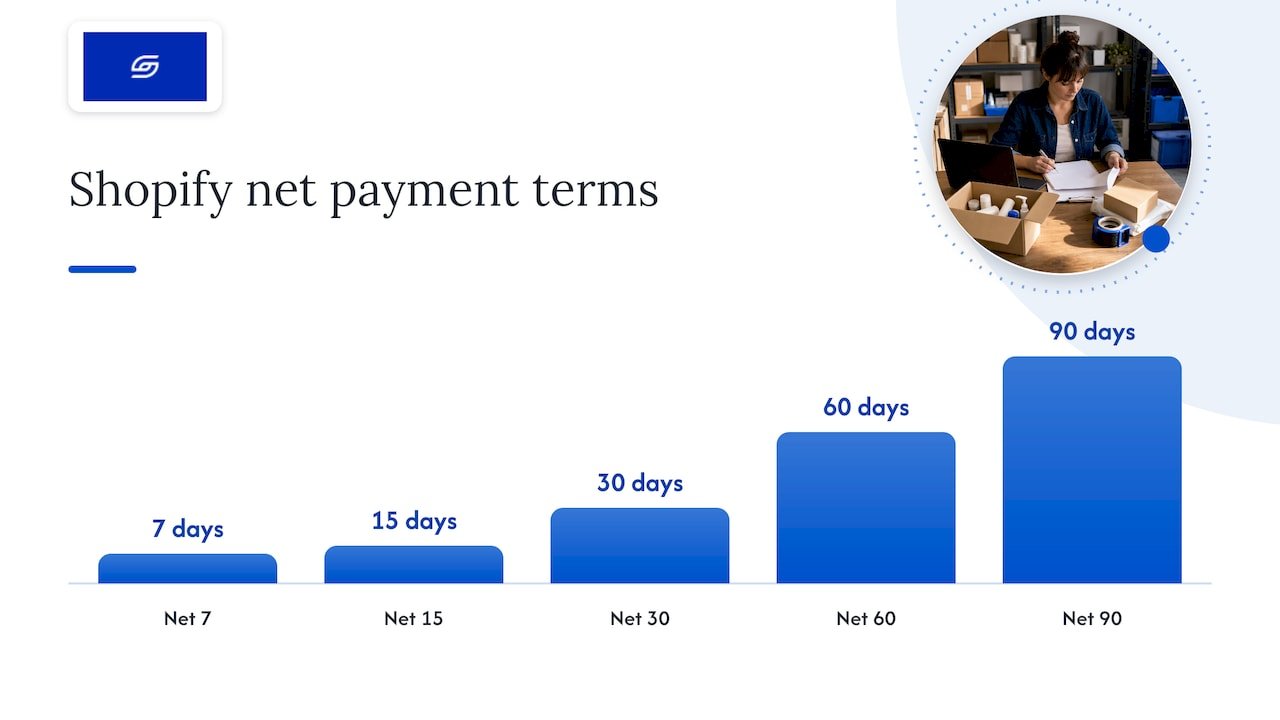
B2B buyers rarely pay by card at checkout the way a direct-to-consumer shopper does. Shopify’s payment terms feature lets you offer standard net periods: Net 7, 15, 30, 45, 60 or 90 days, alongside a “due on fulfilment” option. If you don’t configure payment terms for a company, Shopify defaults to payment due immediately, which catches out merchants who assume net terms apply automatically once a buyer is tagged as a company.
Shopify Plus unlocks two further payment behaviours that standard plans don’t have: percentage-based deposits and partial payments, collected either at checkout or applied later on a draft order. That’s a meaningful gap for merchants selling large equipment or custom orders where a deposit upfront is standard practice.
Order type matters for your operations team too. A standard B2B checkout creates an order directly, while anything needing manual price adjustment, custom line items or a negotiated one-off discount should go through a draft order instead, which your team converts once terms are agreed. Draft orders also require manual payment capture, so your finance process needs a clear rule for who marks an invoice as paid and when.
A few things worth flagging for the accounts team:
- Net terms orders still appear in your standard order reports, but outstanding balances need separate tracking since Shopify doesn’t chase payment automatically.
- Accelerated checkout methods (more on this shortly) are turned off for B2B orders by design, so reconciliation doesn’t need to account for third-party payment processors on these transactions.
- Draft orders sent for approval sit outside your sales totals until converted, which can distort daily revenue snapshots if your team isn’t watching for pending drafts.
Companies, locations and contacts: the B2B identity model
Shopify structures B2B buyers around a three-layer model: company, company location and contact. Getting this structure right at the start saves a lot of cleanup later, because pricing, tax handling and shipping all hang off the location level, not the company level.
- Create the company record first, as the top-level entity that holds billing information and overall account status.
- Add one or more company locations underneath it, each with its own address, tax ID, applicable tax exemptions and assigned payment terms, since a single company (a national retailer, for instance) might have several warehouses buying under different terms.
- Assign contacts to each location and set their role: an ordering-only contact can place purchases, while a location admin can also manage other users and settings for that location.
- Assign catalogues and pricing to the company or, on Plus, directly to individual locations for granular control.
- Import in bulk where needed, since setting up dozens of companies by hand isn’t realistic for merchants migrating an existing wholesale book.
Gating B2B pricing behind customer accounts is what keeps negotiated rates from leaking to the public storefront. Anyone not logged in as an approved company contact simply doesn’t see wholesale pricing or catalogue-restricted products, which matters both commercially and for staying consistent with any distribution agreements you have in place.
Blended versus dedicated store: picking the right setup
Most merchants starting out run B2B and direct-to-consumer from a single store, known as a blended store. It shares one admin, one inventory pool and one app stack across both channels, which keeps overheads low and avoids duplicating product data.
A dedicated B2B store runs as a fully separate Shopify instance, with its own admin, its own inventory and typically its own theme and branding. The trade-off is real: double the apps to maintain, double the content to keep in sync, and inventory that needs manual reconciliation between the two stores unless you’ve built a sync layer.
The decision usually comes down to a few questions:
- Does wholesale stock need to be genuinely separate from retail stock, rather than drawn from the same pool?
- Is the branding or buying experience different enough that a shared theme would compromise one audience?
- Can your team realistically maintain two sets of apps, themes and content without one falling behind?
If the answer to all three leans toward “yes,” a dedicated store earns its extra overhead. Otherwise, a blended store with well-structured catalogues does the job at a fraction of the maintenance cost.
Pro Tip: Before splitting into a dedicated store, check whether a blended store with strict catalogue and discount scoping solves the problem; discounts in a blended store default to “all customers” unless you scope them, so promotion mistakes in one channel can bleed into the other if nobody’s watching.
Connecting Shopify B2B to your ERP, CRM and custom tools
Shopify’s B2B data model is exposed through the GraphQL Admin API, which gives developers direct access to Company, CompanyLocation and Catalog objects. That’s what makes it possible to sync wholesale accounts with an external ERP or CRM rather than managing them only inside the Shopify admin.
For anything customer-facing, Customer Account UI Extensions let you render contextual content inside the native customer account portal, such as a Profile page block showing a buyer’s account manager, available payment methods or location-specific addresses, pulled using the purchasing company context the extension has access to. This matters because it avoids building a separate buyer portal from scratch: the native account experience can be extended rather than replaced.
For checkout-level logic, a Checkout Settings API lets apps detect whether an order is on draft-order terms and adjust behaviour accordingly, useful for merchants running custom approval or notification flows.
A common integration pattern for merchants with real inventory and finance complexity looks like this:
- ERP owns inventory levels and financial records, syncing stock and invoicing data back to Shopify.
- PIM (product information management) owns rich content and specifications, feeding product data into Shopify’s catalogue structure.
- Middleware sits between the two, translating B2B objects into ERP-readable records and keeping company and location context intact during sync.
For merchants who need something lighter than a full middleware build, tools like Gainable can turn existing spreadsheets or CRM data into a working app or dashboard that syncs with Shopify, which is often enough when the integration need is “keep this data current” rather than “run real-time two-way sync.”
Which B2B features vary by Shopify plan
The plan you’re on sets a hard ceiling on a few specific B2B capabilities, and it’s worth knowing exactly where that ceiling sits before you commit to a build.
- Catalogue limits: Basic, Grow and Advanced plans support up to 3 active catalogues across all B2B markets, while Shopify Plus allows unlimited catalogues, up to 25 per company location and a store-wide maximum of 10,000.
- Catalogue assignment: standard plans assign catalogues at the market level; Plus allows direct assignment to individual companies or company locations.
- Payment features: percentage deposits and partial payments on draft orders are Plus-only, as covered earlier.
- Contextual storefront experiences: some location-specific rendering and advanced checkout customisation depend on Plus-level checkout extensibility.
Shopify’s own “B2B for all” announcement confirms that core wholesale tools now reach merchants on every plan, which is a genuine shift from B2B being treated as a Plus-exclusive feature set, according to Shopify’s product news. That said, the gap doesn’t disappear entirely: it just moves to catalogue scale, payment flexibility and deeper checkout customisation.
The practical signal to watch for is catalogue count. If you’re bumping against 3 active catalogues, or you need pricing that differs by warehouse rather than by company as a whole, that’s usually the point where Plus starts paying for itself.
Setting up B2B on Shopify: a practical checklist
Getting B2B live correctly the first time avoids a messy cleanup three months in. Work through this roughly in order:
- Enable customer accounts and switch on B2B in your admin settings, since gated accounts are the mechanism that protects wholesale pricing.
- Create your company records, starting with your highest-volume accounts so early testing reflects real order patterns.
- Add company locations under each company, entering tax IDs and exemption status accurately at this stage rather than retrofitting later.
- Build and assign catalogues, starting with one master catalogue before layering tier-specific ones on top.
- Configure payment terms per company or location, deciding upfront which accounts get net terms versus due-on-fulfilment.
- Test the draft-order workflow end to end, including manual payment capture, before relying on it for live orders.
- Verify tax and exemption settings against a real order for a tax-exempt company location to confirm exemptions apply correctly.
- Bulk import remaining companies via CSV once the structure is confirmed, rather than importing everything before testing.
- Run a final QA pass on customer account pricing visibility, checkout behaviour and order reporting before opening B2B to buyers.
Pro Tip: Test your draft-order-to-paid-order workflow with a real low-value order before your first big wholesale customer places one. Payment capture mistakes are far cheaper to catch on a $50 test order than a $5,000 live one.
Our own Shopify store creation checklist covers the broader launch sequence if you’re building the store itself alongside B2B configuration.
Where Shopify B2B hits limits
Not everything plays nicely with B2B orders, and knowing the incompatibilities upfront saves a frustrating discovery later.
- Accelerated checkouts are disabled for B2B orders by design, so Shop Pay, Apple Pay and Google Pay won’t appear at checkout for logged-in company buyers, according to Shopify’s documentation on B2B considerations.
- Subscriptions don’t currently work with B2B checkout, which matters for merchants selling consumables on a recurring wholesale basis.
- Checkout.liquid customisations and some third-party apps are incompatible, since B2B checkout runs on a different code path than standard checkout.
- Draft orders and standard orders both carry line item limits, which can bite merchants placing unusually large bulk orders with hundreds of distinct SKUs in one purchase.
- Shared inventory in a blended store means a B2B bulk order can deplete stock a D2C customer was about to buy, with no built-in separation unless you actively manage allocation.
Lessons from hands-on Shopify B2B implementation
Across consulting on more than 100 Shopify stores, a few patterns show up again and again when merchants move wholesale online. The most common mistake is choosing a dedicated store out of caution rather than need, taking on double the maintenance for a separation the business never actually required. The second is treating catalogue structure as an afterthought, then discovering months later that overlapping discounts have been quietly undercutting margin on every order.
Our general rule: use native B2B tools until a specific, named limitation forces a custom build. Most merchants never hit the ceiling on catalogues, payment terms or company structure, and a bespoke extension built to solve a problem the native tools already handle just adds a maintenance burden nobody asked for. Custom UI extensions earn their place when the buyer experience needs something Shopify genuinely doesn’t offer, such as a bespoke approval chain across multiple cost centres, not as a default starting point.
Security and compliance for B2B transactions
B2B orders carry a different risk profile from retail ones, mainly because of the volume and the trust placed in company-level access. Gated customer accounts are the first line of defence: pricing and catalogues stay invisible to anyone outside an approved contact, which protects negotiated rates from leaking to competitors or the public.
Staff account permissions deserve the same scrutiny. Scoping sales reps to the specific companies they manage, rather than giving broad access across every account, limits exposure if a single login is compromised. Location-level roles matter too: an ordering-only contact shouldn’t have the same access as a location admin who can add or remove other users.
Payment data itself runs through Shopify’s standard PCI-compliant payment processing regardless of B2B or D2C context, so merchants aren’t managing card data directly in either case. What changes with B2B is the paper trail: net terms and draft orders create outstanding balances that sit outside normal payment reconciliation, so your own record-keeping around who approved what, and when payment terms were agreed, becomes the compliance layer Shopify itself doesn’t automate.
Regular audits of company location data, particularly tax IDs and exemption certificates, also reduce the risk of applying an exemption incorrectly, which is as much a compliance issue as a technical one.
Tax and VAT settings for B2B buyers
Tax handling for B2B customers sits at the company location level, which is why getting that structure right during setup matters so much. Each location can carry its own tax ID and exemption status, so a single company with multiple warehouses can have some locations taxed normally and others exempt, depending on where they’re registered.
For merchants selling internationally, tax obligations vary significantly by the buyer’s own jurisdiction, and a general B2B guide can’t substitute for your own accountant’s read on your specific markets. What Shopify’s settings handle is the mechanical side: applying the correct rate or exemption automatically once a location’s tax status is configured correctly, rather than requiring manual adjustment on every order.
Reporting exemption certificates and audit trails is generally a manual process outside Shopify itself. Most merchants keep exemption documentation in a separate system (a shared drive, a CRM record, or an accounting tool) and reference it against the company location record when questions come up. Shopify doesn’t store or validate exemption certificates natively, so that verification step sits with your team.
Get this wrong in either direction, charging tax where an exemption applies or failing to charge where one doesn’t, and you’re looking at manual order corrections at best and a compliance headache at worst. Testing a real order against a tax-exempt location before going live, as covered in the setup checklist above, is the cheapest way to catch this early.
Shipping and logistics for B2B orders
B2B shipping needs rarely match the simple flat-rate or calculated-rate models that work for direct-to-consumer orders. Wholesale orders tend to be heavier, higher in volume, and more likely to need freight shipping, palletised delivery or a negotiated carrier rate rather than a standard parcel rate.
Shipping profiles can be scoped per company or location in the same way pricing is, which means a buyer with a negotiated freight rate or a specific delivery schedule can see shipping options that differ from your standard storefront rates. For merchants shipping genuinely large freight, calculated rates often aren’t practical through Shopify’s native shipping settings alone, and a freight-specific app or a manual quote process tends to fill that gap.
Delivery timing also matters more for B2B buyers reordering stock to a schedule. Clear lead-time communication at the catalogue or product level, rather than leaving buyers to guess, reduces the support load of “where’s my order” queries on large recurring purchases.
For merchants managing multiple warehouses or fulfilment locations, aligning company locations with the correct fulfilment source avoids the common mistake of a wholesale order shipping from the wrong warehouse simply because the location data wasn’t mapped correctly during setup.
Managing large orders and approval workflows
Large B2B orders often need a different path to confirmation than a standard checkout provides, which is exactly what draft orders are built for. A sales rep or account manager can build a draft order with custom pricing, add or remove line items, and send it for the buyer’s confirmation before it becomes a committed order.
Approval workflows beyond a single confirmation step, such as requiring sign-off from a buyer’s procurement team before an order is finalised, aren’t native to Shopify’s checkout and typically rely on Shopify Flow or a custom app to manage the sequence. Flow can trigger based on order value, tagging high-value orders for manual review before fulfilment begins, which is a practical way to catch pricing errors or unusual quantities before they ship.
Line item limits on orders and draft orders mean genuinely enormous orders, hundreds of distinct SKUs in a single purchase, may need splitting across multiple orders rather than one. Planning for that upfront, rather than discovering the limit mid-checkout with a frustrated buyer on the line, is worth building into your own order size guidance for large accounts.
Multi-currency and international B2B selling
Shopify Markets underpins multi-currency and international selling for B2B the same way it does for direct-to-consumer, letting you present pricing in a buyer’s local currency and manage duties, tax and shipping by region. Catalogues assigned at the market level (the standard approach on Basic, Grow and Advanced plans) tie naturally into this structure, since a market groups the companies and currencies relevant to a given region.
For merchants selling to companies across multiple countries, the combination of markets and company locations lets each location carry its own currency, tax treatment and payment terms, so a buyer in one country isn’t forced into pricing or terms set for another. This is where getting the company location structure right early, as covered earlier, pays off again: international complexity is far easier to manage when it’s built into the data model from the start rather than bolted on after the fact.
Currency conversion and regional pricing rules follow Shopify’s standard Markets settings, so merchants already selling direct-to-consumer internationally are generally extending a structure they’ve already configured rather than starting from nothing.
How we’d approach a Shopify B2B project
Our view, after plenty of migrations and builds, is that the store type decision and the company and location data model deserve far more upfront attention than the storefront design does. Get the data model wrong and every catalogue, price and tax setting built on top of it needs rework later. Get it right, and most of what merchants assume needs a custom build turns out to be a native feature they hadn’t configured yet.
If you’re evaluating Shopify for B2B, start with your actual company structure on paper before opening the admin.
— Soodo
Getting your Shopify B2B setup right
Reading through a feature list is one thing; mapping it correctly to your own company structure, catalogue logic and payment terms without costly rework is another. We work with brands on exactly this: new Shopify builds configured for B2B from day one, and optimisation of existing stores where the catalogue or company setup has become tangled.

Our New Shopify Website Development service, from 6000 SGD, covers builds designed around your actual buyer structure rather than a generic template. For merchants who already have a Shopify store but need the B2B configuration fixed or extended, Existing Shopify Store Optimization starts from 1000 SGD. If you’re weighing up a platform move to get proper B2B support, our platform migration service starts from 4000 SGD.
Get in touch through our site to talk through which of these fits where your store is right now.
FAQ
Is Shopify suitable for B2B?
Yes. Shopify provides native B2B tools, including companies, catalogues, net payment terms and quick order workflows, available across most plans, with deeper catalogue and payment flexibility reserved for Shopify Plus.
Is Shopify B2B worth it compared with a separate wholesale platform?
For merchants already running Shopify for direct-to-consumer sales, the native B2B tools avoid the cost and complexity of a second platform, since companies, pricing and orders live in one admin. Whether it’s “worth it” depends on how far your catalogue, payment term and approval needs push past what your current plan supports.
What are B2B features on Shopify?
Shopify B2B features include company and company location records, customer-specific catalogues with volume pricing, net payment terms, draft orders for custom pricing, and automation through Shopify Flow. Some capabilities, including direct catalogue assignment and partial payments, are limited to Shopify Plus.
What are the key features of the Shopify platform for B2B sellers?
Beyond general ecommerce tools, the B2B-specific layer covers gated customer accounts for wholesale pricing, quantity rules and price breaks at the catalogue level, and a GraphQL Admin API that exposes company and catalogue data for custom integrations. Staff accounts can also be scoped to manage specific company accounts.
Can I run B2B and direct-to-consumer from the same Shopify store?
Yes, this is called a blended store, and it’s the standard setup for most merchants since it shares one admin and one inventory pool across both channels. A dedicated B2B store makes sense only when wholesale inventory or branding genuinely needs to stay separate.
Sources
- Shopify Help Center — B2B features by plan
- Shopify — B2B for all
- Shopify developer docs — Apps and B2B
Recommended

Jessica Bong
Jessica Bong is the founder of Soodo, a Singapore Shopify agency that builds, revamps and migrates Shopify stores, with every store set up to be found in AI search (GEO). She has spent over 10 years in ecommerce and runs her own Shopify brand, Patch&Bagel, where every Soodo technique is tested first. Jessica is also a WSQ-certified Shopify trainer at Equinet Academy.