Shopify Product Recommendations: Native Intents, API, and When to Hire
Use Shopify’s built-in recommendation intents and Search & Discovery settings to cover most merchandising needs on your store. Call the Product Recommendations API directly when you need developer-level control over placement or display logic, and bring in a dedicated app only for advanced features like cross-page personalisation or post-purchase upsell flows. Start today by enabling the product recommendations block in your theme and setting complementary products for your best-selling items.
TL;DR:
- Related recommendations use purchase history and product metadata to suggest substitutes, while complementary pairings require manual setup in Search & Discovery.
- Show three to four items per product; complementary items disappear when inventory reaches zero, while related items may remain visible if backorders are enabled.
- New or recently migrated stores should allow order history to accumulate before judging relevance, then test each placement or intent for two to six weeks.
- Shopify Analytics attributes recommendation conversions through URL tracking parameters, so compare click through, conversion, incremental order value, and revenue per visit.
- Add a third party app only for personalisation across pages, advanced offers after checkout, or finer A/B testing, because each script can slow loading.
Table of Contents
- How Shopify product recommendations actually work
- Recommendation types and where to place them
- Setting up recommendations: native tools, the API, and when to add an app
- Designing recommendations that convert without slowing your store
- Measuring whether your recommendations are working
- Soodo’s perspective on when to bring in an agency
- Staying compliant when personalising recommendations
- Common pitfalls that quietly break your recommendations
- Best practices for personalising based on customer behaviour
- Third-party apps versus Shopify’s native tools
- Getting recommendations right on mobile
- What actually moves the needle here
- How we can help if you’d rather hand this off
- FAQ
- Sources
How Shopify product recommendations actually work
Shopify builds recommendations around two distinct “intents”: related and complementary. Related recommendations are generated automatically and show shoppers substitutes or similar items worth comparing, which suits the browsing or evaluation stage. Complementary recommendations are manual: you choose which products pair with a given item, and they work best for add-ons a shopper might not think to search for on their own, according to Shopify’s documentation on product recommendations.
The underlying algorithm draws on a handful of signals:
- Purchase history across your store, meaning orders placed together.
- Product descriptions and metadata, though this signal only works reliably on English-language storefronts.
- Shared collections and catalogue relationships between products.
Developers get finer control through the Product Recommendations API, which accepts a required product_id, an optional limit between 1 and 10, and an intent parameter that defaults to related if left unset. Every recommended-product URL carries tracking parameters, which is how Shopify Analytics later attributes conversions back to the recommendation widget rather than to organic browsing.
One practical point merchants often miss: recommendations need order and product history to mature. A newly migrated store or a catalogue with thin sales data will produce weaker related recommendations at first, and performance typically sharpens as more orders accumulate. If you have just completed a platform migration, treat the first few weeks of recommendation output as a warm-up period rather than a verdict on the feature.
Recommendation types and where to place them
Different recommendation formats do different jobs, and conflating them is the most common merchandising mistake we see.
- Related products sit on product pages and help shoppers compare substitutes, which supports discovery when a visitor isn’t sure which variant or style fits them.
- Complementary products appear as cart or product-page add-ons and must be configured manually through Search & Discovery, since Shopify does not auto-generate this pairing logic.
- Frequently bought together bundles and post-purchase offers raise average order value by surfacing a natural next purchase right after checkout, when intent is highest.
- Homepage personalisation and curated lists trade some precision for broader discovery, useful for new visitors but less effective at driving an immediate add-to-cart.
Matching the format to the shopper’s moment in the journey, rather than deploying one widget everywhere, is what separates recommendations that convert from ones that just occupy space.
Setting up recommendations: native tools, the API, and when to add an app
Most stores can get a solid recommendation setup running without writing a line of code, but it helps to know the next step up when you need it.
The quick merchant path:
- Add the product recommendations section to your product page template through the theme editor.
- Open Search & Discovery and set complementary products for your highest-traffic or highest-margin SKUs first.
- Choose 3 to 4 items per product rather than filling every slot, since Shopify’s own guidance suggests limiting visible recommendations to four for relevance even though the algorithm can associate up to ten.
- Confirm inventory rules: complementary products must have stock above zero to display, while related recommendations can still appear if “continue selling when out of stock” is enabled, per Shopify Search & Discovery documentation.
The developer path gives you more control over where and how recommendations render. A typical flow calls the /{locale}/recommendations/products endpoint with product_id, limit and intent parameters, renders an empty placeholder in the markup first, then swaps in the populated recommendations asynchronously once the Ajax response returns. This avoids layout shifts during the initial page render, since the recommendations object isn’t populated server-side.
Bulk edits and metafields come into play once you’re managing recommendations across a large catalogue. Search & Discovery lets you combine manual and automatically generated suggestions, and you can edit recommendations in bulk using metafields rather than touching each product individually, as described in Shopify’s Search & Discovery guidance. The “only manual” setting locks in your curated pairings; the “ahead” setting lets manual picks take priority while auto-generated suggestions fill remaining slots.
When to install an app: reach for a third-party tool when you need personalisation that spans multiple pages, post-purchase upsell funnels beyond what checkout extensions offer, or A/B testing more granular than Shopify’s native reports provide. Weigh the trade-off: every added app is another script competing for load time.
Pro Tip: Exclude items already sitting in the shopper’s cart from your recommendation blocks, duplicate suggestions waste a slot and look careless.
Before launch, run through a short checklist: image sizes consistent across recommended cards, lazy loading enabled so recommendations don’t block the initial render, and inventory rules tested so out-of-stock items don’t appear where they shouldn’t.
Designing recommendations that convert without slowing your store
The words above a recommendation block matter more than merchants expect. “You might also like” sets a browsing expectation, while “Pair it with” signals a direct add-on, and using the wrong header for the wrong intent confuses the shopper’s expectation of what they’re looking at.
A few design rules consistently hold up:
- Cap visible cards at 3 to 4 items, since more choice tends to slow decisions rather than speed them up.
- Size images consistently across the recommendation row so the layout doesn’t jump as content loads.
- Load the recommendation block asynchronously to protect your Core Web Vitals scores, particularly Largest Contentful Paint.
- On mobile, stack cards vertically with generous tap targets and minimal supporting text, since cramped horizontal scrollers on small screens tend to get ignored.
Personalisation has a ceiling too. Recommendations built from aggregated behaviour, like “customers who bought this also bought”, feel helpful. Recommendations that reference a shopper’s specific browsing history too explicitly can feel intrusive rather than clever, so lean on pattern-level signals rather than anything that reads as surveillance.
Measuring whether your recommendations are working
Four metrics tell you most of what you need to know:
- Recommendation click-through rate, the share of shoppers who engage with a recommended product card.
- Recommendation conversion rate, tracked through the tracking parameters Shopify attaches to recommended product URLs, visible in Shopify’s Analytics under product recommendation reports.
- Incremental average order value, comparing baskets that included a recommended item against those that didn’t.
- Revenue per visit attributed to recommendation widgets, which rolls the above into one comparable figure across placements.
Recommendation URLs carry tracking parameters by default, which is what lets Shopify Analytics separate recommendation-driven conversions from ordinary browsing, according to Shopify’s API reference. That single detail is the backbone of any reliable measurement setup here.
Once tracking is in place, test deliberately rather than by instinct: swap related for complementary intent on a given template, change placement between product page and cart, vary the number of cards shown, or compare manual curation against automatic suggestions. Give each test a window of roughly two to six weeks before drawing conclusions, since recommendations need order history to warm up and early-week data tends to be noisy.
Soodo’s perspective on when to bring in an agency
We tend to see merchants reach for outside help when catalogue size makes manual curation impractical, when a store runs on a headless or heavily customised storefront, when recommendations need to work across multiple sales channels, or when a naive app installation has quietly slowed the site down.
Our work on recommendation setups usually starts with a review of existing product and order data, then prioritising which SKUs deserve manual complementary pairings rather than leaving everything to auto-generation. From there it’s metafield structuring for bulk management, Liquid and JavaScript integration for custom placements, and performance tuning so the added widgets don’t cost more in load time than they return in conversion.
Staying compliant when personalising recommendations
Personalisation relies on customer and behavioural data, which means privacy obligations follow wherever recommendations go. If your store serves shoppers across different jurisdictions, check which data protection framework applies to each market you sell into rather than assuming one set of rules covers everyone.
A few principles hold regardless of jurisdiction:
- Base recommendations on aggregated behavioural patterns, like co-purchase history, rather than sensitive personal data such as health or financial information.
- Keep your privacy policy current and specific about what customer data feeds your personalisation features, since a vague policy is harder to defend if a customer asks what’s being collected.
- Give shoppers a way to understand or limit tracking where your market’s regulations require it, rather than burying the mechanism in settings no one finds.
- Avoid combining recommendation data with third-party data sources in ways your privacy policy doesn’t disclose.
None of this requires a legal team for a typical small store, but it does mean treating your privacy policy as a living document that matches what your recommendation apps and scripts actually collect. When in doubt on a specific legal question, a quick check with a professional familiar with your market’s rules beats guessing.
Common pitfalls that quietly break your recommendations
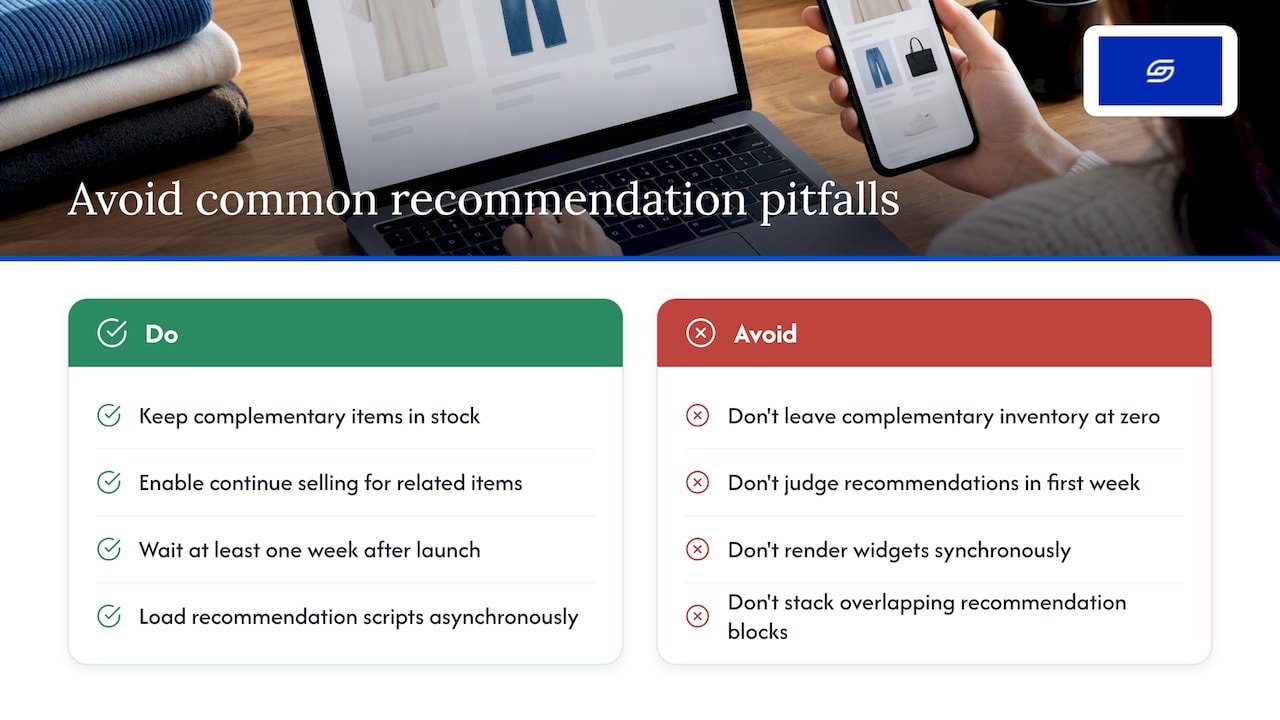
The most frequent issue we encounter is complementary products disappearing from display, usually traced back to stock sitting at zero, since Shopify requires complementary items to have inventory above zero to show at all. Related recommendations don’t share this restriction if “continue selling when out of stock” is switched on, which is why the two intents can behave so differently on the same storefront.
A second common problem is recommendations that look thin or irrelevant shortly after launch or migration. This is usually a data problem rather than a configuration problem: the algorithm needs order history to build confident associations, and judging the feature in its first week overstates how broken it is.
Performance regressions are the third pitfall. A recommendation block that renders synchronously, blocking the rest of the page, will show up as a Core Web Vitals problem long before anyone notices the merchandising benefit. If your product pages have slowed down since adding recommendation widgets, check whether the script is loading asynchronously before assuming the app itself is at fault.
Finally, duplicate or cluttered recommendation blocks, where related and complementary widgets stack on top of each other showing overlapping products, tend to confuse shoppers rather than guide them. Pick one clear job per section of the page rather than layering every available widget onto a single template.
Best practices for personalising based on customer behaviour
Behavioural personalisation works best when it’s built on patterns rather than guesses. Co-purchase history, specifically which products genuinely sell together, is a stronger foundation than manually guessing which items “feel” related.
Segment your approach by shopper stage rather than treating every visitor identically. A first-time visitor benefits from broader related recommendations that support comparison, while a returning customer with order history responds better to complementary suggestions tied to what they’ve already bought.
Refresh manual complementary pairings periodically rather than setting them once and forgetting them, particularly after a seasonal catalogue change or a bestseller shift. A pairing that made sense six months ago may now point to a discontinued or deprioritised product.
Combine signals where you can. A guide to improving on-site search relevance is worth reading alongside your recommendation strategy, since search behaviour and recommendation behaviour often reinforce each other on the same storefront. One partner resource worth a look for merchants exploring broader personalisation and engagement tactics is this piece on AI personalisation for small businesses, which covers cross-channel considerations beyond the product page itself.
Third-party apps versus Shopify’s native tools
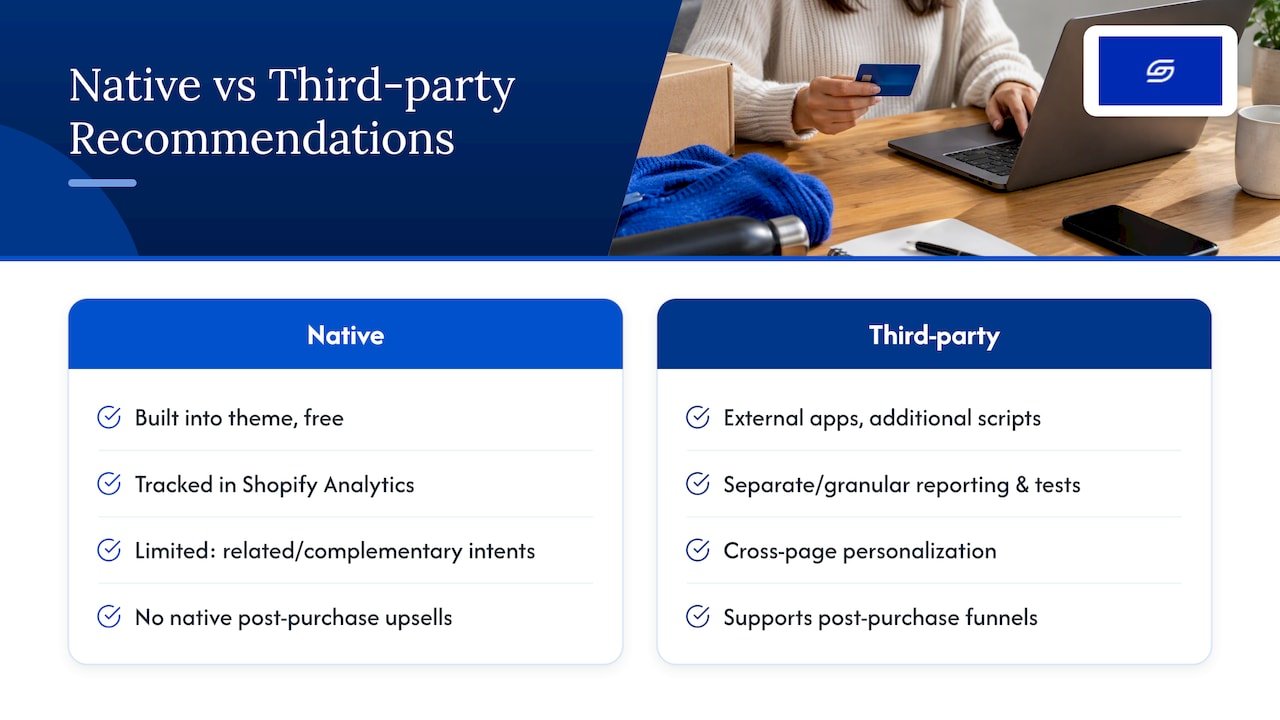
Shopify’s native recommendation system, covering related intents, complementary intents, and the underlying Product Recommendations API, handles the large majority of merchandising needs without adding a new app to your store. It’s free, built into the theme, and tracked natively in Shopify Analytics.
Third-party recommendation apps earn their place when you need things Shopify doesn’t offer out of the box: personalisation that follows a shopper across unrelated page types, post-purchase upsell funnels with their own checkout flow, or split-testing infrastructure more granular than Shopify’s built-in reporting. Some also layer in email or SMS-triggered recommendations, which sits outside what the native tools cover.
The trade-off is real. Every added app brings its own script, its own load time cost, and its own subscription fee. For a store with a moderate catalogue and standard merchandising needs, native Search & Discovery configured properly will often outperform an under-used app simply because it’s lighter and already integrated. Reach for a third-party tool when your use case genuinely exceeds what related and complementary intents can deliver, not as a default first step.
Getting recommendations right on mobile
Mobile shoppers scroll fast and tap with less precision than desktop users, so recommendation design needs its own rules on smaller screens. Stack recommendation cards vertically rather than relying on a cramped horizontal scroller, since thumb-swiping through tiny cards tends to get abandoned quickly.
Keep tap targets generous, ideally large enough that a shopper doesn’t need to zoom or tap twice to open a recommended product. Trim supporting text to the essentials, a product name and price are usually enough, since a mobile card crowded with description text pushes the “add to cart” button below the fold.
Image weight matters more on mobile than desktop given variable connection speeds, so compress recommendation images appropriately and load them lazily as the shopper scrolls toward them rather than all at once on page load. This is one of several areas covered in a broader product page optimisation checklist worth running through if mobile conversion lags behind desktop on your store.
What actually moves the needle here
The conventional advice on this topic treats every recommendation widget as interchangeable, as if adding “more AI” automatically lifts conversion. It doesn’t. The stores we see get real results are the ones that treat related and complementary intents as two separate merchandising decisions, each deserving its own thought, rather than one generic “recommendations” feature to switch on and forget.
The overrated move is reaching for a paid app before configuring what Shopify already gives you for free. Search & Discovery, used properly with manual complementary pairings on your highest-margin products, outperforms a poorly tuned app more often than merchants expect.
What deserves priority instead: get your native setup right first, measure it honestly over a few weeks rather than days, and only add third-party tooling once you can name the specific gap Shopify’s own tools don’t cover. Most stores never reach that gap.
— Soodo
How we can help if you’d rather hand this off
If reading through intents, metafields and API parameters sounds like more than you want to manage alongside running your store, that’s exactly the kind of work we handle through our existing Shopify store optimisation service, built around conversion and merchandising improvements for stores that already have traffic worth optimising.

A typical engagement starts with a review of your current catalogue and recommendation setup, then moves into the specific fixes that matter for your store rather than a generic checklist applied everywhere.
- A scoping call to identify which recommendation gaps are costing you sales right now.
- Deliverables scoped around your catalogue size and current theme setup.
- An alternative path if you’d rather learn to manage this yourself: our corporate training and one-to-one consulting sessions cover the same ground hands-on.
Get in touch to request a scoping call and see what a focused optimisation pass would involve for your store.
FAQ
What products sell best on Shopify?
This depends entirely on your niche and audience rather than any universal list, since Shopify supports stores across nearly every product category. What matters more for recommendations specifically is pairing your actual bestsellers with relevant complementary items, which Search & Discovery lets you configure directly.
What is the best product recommendation app for Shopify?
There’s no single best app, because the right choice depends on whether you need basic related or complementary suggestions, which Shopify’s native Search & Discovery tools already cover for free, or advanced cross-page personalisation and post-purchase flows, which point toward a dedicated app. Start with the native tools and only evaluate apps once you’ve identified a specific gap they don’t fill.
Which product is best for Shopify?
If the question is which product type suits Shopify as a platform, the honest answer is that Shopify supports physical goods, digital products and subscriptions equally well, so the better question is which products your audience actually wants to buy. Focus your recommendation strategy on your proven bestsellers rather than guessing at what should sell.
Is Shopify still worth it in 2026?
Shopify remains a strong choice for merchants who want built-in merchandising tools, including the recommendation intents and Product Recommendations API covered above, without building that infrastructure from scratch. Whether it’s worth it for your specific business depends on your catalogue size, growth plans and whether you need the level of native functionality Shopify provides out of the box.
Sources
Recommended

Jessica Bong
Jessica Bong is the founder of Soodo, a Singapore Shopify agency that builds, revamps and migrates Shopify stores, with every store set up to be found in AI search (GEO). She has spent over 10 years in ecommerce and runs her own Shopify brand, Patch&Bagel, where every Soodo technique is tested first. Jessica is also a WSQ-certified Shopify trainer at Equinet Academy.