

Shopify Email Authentication: SPF, DKIM and DMARC Setup
To authenticate your email domain in Shopify, open Settings > Notifications, start email domain authentication, add the CNAME records Shopify shows you at your domain host, and add one DMARC TXT record. That covers DKIM, SPF and DMARC. Most Singapore store owners can finish it in under an hour, then wait for DNS to catch up.
This guide walks through each step, explains why Shopify asks for it, and shows how to fix the usual errors. We are Soodo, a Shopify agency in Singapore, and we set up sender domains on the stores we build.
Key Takeaways
- Shopify uses CNAME records for DKIM and SPF, plus one DMARC TXT record. You do not add a separate SPF TXT record for this purpose.
- If you do nothing, Shopify rewrites your sender address to a shopifyemail.com address so your emails still send.
- Your domain can only have one DMARC record. If one exists, edit it instead of adding another.
- DNS changes can take up to 48 hours. Wait before you troubleshoot.
- Authentication is the base layer. It does not guarantee inbox placement on its own.
Table of Contents
- Why does Shopify ask you to authenticate your email domain?
- What do you need before you start?
- How do you set up SPF, DKIM and DMARC in Shopify?
- What if your domain already has a DMARC record?
- How do you check that it worked?
- How do you fix a failed authentication or a rewritten sender?
- Does authentication guarantee your emails reach the inbox?
- Who should do the DNS work?
- Set it up as part of your Shopify project
- FAQ
- Sources
Why does Shopify ask you to authenticate your email domain?
Shopify asks because Gmail and Yahoo now require domain authentication and a DMARC record for branded sender addresses. Shopify’s Help Center says this has applied since 1 February 2024.
In plain terms, mailbox providers want proof that an email claiming to come from hello@yourbrand.com.sg really did. Three records give that proof:
- SPF lists which servers may send for your domain.
- DKIM adds a digital signature that shows the message was not altered.
- DMARC tells receiving servers what to do when SPF or DKIM checks fail, and where to send reports.
Google’s own sender guidelines ask senders to set up SPF, DKIM and DMARC, and say the DMARC policy can be set to none. They also set a spam-rate ceiling in Postmaster Tools of below 0.3%.
What happens if you skip it?
Shopify keeps your emails flowing. If you take no action, it rewrites the sender to an address like store+123@shopifyemail.com to meet the minimum requirements, per the Shopify Help Center.
Your order confirmations still go out. But customers see Shopify’s address in the sender details instead of your brand’s. Shopify describes authenticating your own domain as optional but recommended, because it improves brand recognition and customer trust, as set out in its email deliverability guidance.
For a brand that wants customers to recognise every receipt and shipping update, we treat it as part of launch, not an extra.
What do you need before you start?
You need three things: admin access to your Shopify store, login access to wherever your domain’s DNS is managed, and a sender address on a domain you own.
In Singapore, DNS is usually managed at a registrar or host such as GoDaddy or Namecheap, or at a Cloudflare account someone set up for you. If a web developer or an old agency registered the domain, ask them for access or ask them to add the records.
Two cases are simpler:
- Domain bought through Shopify. Authentication is set up automatically, and your DKIM, SPF and DMARC records are configured for you, per the Shopify Help Center.
- Free email address as sender. If your sender is a name@gmail.com or name@yahoo.com address, you cannot authenticate it because you do not control that DNS. Shopify’s sender address guidance says to buy a custom domain from Shopify or a third-party provider instead.
If you are still deciding where your domain should live, our Singapore guide to migrating a domain to Shopify covers the registrar side.
How do you set up SPF, DKIM and DMARC in Shopify?
Add the CNAME records Shopify displays, then add one DMARC TXT record. Follow these steps, which match the Shopify Help Center instructions.
- In your Shopify admin, go to Settings > Notifications.
- Set your sender email address to an address on your own domain.
- Click Email domain authentication or Authenticate your domain.
- Shopify shows a list of CNAME records. Copy each one, name and value.
- Log in to your domain manager and add every CNAME record exactly as shown.
- Add a DMARC TXT record. The record name is
_dmarcand the value isv=DMARC1; p=none;. - Return to Shopify and verify.
Why are there CNAME records and no SPF TXT record?
Shopify’s CNAME records handle both DKIM and SPF. So no separate SPF TXT record is needed for this purpose, per the same Help Center page. A CNAME simply points a name on your domain to a name that Shopify controls, so Shopify can manage the signing keys.
This is the part that trips up people who have set up email before. Do not add an extra SPF TXT record “just in case”. More on that below.
What does the DMARC record look like?
| Field | Value |
|---|---|
| Type | TXT |
| Name or host | _dmarc |
| Value | v=DMARC1; p=none; |
The p=none policy means receivers take no action on failures and simply monitor. It is the minimum Shopify asks for. Many email specialists suggest starting at none and collecting reports before moving to stricter enforcement, as EmailAudit puts it.
Watch the host field
Many DNS providers add your domain to the end of the host name automatically. If you paste the full hostname, you can end up with a doubled entry like name.yourbrand.com.sg.yourbrand.com.sg. DKIM Test flags this as a common cause of a “CNAME not found” error. If your provider appends the domain, enter only the part before your domain.
What if your domain already has a DMARC record?
Update the existing record. Do not add a second one. Your domain must have only one DMARC record, per the Shopify Help Center.
If you already send business email from Google Workspace or Microsoft 365, there is a good chance a DMARC record exists. Look for a TXT record named _dmarc first.
In that case, you only need the CNAME records for DKIM and SPF. Shopify says that when a domain already has a DMARC record, you should add the CNAME records in your DNS to configure both, as described on its email rewrites page.
Using several email tools on one domain
A Shopify store often sits next to other senders: a newsletter platform, a helpdesk, a team inbox. This is where SPF causes trouble.
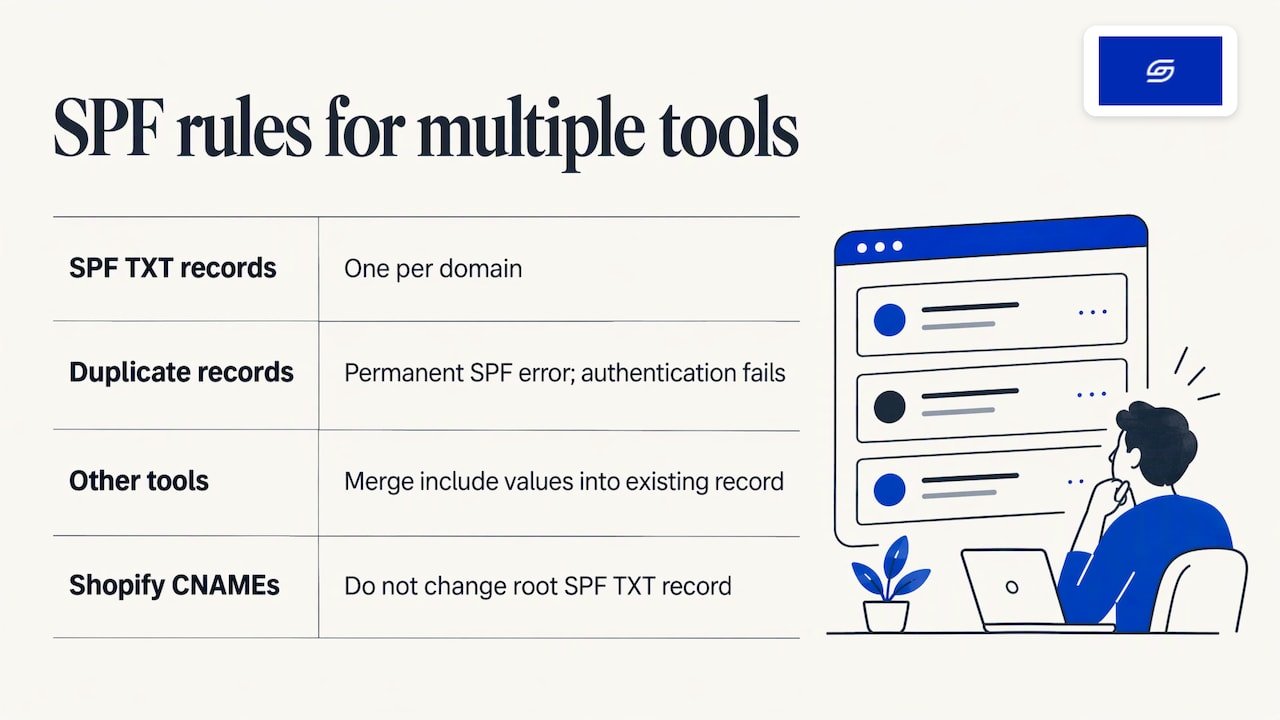
A domain can only have one SPF TXT record. Two records cause a permanent SPF error that fails authentication entirely, according to Suped. If your other tools need SPF entries, merge their “include” values into the single existing record. Shopify’s own CNAME records do not change your root SPF TXT record.
For a wider look at configuring SPF across email platforms, that comparison of sending tools is a handy reference when you are choosing what else will send from your domain.
We also cover consent and SPF for marketing sends in Shopify email marketing in Singapore, including what to have in place before your first campaign.
How do you check that it worked?
Go back to Settings > Notifications and read the status of your email domain authentication. Then check the DMARC record with a lookup tool.
Shopify suggests using a free online DMARC lookup tool or a DMARC record checker to confirm the record, per its email rewrites page.
Here is a simple routine:
- Wait for DNS to update. Changes can take up to 48 hours, per the Shopify Help Center.
- Click verify again in Shopify.
- Run your domain through a DMARC lookup to confirm there is exactly one record.
- Place a test order, or send a test notification to a Gmail and an Outlook address you control.
- Open the message and look at the sender details. Your own domain should show, not shopifyemail.com.
How do you fix a failed authentication or a rewritten sender?
Check the status, correct the records, and wait. Work through the list in this order.
Status says “Update recommended”
Add any missing CNAME records and fix any that do not match. Make sure the DNS values match what Shopify’s admin shows, then click the button to confirm you updated the records, per the Shopify Help Center.
Verification says a record was not found
The usual cause is propagation delay. DKIM Test advises waiting at least 30 minutes before troubleshooting. After that, check the host field for the doubled-domain mistake described earlier.
Your sender keeps reverting to a Shopify address
If someone removed the authentication CNAMEs, for example during a DNS clean-up or a move to a new host, Shopify Email resets the sender to a store+123@shopifyemail.com address until the records are restored. Put them back and verify again. This is common after a domain transfer, so keep the list of records somewhere safe.
Quick fault table
| Symptom | Likely cause | Fix |
|---|---|---|
| Update recommended | Missing or mismatched CNAME | Compare each record to the admin values |
| Record not found | DNS delay or doubled host | Wait, then check the host field |
| Two DMARC results | Duplicate _dmarc record |
Merge into one |
| SPF error | Two SPF TXT records | Combine into one record |
| Sender shows shopifyemail.com | Records removed or not verified | Restore CNAMEs, verify |
Does authentication guarantee your emails reach the inbox?
No. Authentication proves who you are. It does not decide whether a message lands in the inbox, Promotions or spam.
Google’s sender guidelines list authentication next to other requirements, including keeping the spam rate reported in Postmaster Tools below 0.3% and formatting messages to the Internet Message Format standard. So a clean DNS setup is the entry ticket, and your sending habits do the rest.
In practice, that means:
- Send to people who asked to hear from you.
- Make unsubscribing easy.
- Keep your list clean and drop addresses that never open.
- Use a sender name and address customers recognise.
- Keep transactional emails, such as receipts, clear and useful.
For the consent side under Singapore’s PDPA, see our guide to mapping cookie consent to the Customer Privacy API and PDPA. If you are building your list, Shopify email capture touchpoints shows where to ask.
Our view on email authentication
We set up sender authentication as part of a store launch, not as a clean-up job months later. A store that sends receipts from a Shopify address looks unfinished to a customer who has just paid.
Jessica Bong, the founder of Soodo, has more than 10 years in ecommerce and is a WSQ Shopify trainer at Equinet Academy. Her view is that small details like the sender name shape trust at the exact moment a customer is waiting for confirmation.
We test recommendations on Patch&Bagel, our own ecommerce brand, before we suggest them to clients. Soodo is a Shopify Partner with 30+ live stores, and every store we build is set up for AI search (GEO) as well as for the shoppers who find it today.
Email authentication is a small job with a clear finish line. We would rather hand you a store where it is already done, with training so your team knows what each record does.
Soodo
Who should do the DNS work?
You can do it yourself if you have DNS access and are comfortable copying records exactly. The risk is rarely the records themselves. It is the neighbouring ones: an old SPF record, an existing DMARC policy, or a mail setup that someone else depends on.
Some owners prefer to hand it over as part of a larger project. That makes sense when you are rebuilding the store, moving from WooCommerce, or changing domain host, because DNS changes are already on the list. Moving hosts is exactly when authentication records get lost.
Set it up as part of your Shopify project
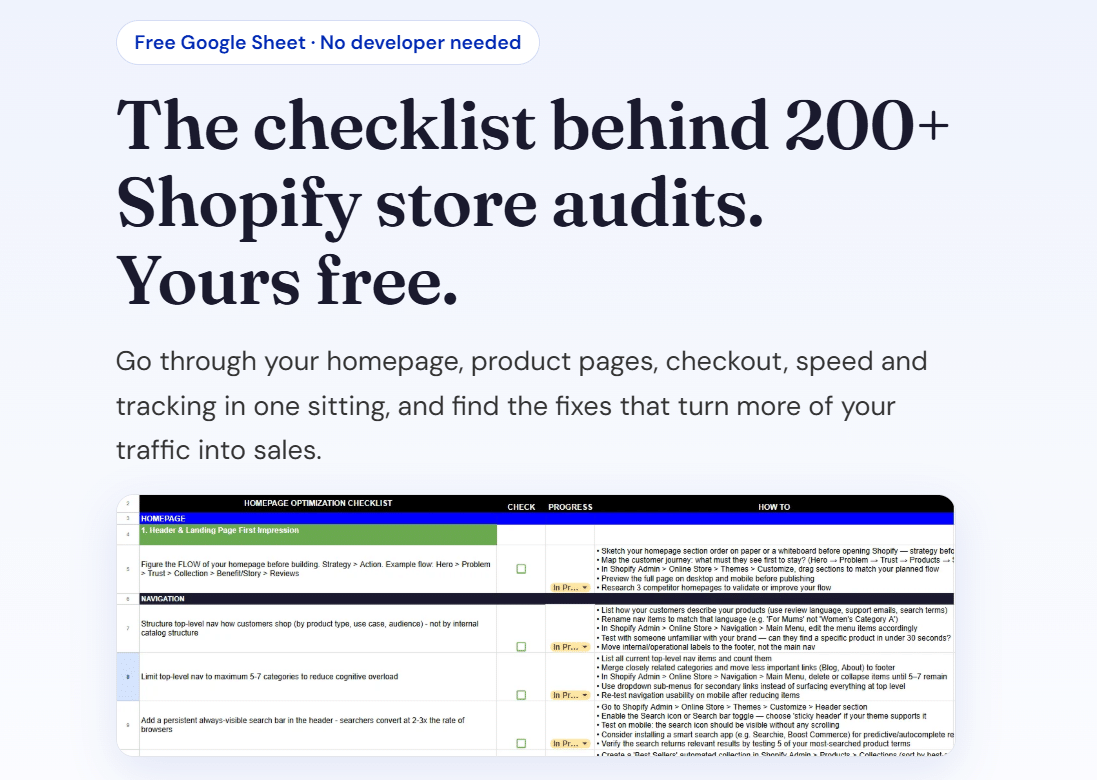
If you are planning a new store, a revamp or a migration, we include sender authentication in the launch set-up. Our fixed project prices start at:
- New Shopify store: from SGD 8,500
- Shopify Revamp: from SGD 3,000
- Migration to Shopify: from SGD 6,000
No GST is added, because Soodo is not GST-registered. Every project includes handover training and 6 months of post-launch fixes: if something we built breaks, we fix it. Unlimited revisions apply within the agreed scope.
We take on a small number of projects each month, by application. Projects start on set monthly start dates. A 50% non-refundable deposit secures your start date and the balance is due on completion. The timeline and start date are agreed before we begin.
We do not run monthly GEO or SEO services. For long-term GEO growth after launch, we work with specialist partners. You can read what GEO means in our guide to GEO.
FAQ
Do I need a separate SPF record for Shopify?
No. Shopify’s CNAME records handle SPF, so no separate SPF TXT record is needed for this purpose. If your domain already has an SPF record for other tools, leave it as one record and do not add a second. Two SPF records cause an SPF error, per Suped.
What DMARC policy should I start with?
Start with v=DMARC1; p=none;, which is the minimum Shopify asks for, per the Shopify Help Center. It monitors without blocking anything. Remember that a domain can hold only one DMARC record, so edit an existing one instead of adding another.
How long do DNS changes take?
Shopify says changes can take up to 48 hours to appear. Often it is much faster. If verification fails in the first half hour, wait before changing anything, then check the host field for a doubled domain.
Can I authenticate a Gmail or Yahoo sender address?
No, because you do not control the DNS for those domains. Buy a custom domain from Shopify or another domain provider and use an address on it, as Shopify’s sender address guidance explains.
Why does my sender still show a Shopify address?
The authentication records are probably missing, mismatched or removed. Restore the CNAME records, confirm they match Shopify’s admin values and verify again. Shopify Email resets the sender to a shopifyemail.com address until they are back.
Sources
- Shopify Help Center: Setting up your email
- Shopify Help Center: Displaying your store’s sending email
- Shopify Help Center: Email deliverability
- Gmail Help: Email sender guidelines
- Suped: How to set up DMARC, DKIM and SPF for Shopify
- EmailAudit: Shopify email authentication setup
- DKIM Test: DKIM for Shopify
- Email marketing platforms comparison
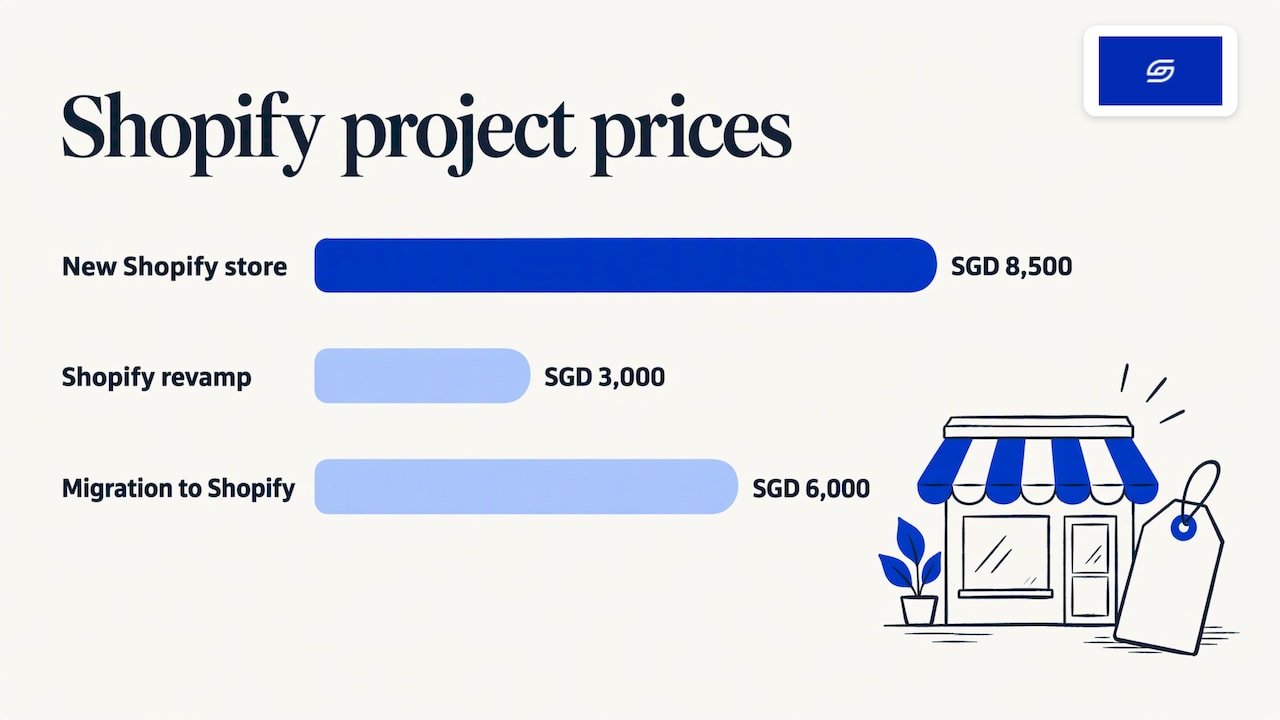
Get our free Shopify optimisation checklist or apply for a project slot.
Recommended

Jessica Bong
Jessica Bong is the founder of Soodo, a Singapore Shopify agency that builds, revamps and migrates Shopify stores, with every store set up to be found in AI search (GEO). She has spent over 10 years in ecommerce and runs her own Shopify brand, Patch&Bagel. Jessica is also a WSQ-certified Shopify trainer at Equinet Academy.