

Shopify Server-Side Tracking: How It Works and When to Set It Up
Shopify server-side tracking means your store’s server, not the shopper’s browser, sends purchase and behaviour events to platforms such as Google Analytics and Meta. It recovers some data that browser pixels lose. It does not remove the need for consent. This guide explains how it works, what to prepare, how to test it and what Singapore stores must respect under the PDPA.
We are Soodo, a founder-led Shopify agency in Singapore. We build, revamp and migrate Shopify stores for brands in Singapore and Southeast Asia, so tracking questions come up in almost every project.
Key Takeaways
- Server-side tracking sends events from a server you control to ad and analytics platforms. Browser tracking runs scripts in the shopper’s browser.
- It reduces data loss from ad blockers and browser restrictions, but it does not give perfect attribution.
- Most stores do best with a hybrid setup: browser and server events together, with a shared event ID to avoid double counting.
- Consent still applies. Under Singapore’s PDPA, you must be able to show people were told why their data is collected and used.
- Fix the basics first. A clean store and clear event naming matter more than the tool you pick.
Table of Contents
- What is server-side tracking on Shopify?
- Why do Shopify stores use it?
- What are the limits of server-side tracking?
- Should you use server-side, browser or both?
- What should you prepare before you set it up?
- How do you set up server-side tracking on Shopify?
- How do you test that events arrive correctly?
- What does the PDPA mean for server-side tracking in Singapore?
- Does tracking affect store speed?
- Our view on tracking
- How does this fit into a new store, revamp or migration?
- Work with Soodo on your Shopify store
- FAQ
- Sources
What is server-side tracking on Shopify?
It is a way of collecting store events on a server and forwarding them to marketing and analytics platforms. Shopify’s Singapore guidance describes it as the business’s server processing event data and sending it on. Browser-based tracking instead runs code in the shopper’s browser, which sends events straight to each platform.
The key difference is location and control. With browser tracking, data goes from the customer’s device to each destination. With server-side tracking, it goes to your server first. Your server then decides what to forward and where.
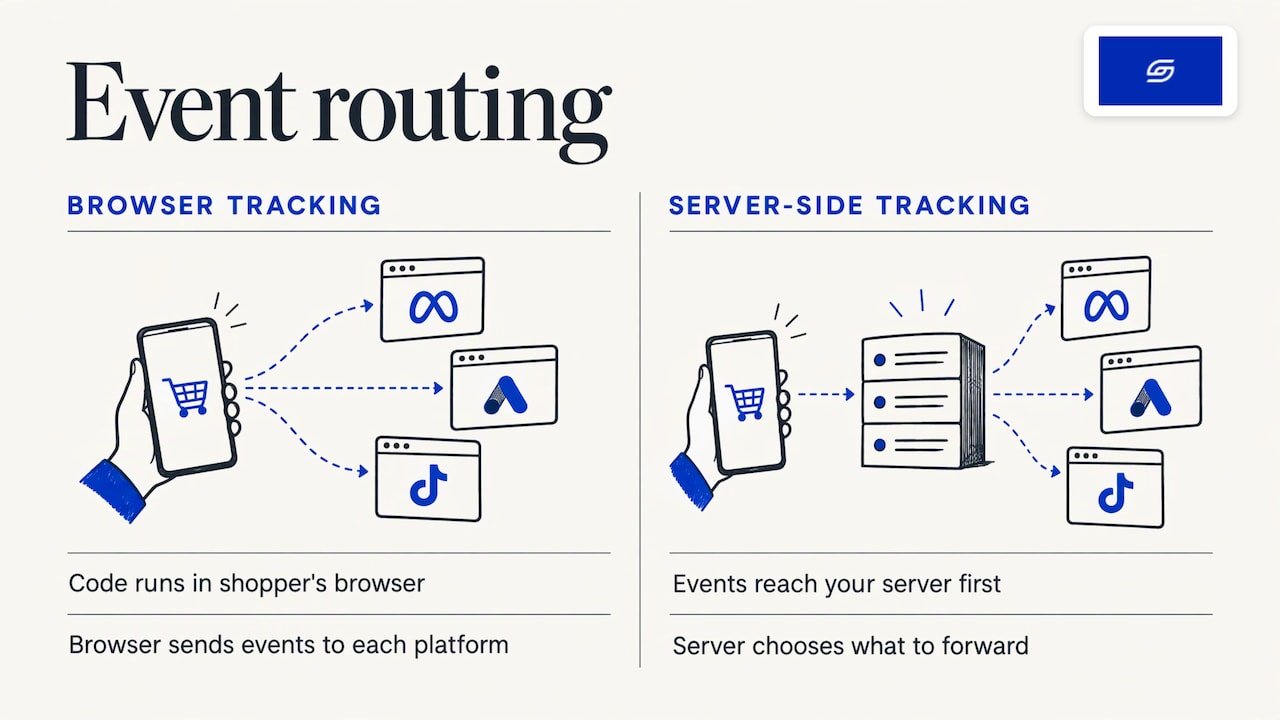
This is also what people mean by server-side tagging. Server-side tagging is the tag management version of the same idea. An event is routed to a tagging server. That server applies the tags for each destination and passes on only the data you choose to share.
One point often missed: the browser still plays a part. In many setups the browser supplies basic event data to the server. So it is rarely “browser versus server”. It is usually both.
Why do Shopify stores use it?
Stores use it because browser pixels miss events. A shopper may run an ad blocker. Their browser may restrict third-party scripts or cookies. They may close the page before the pixel fires. Each gap means a sale your ad platform never hears about.
Shopify says server-side tracking can reduce this loss because third-party scripts do not have to load in the shopper’s browser. It can also give you more control over what data leaves your store.
The benefit shows up in two places:
- Reporting. Your ad dashboards can see more of the orders you actually received.
- Ad optimisation. Platforms learn from conversions. More complete conversion data gives them better signals to work with.
Be careful with big promises. Vendors often quote percentage gains in lost conversions recovered. Those figures vary by store, audience and setup, so treat them as marketing, not as a forecast for your shop.
What are the limits of server-side tracking?
It does not fix a broken foundation. If your events are named inconsistently, your product feed is messy or your checkout flow has errors, a server will just forward bad data faster. One analytics vendor puts it this way: server-side tracking amplifies a good foundation but does not rescue a broken one.
Its accuracy also depends on the identifiers you send. Platforms match events to people using details such as hashed email addresses and phone numbers. Shopify notes that server-side tracking reduces browser-related loss but does not guarantee perfect attribution. Consent rules and applicable law still matter.
It is also not cookieless, consent-free or automatically first-party tracking. Shopify says businesses may still need consent before collecting or sharing data. We cover this in the PDPA section below.
Should you use server-side, browser or both?
For most Shopify stores, both. This is called a hybrid setup. Browser events capture rich on-page detail. Server events catch what the browser drops. A shared event ID lets the platform recognise that two copies are the same order and count it once.
Here is a plain comparison.
| Question | Browser-based tracking | Server-side tracking | Hybrid |
|---|---|---|---|
| Where does the code run? | In the shopper’s browser | On a server you control | Both |
| Affected by ad blockers? | Yes | Much less | Reduced |
| Control over data shared | Limited | High | High |
| Needs consent handling? | Yes | Yes | Yes |
| Setup effort | Low | Higher | Highest |
| Risk of double counting | Low | Low | Needs event ID matching |
If you spend little or nothing on ads, the extra effort may not pay off. If paid social and search drive a large share of your orders, the case is stronger.
What should you prepare before you set it up?
Start with the business question, not the tool. Ask which ad channels you want server-side tracking to fix. Confirm you actually spend on those channels. Without ad spend, there is little attribution to repair.
Then work through this list:
- Your event list. Write down every event you need: view item, add to cart, begin checkout, purchase. Use one naming scheme across platforms.
- Your destinations. Typically Google Analytics 4, Google Ads, Meta and TikTok. Only list the ones you really use.
- Your consent setup. Decide how consent is captured and how that choice reaches every tag. Our guide to Shopify cookie consent and the PDPA shows how to map your banner to Shopify’s Customer Privacy API.
- Your customer data fields. Know which identifiers you collect at checkout and have a lawful basis to use them.
- A subdomain. Server-side containers are often hosted on a subdomain of your own, such as track.yourstore.com, so cookies are set as first-party.
- An owner. Name one person who checks the data each week.
If your basic analytics is not yet clean, begin there. Our walkthrough of Shopify GA4 ecommerce tracking covers events, setup and quality checks.
How do you set up server-side tracking on Shopify?
The common route uses a server-side Google Tag Manager container. The steps below are the typical pattern. Exact screens differ by app and host.
- Create the server container. Host it on a provider of your choice and point your own subdomain at it.
- Send Shopify events to it. Events come from the storefront and checkout and are forwarded to the container. Some events, such as order updates, can also come from Shopify webhooks, which fire from the back end and do not depend on the browser.
- Add destination tags. Set up GA4, Google Ads, Meta and others inside the container. Each tag forwards only the fields you approve.
- Add an event ID. Give the browser event and the server event the same ID, so platforms can remove duplicates.
- Pass the consent state. Make sure tags only fire in line with the visitor’s choice, whether the event began in the browser or on the server.
- Send customer identifiers where permitted. Hashed email and phone number can improve Meta’s Event Match Quality. Only send what your consent notice covers.
Many stores use a Shopify app to do much of this. That can be sensible. Whichever route you choose, you still need the event list, consent logic and testing described here.
How do you test that events arrive correctly?
Test before you trust any dashboard. Use the preview mode in your tag manager’s server container to see each request come in. Then use the test tools inside each ad platform, such as Meta’s Events Manager, to confirm the payload arrived.
Check these points on a test order:
- Event ID present and matching on both the browser and server copy.
- Value and currency included. A purchase with no value or the wrong currency distorts return on ad spend. For Singapore stores, the currency should read SGD.
- Server responses. The endpoint should return a success status in the 2xx range.
- No duplicates. One test order should show as one purchase in each platform.
- Consent respected. Decline marketing cookies on a test visit and confirm marketing tags stay quiet.
Then keep checking. Failures are often operational rather than technical: no shared event list, or deduplication logic that differs between platforms. Review match rates weekly for the first few months. A Shopify search analytics guide makes a similar point about operational habits: reliable data comes from regular review, not a one-off setup.
If a pixel is inflating conversions, see our note on setting the TikTok pixel correctly on Shopify.
What does the PDPA mean for server-side tracking in Singapore?
It means you still need a clear purpose and, in most marketing cases, consent. Server-side tracking changes where data is processed. It does not change your duty to the person the data is about.
Here is what Singapore’s guidance says:
- The PDPC’s advisory guidelines on selected topics say individuals must be informed of, and consent to, the purposes for which personal data is collected, used and disclosed, unless an exception applies.
- The same guidelines say consent is required for behavioural targeting that involves personal data. Consent may be deemed where someone voluntarily gives data for an obviously appropriate purpose, such as paying for an order.
- The IMDA’s SS 714:2025 implementation guide says organisations should make data-protection settings easy to find and understand, and use opt-in consent for data collected for marketing.
In practice, that means three things:
- Your cookie banner and privacy policy must describe your tracking honestly, including any server-side forwarding.
- Marketing tags, browser or server, should only fire after the visitor has opted in.
- Do not send hashed email or phone data to ad platforms unless your notice and consent cover it.
The same care applies to email. Our guide to Shopify email marketing in Singapore covers consent before you send.
This is general information, not legal advice. For a specific situation, such as how to word a notice for your own data flows, speak to a data protection professional or check the PDPC’s guidance directly.
Does tracking affect store speed?
It can, in a good way. Fewer scripts running in the browser means less work for the shopper’s device. Moving tags to a server is one way to lighten the page. It does not replace proper speed work, though. Measure real visitor experience first, then decide what to change. See our guide on Shopify speed optimisation with real user monitoring.
Our view on tracking
We build Shopify stores with a sales-first approach. That means every page, menu and app is built around how customers actually buy. Tracking is part of that. If you cannot trust your numbers, you cannot decide what to fix next.
Our advice is to get the foundation right before adding server-side tools. Name your events clearly. Set up consent properly. Check that your checkout reports value and currency. Then add a server-side layer if your ad spend justifies it.
We run our own ecommerce brand, Patch&Bagel, and we test our recommendations there first. Our founder, Jessica Bong, has more than 10 years in ecommerce and is a WSQ Shopify trainer at Equinet Academy. Soodo is a Shopify Partner with 30+ live stores.
The best time to plan tracking is during a build, revamp or migration, when the store structure is being decided anyway. Every store we build is also set up for AI search (GEO), so the data foundation and the content structure are planned together.
Soodo
How does this fit into a new store, revamp or migration?
The cheapest moment to plan tracking is when the store is already being rebuilt. Event names, the data layer, consent and checkout settings all get decided then. Retrofitting them later usually means redoing work.
Here is how the three project types relate to tracking.
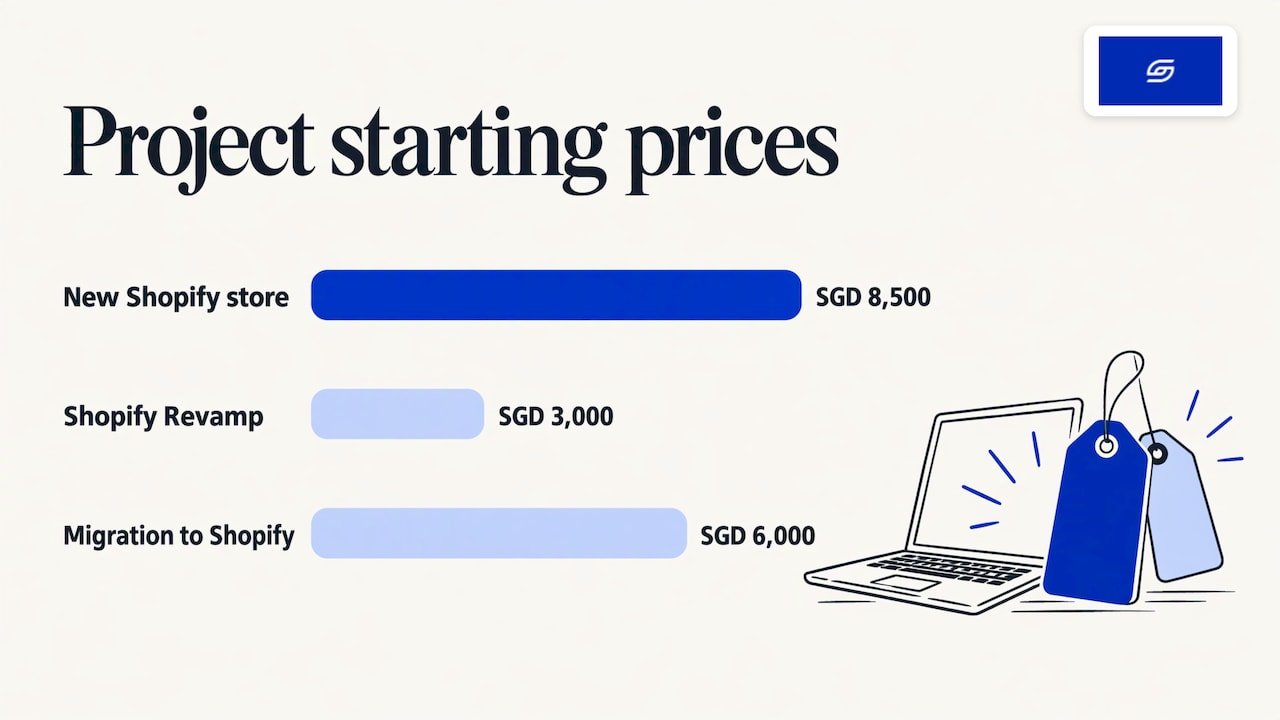
| Project | Best for | Starting price | Tracking angle |
|---|---|---|---|
| New Shopify store | Brands launching on Shopify | From SGD 8,500 | Plan events and consent from day one |
| Shopify Revamp | Live stores that need an upgrade | From SGD 3,000 | Clean up events and consent while redesigning |
| Migration to Shopify | Stores moving from WooCommerce or similar | From SGD 6,000 | Carry over reporting and avoid gaps in data |
No GST is added, as Soodo is not GST-registered.
Every project includes handover training and 6 months of post-launch fixes. If something we built breaks, we fix it. Revisions are unlimited within the agreed scope. The timeline and start date are agreed before we begin. Projects start on set monthly start dates. A 50% non-refundable deposit secures your start date, and the balance is due on completion.
If you are weighing the options, our comparison of revamp, rebuild and migration will help you choose.
Work with Soodo on your Shopify store
We take on a small number of projects each month, by application. A dedicated developer builds while the founder leads strategy. You get clear fixed pricing, handover training and 6 months of post-launch fixes.
If you are planning a new store, a revamp or a move to Shopify and want tracking and consent handled properly from the start, apply for a project slot. You can also read about our new Shopify store builds.
We do not offer a monthly GEO or SEO service. For long-term GEO growth after launch, we work with specialist partners. To learn the basics first, read what GEO is.
FAQ
Is Shopify server-side tracking worth it for a small store?
It depends on your ad spend. If paid channels drive a meaningful share of your orders and your reports look too low, it can help. If you spend little on ads, fix your basic analytics and consent first. Start by identifying which ad channels you want it to fix.
Is server-side tagging the same as server-side tracking?
Nearly. Server-side tracking is the wider idea of sending events from a server. Server-side tagging is the tag management method for doing it: a tagging server receives events, applies each platform’s tags and forwards only the data you select.
Does server-side tracking mean I do not need a cookie banner?
No. Shopify states that server-side tracking is not consent-free and that businesses may still need consent before collecting or sharing data. In Singapore, the PDPA requires you to inform people of your purposes and obtain consent where it applies.
Will server-side tracking stop duplicate conversions?
Only if you set it up for that. When browser and server both send the same purchase, they must share an event ID so the platform counts it once. Test with a real order and check each platform’s test tool.
Can Soodo set up server-side tracking for my store?
We plan tracking and consent as part of new store, revamp and migration projects. Tell us what you need when you apply, and we will agree the scope, timeline and start date before we begin.
Sources
- Cookieless Tracking: How Cookieless Tracking Works, Shopify Singapore
- Is server-side tracking really necessary for a Shopify store, Aimerce
- Advisory Guidelines on Selected Topics, PDPC Singapore
- Singapore Standard SS 714:2025 implementation guide, IMDA
- Shopify Search Analytics: What to Track and How to Act, Indexa Pulse
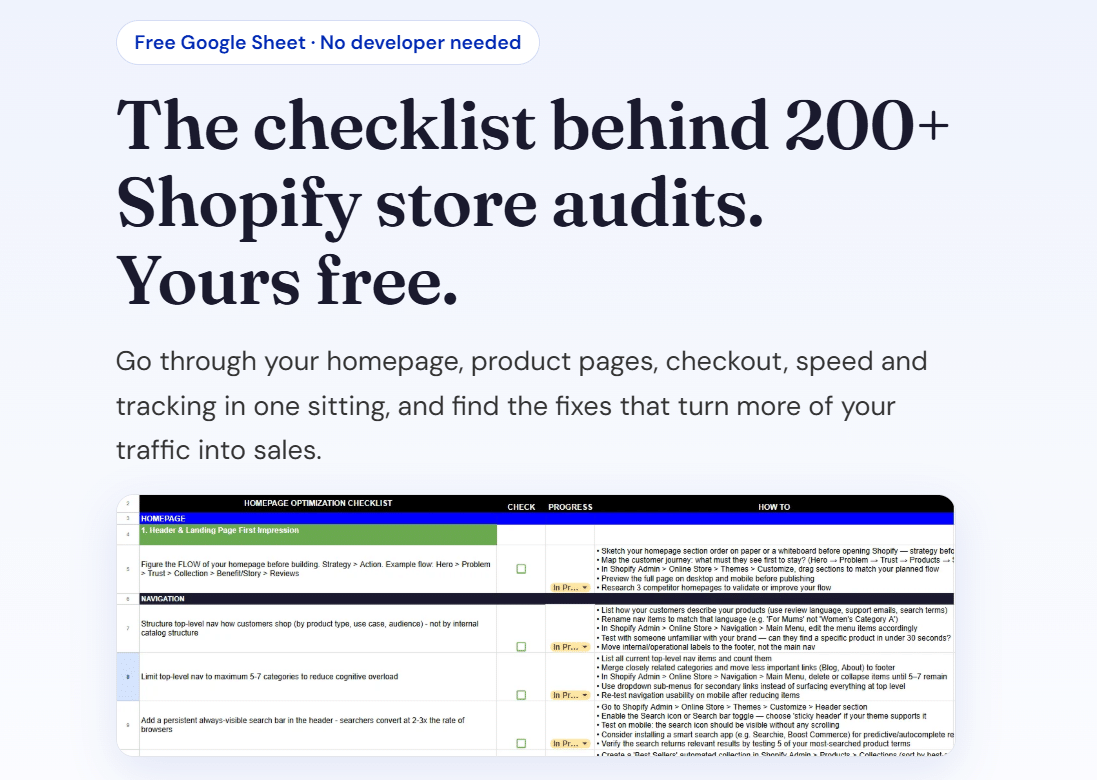
Get our free Shopify optimisation checklist or apply for a project slot.
Recommended

Jessica Bong
Jessica Bong is the founder of Soodo, a Singapore Shopify agency that builds, revamps and migrates Shopify stores, with every store set up to be found in AI search (GEO). She has spent over 10 years in ecommerce and runs her own Shopify brand, Patch&Bagel. Jessica is also a WSQ-certified Shopify trainer at Equinet Academy.