
Shopify Shipping Zones: How to Set Them Up in Singapore
A Shopify shipping zone is a group of countries or regions that share the same shipping rates. You create zones inside a shipping profile, add rates to each zone, and Shopify shows the matching rate at checkout. For a Singapore brand, that usually means one zone for Singapore, one for nearby Southeast Asian markets and one “rest of world” zone, each with rates that protect your margin.
This guide walks through the setup step by step, then covers the mistakes that cause the dreaded “no shipping methods available” message at checkout.
TL;DR
- A shipping zone groups destinations that share rates. Within one shipping profile, a country can sit in only one zone, and the country must also be in an active market to be able to order (Shopify Help Center).
- Start simple: Singapore, a SEA zone and a rest-of-world zone. Add profiles for bulky or fragile products only when you need them.
- Most checkout errors come from gaps in weight or price ranges, or from a default package weight that is not zero.
- If you use a courier app for live rates, installing it is not enough. You must activate its zone settings and map them to your Shopify profiles.
- Singapore GST on imports is a separate matter from your zones, but it affects what you tell overseas customers.
Table of Contents
- What shipping zones actually do
- Plan your zones before you click anything
- How to set up shipping zones in Shopify, step by step
- Choosing the right rate type for each zone
- Fixing “no shipping methods available”
- Using courier apps with your zones
- Singapore GST and overseas customers
- Our perspective: keep zones boring
- When to get help with your shipping setup
- Quick pre-launch shipping checklist
- FAQ
- Sources
What shipping zones actually do
Think of a zone as a row in a rate card. Each row answers one question: “If the customer is in this place, what do I offer and what do I charge?”
Shopify’s own example is a business with a warehouse in Germany that ships anywhere in Europe for the same flat rate. It puts those countries in one zone and sets one rate (Shopify Help Center). The same logic applies to a Singapore store: if Malaysia and Indonesia cost you about the same to serve, they can share a zone.
Three terms are worth separating:
| Term | What it controls | Where you find it |
|---|---|---|
| Shipping profile | Which products ship from which location, with which rules | Settings > Shipping and delivery |
| Shipping zone | Which countries or regions share rates inside a profile | Inside each profile |
| Shipping rate | The price and conditions for one option in a zone (flat, weight-based, price-based or carrier-calculated) | Inside each zone |
| Market | Whether you sell to a country at all | Settings > Markets |
The market point trips up many merchants. Shopify states that a country must be in an active market, and customers in inactive markets cannot place orders even when their country sits in a zone with rates (Shopify Help Center). Shopify is also gradually moving shipping profiles and rates to “shipping options by market”. Most stores keep their current setup until upgraded, and existing rates are migrated for them, so check which version your admin shows before following any older tutorial screenshot.
Plan your zones before you click anything
Open a spreadsheet first. For each destination, note your real cost to deliver, the delivery time and the carrier. A sensible starting layout for a Singapore SME looks like this:
| Zone | Typical countries | Rate approach | Notes |
|---|---|---|---|
| Singapore | Singapore | Order-value tiers with a free-shipping threshold | Customers expect fast, cheap delivery |
| Southeast Asia | Malaysia, Indonesia, Thailand, Vietnam, Philippines | Weight-based or carrier-calculated | Group by cost, not by geography alone |
| Rest of world | Everything else | Weight-based, or carrier-calculated | Consider switching off if margins are thin |
Group by cost, not by map. If Indonesia costs twice what Malaysia does through your courier, they belong in different zones even though both are in SEA.
If you also sell through marketplaces or ship from more than one location, decide now whether each location needs its own profile. Keep it as simple as your catalogue allows. Every extra profile is another place where a gap can hide.
How to set up shipping zones in Shopify, step by step
These steps follow Shopify’s official instructions for zones and rates. Menu labels can shift slightly as Shopify updates the admin.
- Activate your markets. Go to Settings > Markets and make sure each country you want to sell to is in an active market. To add a zone for a new country, add and activate its market first.
- Open your shipping profile. Go to Settings > Shipping and delivery, then click the profile you want to edit. Your General profile applies to all products not assigned elsewhere.
- Add a zone. In the Shipping zones section, click Add zone, name it (for example “Singapore”) and pick the countries or regions.
- Add a rate. Choose a rate type: flat, order-value or weight-based, or carrier-calculated.
- Repeat for each zone, then test every one with a real address.
Remember the one-zone rule: inside a group of locations in a profile, a country can exist in only one zone. If you want to move Malaysia from “SEA” to a new zone, remove it from the first zone before adding it to the second.
Choosing the right rate type for each zone
Flat rates
A flat rate charges one fixed amount, or free shipping. Shopify notes you can also vary it by order value or weight. It is the easiest to explain to customers and works well for Singapore, where cost differences across the island are small.
Order-value tiers
Tiers are how most stores implement a free-shipping threshold. Shopify’s example uses three bands: a higher fee for small orders, a lower fee in the middle and free above the top band. Build yours the same way.
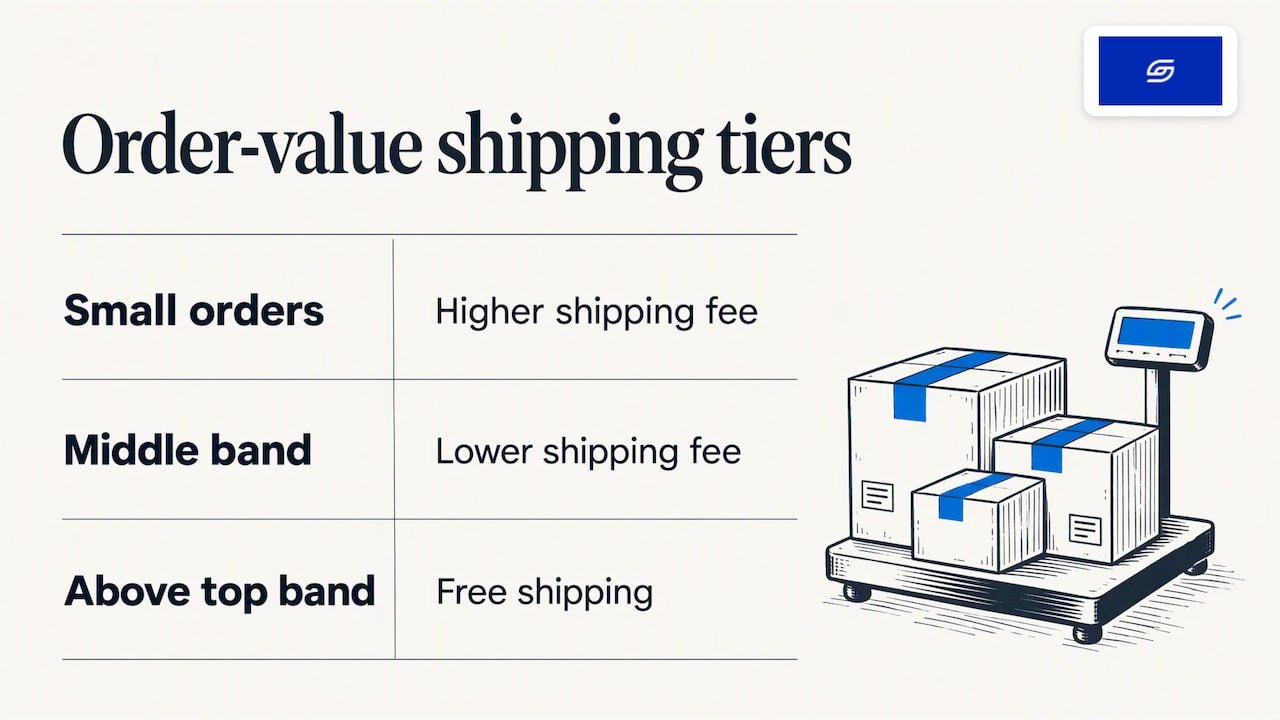
How high should the threshold be? A Singapore logistics blog reports that e-commerce businesses commonly set free shipping at two to three times their average shipping cost. If delivery costs S$5, that points to S$40 or S$50. Treat it as a starting point and check it against your own average order value and margin.
The same source cites industry research suggesting free shipping can lift conversion by 20% or more. Your results will vary, so measure rather than assume. Our guide to conversion tracking shows how to see whether a threshold change actually moved your numbers.
Weight-based rates
Weight-based rates suit heavier goods and regional zones. They are also where most errors start, because every possible cart weight must fall into a defined band. More on that below.
Carrier-calculated (live) rates
Live rates pull the price from a courier at checkout. Shopify’s carrier-calculated shipping is available on certain plans, and the courier app’s own guide notes it is available on Advanced and Plus plans or annual plans. See the courier app’s live-rates setup guide for the current requirements. If you are still choosing couriers, our comparison of shipping providers in Singapore covers the trade-offs.
Fixing “no shipping methods available”
This message appears when Shopify cannot find a rate that matches the cart and destination. It is rarely a system bug. It is almost always a configuration gap (Web Pop).
Work through this checklist in order:
- Is the destination in a zone? If a customer’s country is in no zone in the relevant profile, there is nothing to show.
- Is the country in an active market? No active market, no checkout, even with rates in place.
- Do your ranges overlap the whole cart range? The classic gap: a rate for 0 to 2 kg and another for 5 to 10 kg, with nothing for 2 to 5 kg. The cart message about items not meeting price or weight requirements points to exactly this, and the fix is to make thresholds cover every possible cart value and make sure every product has a weight (Web Pop).
- Is your top band high enough? When customers add several items, the combined weight can exceed your highest threshold. Set the top band well above your heaviest realistic cart.
- Is your default package weight zero? Shopify adds a default package weight to the cart’s combined weight at checkout, which can push an order into a band you never defined. A Shopify Community answer recommends setting it to zero.
- Are zones consistent across profiles? The same thread points to inconsistent zones across profiles, and to conflicts between standard and express rules, as other causes. Test with express disabled to isolate the problem.
A quick test routine: put one light item, one heavy item and a mixed cart in the basket, then run checkout with a Singapore, a Malaysian and a rest-of-world address. Do it after every change.
Using courier apps with your zones
Many Singapore merchants add a courier app to show real-time rates. The common failure is stopping at installation. The EasyParcel help centre explains that you need to activate the app’s zone settings and map them to your Shopify shipping profiles, otherwise live rates do not appear at checkout even though the app shows as installed (EasyParcel SG Help Centre).
Same-day providers work in a similar way. uParcel’s Shopify integration page describes adjusting which delivery types customers see under Shipping and delivery, in the carrier and app rates section for your shipping origin.
Speed matters as much as price here. According to uParcel’s analysis, slow delivery on urgent products tends to cause abandoned carts, more “where is my order” enquiries and more returns, which can outweigh the saving from a cheaper courier. If you offer both a standard and a same-day option in the Singapore zone, label them clearly so the customer knows what they are paying for.
Singapore GST and overseas customers
Zones set what you charge for delivery. They do not handle tax. But if you sell to buyers elsewhere, or you import stock yourself, GST rules shape what you should say on your shipping page.
Per IRAS, goods imported into Singapore by air or post with a value of S$400 or less generally qualify for import GST relief, but if the buyer purchases from a GST-registered overseas supplier, GST is collected at the point of sale. The relief does not apply to intoxicating liquors or tobacco, and it is not granted for goods imported by sea or land, whatever the value (IRAS/consumers/gst-on-imported-low-value-goods); see also IRAS guidance for consumers importing goods/consumers/consumers-importing-goods-into-singapore)). If your tax position is not clear, speak to an accountant or check with IRAS before publishing duty and tax statements.
For other countries, duty and tax rules differ, so state on your shipping page whether customers must pay import charges on delivery.
Our perspective: keep zones boring
We build and optimise Shopify stores for Singapore and SEA brands, and the shipping setups that cause the most trouble are rarely the simple ones. They are the clever ones: eight zones, four profiles, express rules layered on top of weight bands, and nobody remembering why.
Our advice, from working with stores of all sizes:
- Start with three zones and earn every extra one. Add a zone only when your costs genuinely differ.
- Make the free-shipping threshold a visible promise. Show it in the header bar and on the cart, not just at checkout. Shipping cost is one of the most common reasons shoppers leave, so state it early.
- Test like a customer, every time. After a theme update, an app install or a rate change, run three test checkouts on mobile.
- Document the logic. One short note listing zones, thresholds and carriers saves hours when staff change.
Shipping is also a conversion lever, not just an admin task. Our Shopify CRO fixes cover where delivery messaging fits on product and cart pages.
— Soodo
When to get help with your shipping setup
If your store has multiple warehouses, bulky goods, live courier rates and several markets, shipping settings can turn into a project of their own. That is the point where a second pair of eyes pays for itself.
We offer Existing Shopify Store Optimization from 1,600 SGD one-off, which suits a review of shipping, checkout and conversion on a store that is already live. If you are building from scratch, New Shopify Website Development starts from 4,500 SGD one-off, and moving from another platform starts from 4,000 SGD one-off through our platform migration service. Both are fixed-price, and you can reach us on WhatsApp for support afterwards.
Migrating from WooCommerce? Zones do not carry across automatically, so rebuild and test them as part of the move. Our WooCommerce to Shopify guide lists the steps.
Quick pre-launch shipping checklist
- Every country you sell to is in an active market.
- Every active country is in exactly one zone per profile.
- Weight and price bands have no gaps, and the top band is generous.
- Default package weight is set to zero, and every product has a weight.
- Courier app zone settings are activated and mapped to your profiles.
- Free-shipping threshold is set and shown on the storefront.
- Test orders pass for Singapore, one SEA country and one far destination.
- Your shipping page states delivery times, returns and who pays import charges.
For a broader pre-launch review, see our Shopify store creation checklist.
FAQ
What is a shipping zone in Shopify?
It is a group of countries or regions that share the same shipping rates inside a shipping profile. Within a profile, each country can be in only one zone. The country must also be in an active market for customers to order.
Why does my store say there are no shipping methods available?
Usually because of a configuration gap: the destination is not in a zone, the market is inactive, or the cart’s weight or value falls outside your defined rate ranges. Check for gaps between bands, raise your top threshold and set the default package weight to zero.
Can I offer free shipping in Singapore but charge for Malaysia?
Yes. Create a Singapore zone with a free rate above your chosen order value, and a separate zone for Malaysia with its own flat or weight-based rates. Just make sure Malaysia is not also listed in another zone in the same profile.
Do I need a courier app to use shipping zones?
No. Flat, order-value and weight-based rates work with Shopify alone. A courier app is only needed for live carrier rates, and then you must activate its zone settings and map them to your Shopify profiles.
Sources
- Shopify Help Center: Setting up shipping zones and rates
- Shopify Help Center: Setting up shipping zones
- Web Pop: Fixing the no shipping methods available error
- Shopify Community: Shipping not available method
- EasyParcel SG Help Centre: Live rates at Shopify checkout
- uParcel: Shopify integration
- uParcel: Same-day vs next-day delivery in Singapore
- BoxPls: Should sellers or buyers pay delivery fees in Singapore
- IRAS: GST on imported low-value goods/consumers/gst-on-imported-low-value-goods)
- IRAS: Consumers importing goods into Singapore/consumers/consumers-importing-goods-into-singapore)
Recommended

Jessica Bong
Jessica Bong is the founder of Soodo, a Singapore Shopify agency that builds, revamps and migrates Shopify stores, with every store set up to be found in AI search (GEO). She has spent over 10 years in ecommerce and runs her own Shopify brand, Patch&Bagel, where every Soodo technique is tested first. Jessica is also a WSQ-certified Shopify trainer at Equinet Academy.