

Shopify Shipping in Singapore: Setup Guide for Store Owners
Shopify handles shipping in Singapore through your store admin, but you connect your own couriers. You set zones and rates in Shopify, add a local courier or carrier app for labels and tracking, and follow Singapore GST and customs rules for anything that leaves the country. This guide shows you how to put those pieces together so checkout stays simple and your margins hold.
We are Soodo, a founder-led Shopify agency in Singapore. Shipping setup is part of almost every store we build, revamp or migrate.
Key Takeaways
- Set up zones and rates under Settings > Shopify “Shipping and delivery”, then add a courier app for labels and tracking.
- Live carrier-calculated rates depend on your Shopify plan. Always set backup rates.
- Local delivery can run by postal code or radius, which suits same-day and island-wide offers.
- You stay responsible for customs and duties on overseas orders. Plan for GST before you promise free shipping.
- Work out your average cost per parcel first. Then decide what you absorb and what you pass on.
Table of Contents
- Does Shopify have its own shipping service in Singapore?
- How do you set up shipping zones and rates for a Singapore store?
- Which Shopify plan do you need for live carrier rates?
- How do you offer local delivery in Singapore?
- Which courier and postal apps connect to Shopify in Singapore?
- Is shipping through Shopify cheaper?
- What should you know about GST, customs and overseas orders?
- What does a good Shopify shipping setup look like?
- Our view: shipping is a sales decision
- How much does it cost to get Shopify shipping built properly?
- FAQ
- Sources
Does Shopify have its own shipping service in Singapore?
Shopify gives you the shipping tools. You bring the carriers. Shopify’s own Singapore page describes a shipping workflow inside your store admin, with orders from every sales channel in one place.
The Shopify Shipping Terms for Singapore add an important detail. Shopify acts as an intermediary for third-party shipping services. You remain responsible for shipping your goods and for local and international customs laws.
In practice, a Singapore store does three things:
- Sets shipping zones and rates in Shopify.
- Connects one or more courier or postal apps to sync orders, print labels and send tracking.
- Decides how to handle overseas customs, GST and duties.
The Shopify fulfilment features cover the basics. According to the Shopify Help Center, you can route orders, print shipping labels and packing slips, and send automated order notifications.
How do you set up shipping zones and rates for a Singapore store?
Start in the admin. Zones and rates live under Settings > Shipping and delivery, inside a shipping profile. Per the Shopify Help Center, a zone groups countries or regions. Each zone gets its own rates.
For most Singapore brands, a clean starting structure looks like this:
- Singapore: one domestic zone with a flat rate and a free shipping threshold.
- Malaysia, Indonesia, Thailand and other SEA markets: one regional zone, priced by weight.
- Rest of world: one zone with weight-based rates, or no zone if you do not ship there yet.
Shopify supports three rate types:
| Rate type | Best for | Watch out for |
|---|---|---|
| Flat rate | Simple catalogues, similar parcel sizes | Heavy or bulky items can erode margin |
| Weight-based | Mixed catalogues, regional shipping | Needs accurate weight on every product |
| Price-based | Free shipping thresholds, tiered rates | Low-margin items can slip into a free tier |
The Help Center notes that weight-based rates need accurate product weights. Fix your product data first. Wrong weights cause wrong rates, and wrong rates cost you money on every order.
We cover this step by step in our guide to Shopify shipping zones in Singapore.
Why free shipping thresholds work
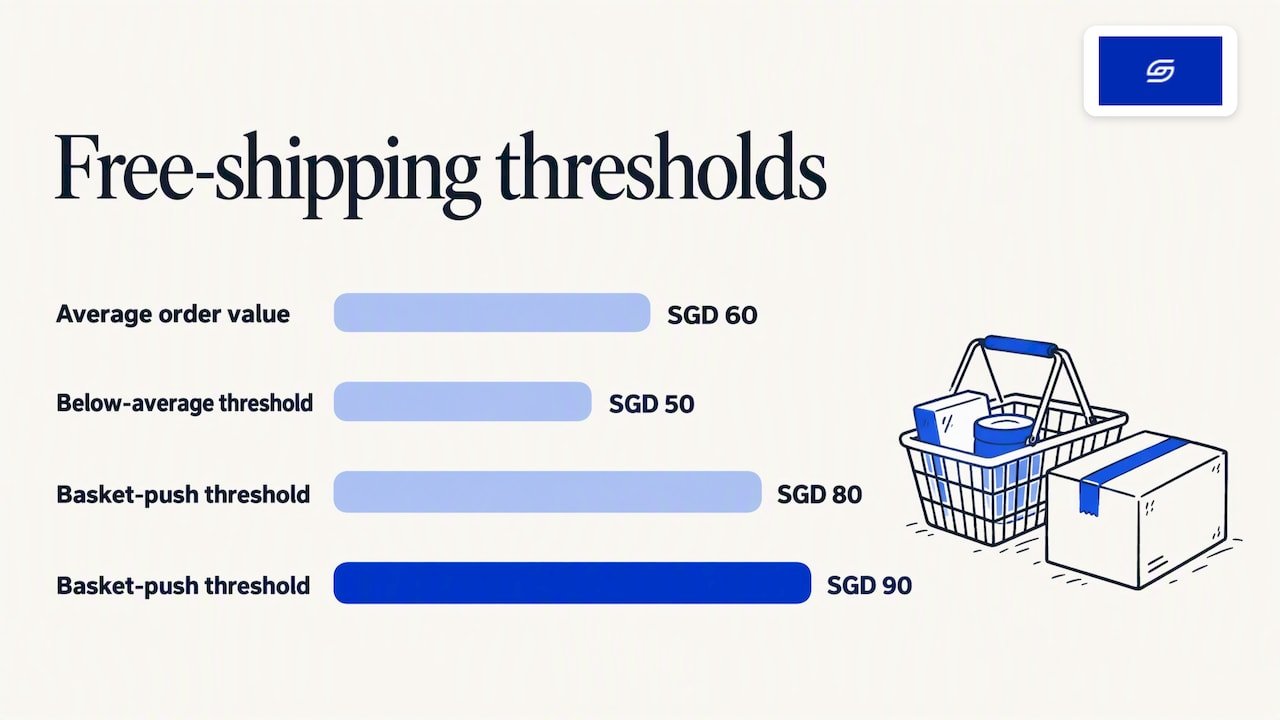
A threshold gives shoppers a reason to add one more item. Set it above your average order value, not below it. If your average order is SGD 60, a threshold of SGD 80 or SGD 90 pushes baskets up. A threshold of SGD 50 only gives away shipping.
Check your own order data before you pick the number. Do not copy another brand’s threshold.
Which Shopify plan do you need for live carrier rates?
Live rates show the courier’s actual price at checkout. They depend on your plan. The Shopify Help Center says third-party carrier-calculated shipping is available on Shopify Advanced and Shopify Plus. Shopify Grow can add it for an extra monthly fee or through annual billing. Other plans do not include it.
That matters for how you plan the build. Most emerging stores do not need live rates. A well-built set of flat and weight-based rates does the job. Live rates start to pay off when your parcels vary a lot in size and weight, or when you ship to many countries.
Always set backup rates
If a third party calculates your checkout rates, the rate lookup can fail. The Shopify Help Center on backup rates says backup rates are required in that case. You can customise them by order value or item weight.
Set them at a level that protects your margin. A backup rate that is too low means you quietly pay for shipping whenever the lookup fails.
How do you offer local delivery in Singapore?
Local delivery suits a small island. You deliver the order yourself or with your own rider, and customers see the option at checkout. The Shopify Help Center says you can define the area by postal code or by radius, up to 160 km. You can set up to 10 delivery zones per location.
We suggest a simple setup for most Singapore brands:
- One zone for your core delivery area with a low minimum order.
- A second zone for the rest of the island with a higher minimum.
- A clear cut-off time on the product page and at checkout.
Local delivery works well for food, gifts, flowers and bulky home goods. It also pairs well with in-store pickup if you have a shop or a studio.
Test it with your payment methods before launch. Local delivery can behave differently with accelerated checkout buttons and with some shipping apps. Place real test orders on mobile, because most Singapore shoppers buy on their phones. Our Shopify mobile optimisation guide shows what to check.
Which courier and postal apps connect to Shopify in Singapore?
Most local carriers offer a Shopify app or plugin. Choose by the type of parcel you send, your daily volume and how fast customers expect delivery.
Singapore Post is one clear example. Its Shopify plugin guide describes a plugin that syncs orders, prints labels and books collections. Setup means installing the plugin, connecting your Shopify account through the SingPost merchant portal, and mapping rates. SingPost rates can be synchronised on the Advanced and Plus plans.
Other options sit in the same few groups:
- Postal services for lightweight parcels and international mail.
- Local last-mile couriers for next-day and island-wide delivery.
- On-demand delivery for same-day and few-hour windows.
- Express carriers for international parcels with tracking.
- Fulfilment partners who store, pick and pack for you.
A courier comparison is a separate job, and we keep one in our Singapore shipping providers comparison. For the wider app picture, see our notes on Shopify integrations that work in Singapore.
What to check before you install a shipping app
- Does it sync orders and tracking numbers back to Shopify automatically?
- Does it work with your plan, especially for live rates?
- Can it print labels in bulk?
- Does it handle the countries you actually ship to?
- Who do you call when a parcel goes missing?
Do not install four apps to solve one problem. Extra apps slow your store and can clash at checkout. Keep the stack small.
Is shipping through Shopify cheaper?
It can be, but it depends on the carrier and the account. Shopify’s global shipping pages advertise discounts of up to 88% with some carriers. Those carrier deals are mainly tied to carriers in other markets, so check what is available for your Singapore account.
Rate comparisons only hold when they are like for like. The Shopify Help Center says a comparison is valid only when the account number, package dimensions, weight, destination and postal code all match. A carrier tool may show a retail rate or your own account rate.
Here is a simple method to find your real cost, based on Shopify’s guidance on calculating shipping costs:
- Add up one month of shipping costs.
- Divide by the number of parcels sent.
- Use that as your baseline cost per order.
- Decide how much you absorb and how much you pass on at checkout.
Shopify treats this as a margin decision, and we agree. Shipping is not just a cost line. It shapes your pricing, your free shipping offer and your conversion at checkout.
DHL Express Singapore also advises that charges depend on carrier, weight, size, distance and speed. It recommends asking several providers for quotes and negotiating. Do that once your volume is steady.
What should you know about GST, customs and overseas orders?
GST applies to local sales, and overseas orders add customs rules. The IRAS e-commerce guidance says goods sold online and delivered in Singapore should be standard-rated, with GST charged. Exports can be zero-rated only when you keep the required export documents.
If you are GST-registered, set up your Shopify tax settings with your accountant. Do not guess.
For customers abroad, the rules of the destination country apply. Shopify’s international shipping considerations tell merchants to keep up with changing border rules, customs requirements and duty collection. Some carriers offer Delivered Duty Paid (DDP) options, where duties are settled before delivery.
For overseas shoppers, decide one of two paths:
- Customer pays on delivery. Simpler for you, but surprise fees can lead to refused parcels.
- You prepay duties (DDP). A smoother customer experience, but you must price it into the order.
Shoppers buying from abroad into Singapore face their own rules. The Singapore Customs page on GST and duty says GST relief applies only to postal or air imports with a CIF value not exceeding S$400, except liquor and tobacco. CIF means cost, insurance and freight. This is useful if you also source stock from overseas suppliers.
When a postal item has an amount payable, SingPost notifies the recipient to pay through its app, SAM kiosks or post offices before delivery. Tell your customers what to expect in your shipping policy.
Shopify’s terms are clear that you carry this responsibility. Write a plain shipping policy page. State your countries, your delivery times, who pays duties, and your returns process.
What does a good Shopify shipping setup look like?
Good shipping setup is mostly invisible to the customer. Here is the checklist we work from on builds:
- Accurate weights and dimensions on every product.
- Zones for Singapore and each SEA market you serve.
- A free shipping threshold based on your real average order value.
- Backup rates in place.
- One courier app connected and tested with real orders.
- Tracking emails that match your brand.
- A shipping policy page linked in the footer and at checkout.
- Delivery estimates on product pages, not only at checkout.
That last point is a common miss. Shoppers who see shipping cost and timing late in the journey often leave. Show it early.
If you are setting up a store from scratch, our Shopify store creation checklist places shipping in the full launch sequence. Our complete guide to setting up Shopify in Singapore covers payments and compliance alongside it.
Our view: shipping is a sales decision
We treat shipping as part of the sales funnel, not an admin task. Every page, menu and app in a store we build is designed around how customers actually buy. Shipping is one of the biggest parts of that.
Jessica Bong, our founder, has more than ten years in ecommerce. She also teaches Shopify as a WSQ trainer at Equinet Academy. The pattern she sees is simple. Brands spend weeks on product photos and then leave shipping as a default setting.
So we start from the customer. What will they expect to pay? How fast do they expect it? What will make them add one more item? Then we set zones, rates and thresholds to match. We test the logic on our own ecommerce brand, Patch&Bagel, before we recommend it to clients.
We also set every store up for AI search (GEO), so your shipping and returns information is clear and easy for AI tools to read. If you want long-term GEO growth after launch, we work with specialist partners who focus on that full time.
Soodo
How much does it cost to get Shopify shipping built properly?
Shipping setup is included in our fixed-price projects. We do not sell it as a stand-alone line item. The price depends on the project:
| Project | Starting price | Timeline |
|---|---|---|
| New Shopify store | From SGD 4,500 | From 6 weeks |
| Shopify Revamp | From SGD 1,600 | From 2 weeks |
| Migration to Shopify | From SGD 4,000 | From 4 weeks |
| AI-Readiness Audit & Fix (one-time) | From SGD 1,500 | n/a |
For store maintenance, talk to us for pricing. Every project includes handover training and 6 months of post-launch support.
We are a Shopify Partner with 30+ live stores. A new store from us includes the shipping logic described above. If your current store has clunky checkout, wrong rates or messy courier apps, a Shopify revamp is usually the fastest fix. If you are moving from another platform, see our Shopify migration service. To build from scratch, see our new Shopify store service.
Not sure where your store stands? The one-time AI-Readiness Audit & Fix reviews your store and fixes what it finds. It is a project, not a monthly service.
FAQ
Does Shopify have a shipping service in Singapore?
Shopify gives you shipping tools in the admin, such as zones, rates, labels and notifications. You connect your own courier or postal apps for the actual delivery. Shopify acts as an intermediary for third-party services, so you stay responsible for the shipment itself.
Is Shopify legal in Singapore?
Yes. Shopify’s own FAQ says it can be used in nearly every country, and Singapore has a dedicated Shopify site. As a seller, you still follow Singapore rules, including GST where you are registered. IRAS sets out how GST applies to goods sold online and delivered locally.
Can I offer same-day delivery on Shopify in Singapore?
Yes. You can use Shopify local delivery with postal code or radius zones, or connect an on-demand courier app. Set a clear cut-off time and test the checkout on mobile before you promote it.
Do I need a paid plan for live courier rates?
Often yes. Shopify says carrier-calculated shipping is available on Advanced and Plus, with an add-on option on Grow. Many small stores do well with flat and weight-based rates instead. Backup rates are needed either way if a third party calculates checkout rates.
Sources
- Ship on Shopify, Shopify Singapore
- Shopify Shipping Terms of Service, Singapore
- Overview of order fulfilment, Shopify Help Center
- Setting up shipping zones and rates, Shopify Help Center
- Third-party shipping carrier accounts, Shopify Help Center
- Backup shipping rates, Shopify Help Center
- Setting up local delivery, Shopify Help Center
- SingPost Shopify plugin user guide
- How to calculate shipping costs, Shopify Singapore
- Reduce shipping costs for SMEs, DHL Express Singapore
- IRAS e-commerce GST guidance
- International shipping considerations, Shopify Help Center
- Paying GST and duty for postal and courier items, Singapore Customs
- Courier and postal procedures, Singapore Customs
- Shopify FAQ, Shopify Singapore
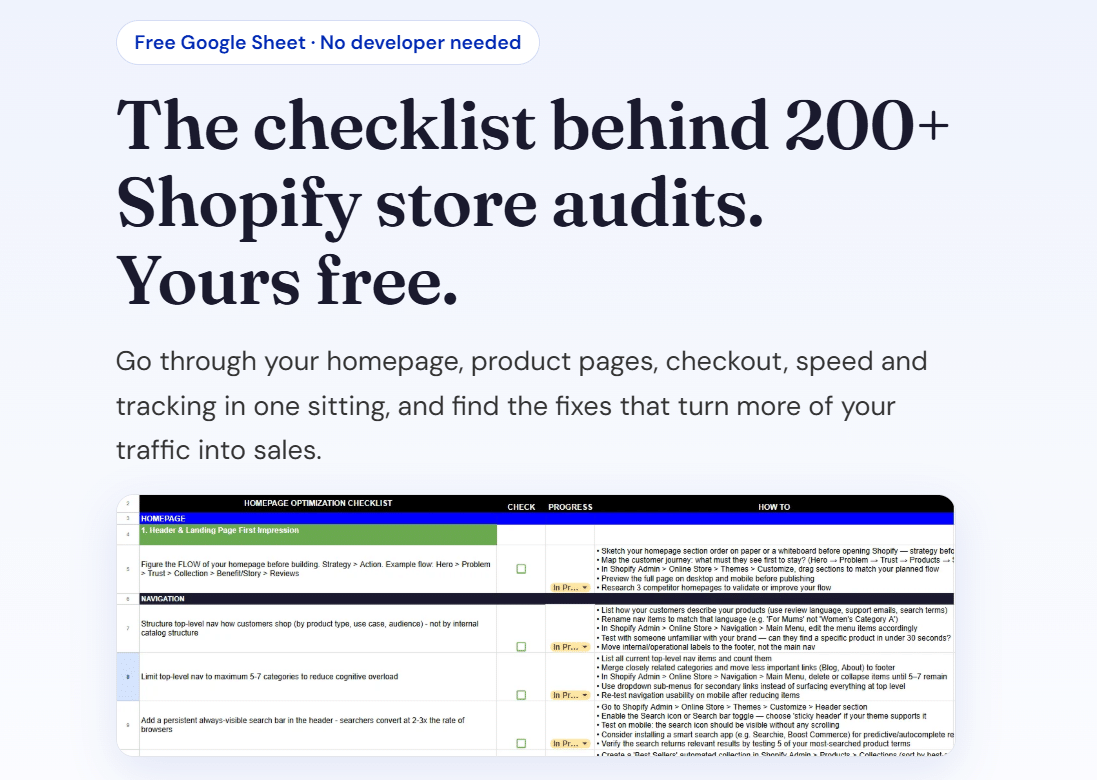
Ready to fix your shipping setup? Download our free Shopify optimisation checklist or get an instant quote.
Recommended

Jessica Bong
Jessica Bong is the founder of Soodo, a Singapore Shopify agency that builds, revamps and migrates Shopify stores, with every store set up to be found in AI search (GEO). She has spent over 10 years in ecommerce and runs her own Shopify brand, Patch&Bagel, where every Soodo technique is tested first. Jessica is also a WSQ-certified Shopify trainer at Equinet Academy.