

Shopify Bundles Setup: A Singapore Store Owner’s Guide
You can set up a bundle in Shopify in about ten minutes with the free Shopify Bundles app. It covers fixed bundles and multipacks on every plan. Mix-and-match bundle builders need a third-party app or custom development. This guide shows you each route, what to check before you publish, and where a Singapore store usually runs into trouble.
We are Soodo, a founder-led Shopify agency in Singapore. We build, revamp and migrate Shopify stores for brands in Singapore and Southeast Asia, and we set up bundles as part of that work.
Key Takeaways
- The free Shopify Bundles app creates fixed bundles and multipacks on all Shopify plans.
- Mix-and-match bundles need a third-party app from the Shopify App Store, or custom work through the bundle APIs on Shopify Plus.
- Bundle stock is based on component stock, and bundle prices are not updated automatically when a single item’s price changes.
- Stores that still use checkout.liquid customisations cannot sell bundles until they upgrade their checkout.
- Plan the offer first: pick bundles that raise order value without cutting your margin.
Table of Contents
- What types of bundles can a Shopify store offer?
- Why bundle at all?
- How do you set up a bundle with the free Shopify Bundles app?
- How do bundle pricing, stock and shipping weight work?
- Can you create Shopify bundles without an app?
- How do you build a mix-and-match bundle?
- What should you check before publishing a bundle?
- How do you make a bundle page that sells?
- Our perspective: bundles are a store design decision
- When should you bring in a developer?
- How Soodo can set up bundles for your store
- Common mistakes with Shopify bundles
- FAQ
- Sources
What types of bundles can a Shopify store offer?
Shopify describes three bundle types: fixed bundles, multipacks and mix-and-match bundles, as set out in its bundle eligibility guidance. Each one suits a different kind of shop.
| Bundle type | How it works | Typical use | Tool needed |
|---|---|---|---|
| Fixed bundle | Set items sold together as one product | Skincare routine, gift set, starter kit | Free Shopify Bundles app |
| Multipack | Several units of the same product | 3-pack of coffee, 6-pack of snacks | Free Shopify Bundles app |
| Mix-and-match | Customer picks items from a list | Build-your-own box, choose 4 flavours | Third-party app, or custom build on Shopify Plus |
Fixed bundles
A fixed bundle has a set list of components. The customer buys the whole set. A cleanser, toner and moisturiser sold as a “starter routine” is a good example. You choose the contents, so you control the story and the margin.
Multipacks
A multipack sells several units of one product as a single item. It is the simplest bundle to run. It also gives a clear reason to buy more, such as a lower price per unit on a pack of three.
Mix-and-match bundles
With mix-and-match, the customer builds the bundle from a list of interchangeable products and variants. This is what most people mean when they search for a bundle builder. Shopify’s own app does not cover it, so you need an extra tool. We cover that below.
Why bundle at all?
Shopify says bundling is a merchandising strategy that can increase average order value, lower distribution costs and cut inventory waste. For a Singapore store, the order value point matters most. Shipping, payment fees and ad costs apply to every order, whether it holds one item or three.
Bundles also help when shoppers are unsure what goes together. A routine, a kit or a set takes that decision away from them. If you plan to run paid ads, raise order value first. We explain the logic in our guide on increasing AOV before running Facebook ads.
How do you set up a bundle with the free Shopify Bundles app?
Open Apps, then Bundles, in your Shopify admin, click Create bundle, name it and add products. Then save it and set the status to Active. That is the route set out in the Shopify Bundles help page.
Here is the full process we follow on client stores.
- Install the app. Find Shopify Bundles in the Shopify App Store and add it to your store. It is a first-party app and free on all plans.
- Create the bundle. Go to Apps, then Bundles, and click Create bundle.
- Name it clearly. Use a title shoppers would search for, such as “Morning Skincare Set” rather than “Bundle 01”.
- Add the products. Select the items to include. Set the quantity of each. Choose the variants if an item has sizes or colours.
- Set the price. Adjust the bundle price. A common approach is to price it a little below the sum of the parts.
- Write the product page. Add photos, a description and a short line on what is inside and who it is for.
- Save and set to Active. This publishes the bundle to your sales channels.
- Place a test order. Check the cart, the checkout and the order record.
Step eight is the one most owners skip. Do not skip it.
How do bundle pricing, stock and shipping weight work?
The bundle has its own price, but its stock and weight come from its parts. The Shopify guidance says you can adjust the bundle price, and that availability depends on component stock. In POS, bundle contents show as separate line items in the cart.
Three practical points follow from this.
- Stock. If one component runs out, the bundle cannot be sold. A bundle of three items is only as available as the scarcest item. Keep this in mind when you plan promotions.
- Weight. Shopify works out the bundle weight from the sum of its components’ weights. You do not set a separate weight on the bundle. This matters for shipping rates, so check that each component has the right weight first.
- Price changes. When you change the price of one item, the bundle price does not update by itself. You must edit it in the admin. If you run sales often, add a bundle check to your sale checklist.
A simple pricing example
Say three items sell separately at SGD 30, SGD 25 and SGD 20. Together that is SGD 75. You might price the set at SGD 65. The shopper sees a clear saving and you still earn on every item. Work out your margin on each component before you set a discount. A bundle that sells well at a loss is still a loss.
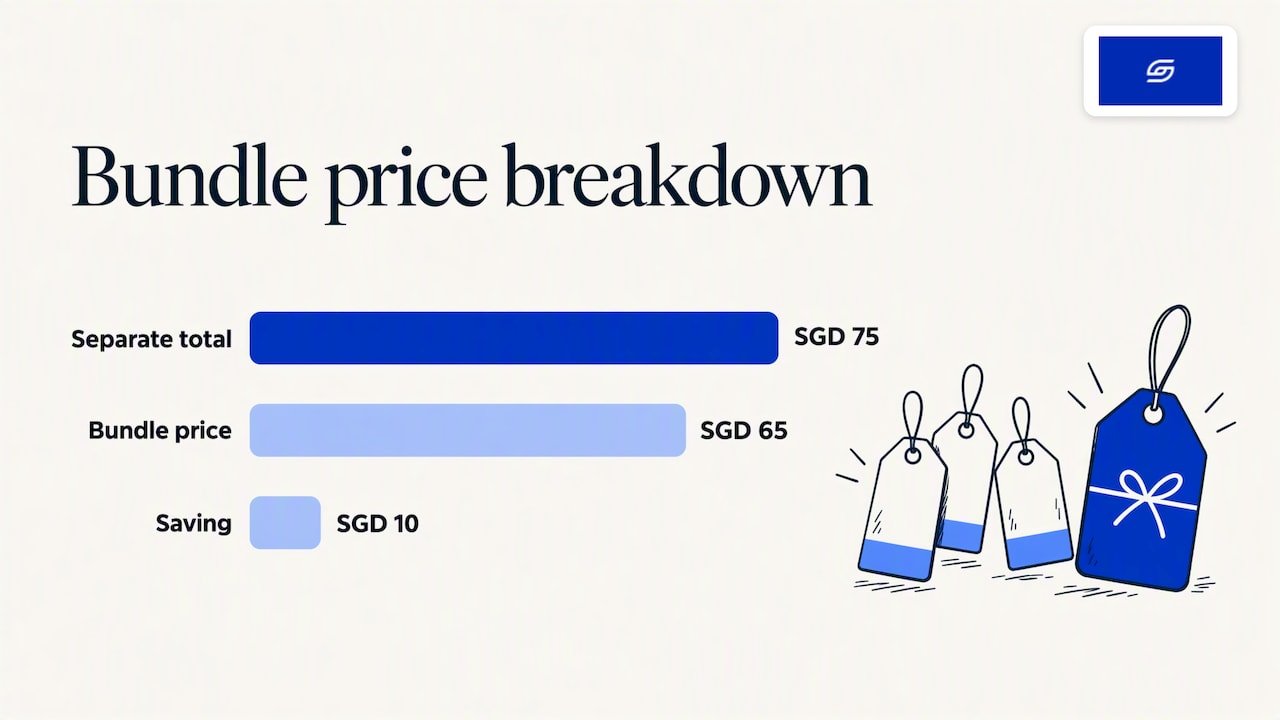
These figures are an example only, not a recommendation for your products.
Can you create Shopify bundles without an app?
Yes, you can sell a bundle without an app by creating a normal product that represents the set. You write the title, photos and price yourself. The limit is that the listing is just another product. It does not link back to the stock of the items inside it unless you manage that yourself.
This suits a very small catalogue with one or two sets that rarely change. It becomes hard to run once you have several bundles, shared components or variants. You would then update stock and prices by hand in more than one place. For most stores, the free Shopify Bundles app is the cleaner option, because it ties the bundle to its components.
How do you build a mix-and-match bundle?
You need a third-party bundle builder app from the Shopify App Store, or custom development. Shopify’s guidance says mix-and-match bundles require an app that supports them, or the bundle APIs on Shopify Plus. The options let customers compose a bundle from a list of interchangeable products and variants.
Think about the shopper’s journey before you choose a tool.
- How many items do they pick? A fixed count, such as “choose any 4”, is easier to explain than a free choice.
- What does the discount rule look like? A flat set price is easier than tiered discounts.
- Where does the builder sit? It can live on the product page or on a dedicated page. On mobile, a short, clear flow wins.
- How does it look on a phone? Most Singapore shoppers browse on mobile, so test the picker with one thumb.
Before you commit to an app, it helps to see what comparable stores use. You can check which apps a store uses and compare the bundle builders that appear. Then read the app listing, test it on a development store and check how it behaves with your theme.
If your product options are complex, such as many sizes, colours and add-ons, a bundle builder can clash with your variants. We cover that in maintainable product option builds.
What should you check before publishing a bundle?
Check your checkout first. Selling bundles needs an upgraded checkout, and stores using checkout.liquid customisations are not compatible with product bundles. If your store has an older custom checkout, you must move it to the current system before bundles will work.
Our checkout extensibility migration guide walks through the steps. If you want to know which changes survive Shopify upgrades, read about the five checkout customisation routes.
Then run this pre-launch list.
- Every component has a correct price, weight and stock count.
- The bundle price matches your margin plan.
- The product page says clearly what is inside.
- The bundle appears correctly in the cart and at checkout.
- A test order shows the right items and the right stock deduction.
- The shipping rate looks right for a Singapore address and for your main overseas markets.
- The page loads fast on mobile.
A fast page matters for bundles because they carry more images and more text. See our notes on Shopify speed optimisation if your product pages feel slow.
How do you make a bundle page that sells?
A bundle page works when it answers three questions quickly: what is in it, what do I save and why should I buy it now. Everything else supports those three.
- Show the contents. Use a clear photo of the full set, then a short list of items.
- Show the saving. State the saving in dollars, such as “Save SGD 10”, when the maths holds.
- Name the use. “For dry skin” or “for a first-time baker” beats a generic title.
- Keep the buy button visible. On mobile, do not bury it under long copy.
- Add structured data. Clear product data helps search engines and AI tools read what you sell. See our guide on fixing structured data gaps.
For more on the page itself, read our piece on product page issues that lift sales.
Our perspective: bundles are a store design decision
We see bundles as part of how a store is planned, not as an app you switch on at the end.
Jessica Bong, our founder, has more than 10 years in ecommerce. She is also a WSQ Shopify trainer at Equinet Academy. Her view is simple: start with how customers actually buy, then decide which products belong together. The tool comes second.
That is what we mean by a sales-first approach. Every page, menu and app is built around the buying path. A bundle that sits on a page nobody reaches does nothing. A bundle placed beside the product a shopper already likes can lift order value without extra ad spend.
We also test ideas on our own ecommerce brand, Patch&Bagel, before we recommend them to clients. We keep the team small on purpose. The founder leads strategy and a dedicated developer builds.
Every store we build is also set up for AI search (GEO), so bundle pages carry clear product data. Long-term GEO growth is handled through specialist partners, as we do not offer a monthly GEO or SEO service.
Soodo
When should you bring in a developer?
Bring one in when the free app no longer fits the offer. The signs are easy to spot.
- You want customers to build their own box with tiers or rules.
- Your theme does not show the bundle contents well.
- You use a custom checkout that must be upgraded first.
- You sell through several channels and need stock to stay in sync.
- Your product options are complex and clash with the bundle logic.
If you are on Shopify Plus, custom builds through the bundle APIs become an option. Our overview of Shopify Plus features explains who needs it and who does not.
If you sell to other businesses, bundles may sit alongside wholesale pricing. See Shopify B2B features for how catalogues work.
If you are choosing apps for a new store, our list of top Shopify apps for new businesses is a good start.
How Soodo can set up bundles for your store
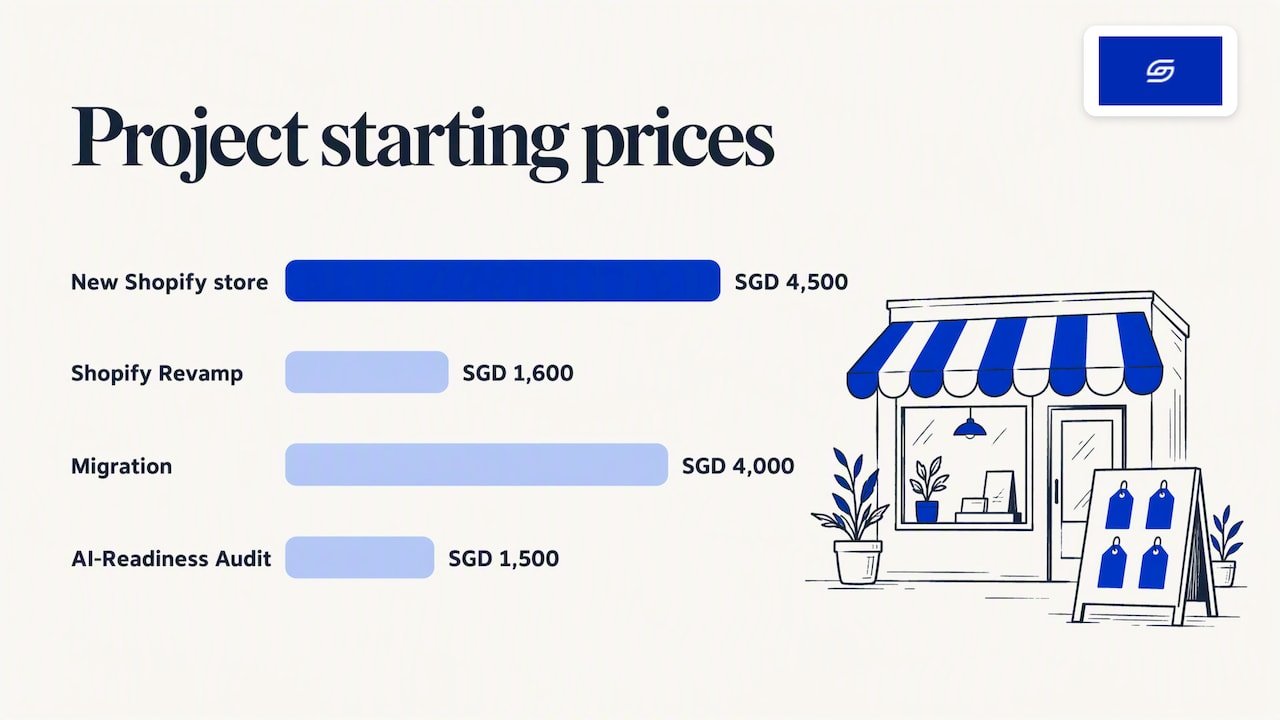
We are a Shopify Partner with 30+ live stores, based in Singapore. We build bundles into three kinds of project.
- A new Shopify store costs from SGD 8,500. Your timeline and start date are agreed before we begin. Bundles are planned into the product structure from day one. See our new Shopify store service.
- A Shopify Revamp costs from SGD 3,000. Your timeline and start date are agreed before we begin. It suits an existing store that needs better bundle pages, a cleaner product page or a faster path to checkout. See our Shopify Revamp service.
- Migration to Shopify costs from SGD 6,000. Your timeline and start date are agreed before we begin. It suits stores moving from WooCommerce or another platform. See our migration service.
Every project includes handover training and 6 months of post-launch fixes. That means you or your team can manage bundles after launch, and you have us to ask if something breaks.
Common mistakes with Shopify bundles
Most bundle problems come from a few repeat errors.
- Discounting too deep. A big saving on a low-margin set wipes out the profit. Work out the margin first.
- Forgetting price updates. The bundle price does not follow its parts. After a price change, edit the bundle by hand.
- Ignoring stock. One empty component blocks the whole bundle. Watch your lowest stock lines.
- Skipping the test order. Always buy your own bundle once before you promote it.
- Too many choices. A builder with twenty options can slow a decision. Start with a short list.
- Leaving checkout untouched. An old checkout customisation can stop bundles from working at all.
FAQ
Is the Shopify Bundles app free?
Yes. The first-party Shopify Bundles app is free, and it lets you create fixed bundles and multipacks on all Shopify plans, according to the Shopify Help Center. Third-party bundle builders usually have their own pricing, so check each app listing.
Can customers choose their own items in a bundle?
Yes, but not with the free app alone. Mix-and-match bundles need a third-party app from the Shopify App Store, or custom development through the bundle APIs on Shopify Plus. Pick the tool after you decide how many items shoppers choose and how the discount works.
Why will my bundle not show or sell?
Start with two checks. First, make sure the bundle status is Active. Second, check that every component has stock, because bundle availability depends on its parts. If your store still uses checkout.liquid customisations, you will also need to upgrade your checkout.
Do I need to update the bundle price when a product price changes?
Yes. Price changes to single items do not carry over to the bundle price automatically, so you must edit the bundle in your admin. Add this step to your sale checklist so a promotion does not leave an old bundle price live.
Does Soodo offer a monthly GEO or SEO service?
No. We build every store to be set up for AI search (GEO). For long-term GEO growth, we work through specialist partners.
Sources
- Shopify Help Center: Eligibility and considerations for Shopify Bundles
- Shopify Help Center: Shopify Bundles
- Shopify Dev: About product bundles
- Shopify apps detector
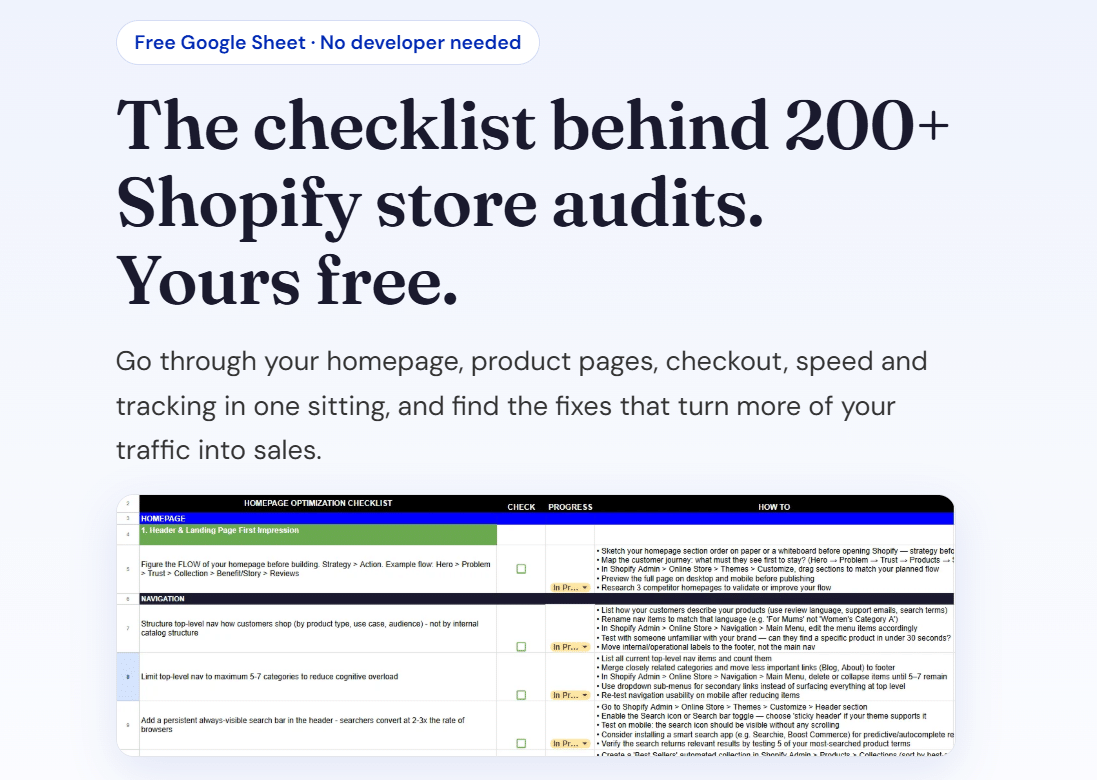
Ready to plan your bundles? Get our free Shopify optimisation checklist or apply for a project slot.
Recommended

Jessica Bong
Jessica Bong is the founder of Soodo, a Singapore Shopify agency that builds, revamps and migrates Shopify stores, with every store set up to be found in AI search (GEO). She has spent over 10 years in ecommerce and runs her own Shopify brand, Patch&Bagel, where every Soodo technique is tested first. Jessica is also a WSQ-certified Shopify trainer at Equinet Academy.