How to Choose a Shopify Theme: A Practical Guide for Singapore Brands
Choose the least expensive Shopify theme that natively supports how your customers actually buy, then test it with your real products on a phone before you publish. Do not pick from a demo homepage. A theme that looks stunning with stock photos can fall apart once your catalogue, apps and Singapore-specific content go in.
This guide walks you through the decision in the order we would make it with a client: define the job, shortlist, trial, test, and only then pay or commit. It also covers fashion stores, which is where many of you start.
TL;DR
- Start from the functions your store needs (filtering, size charts, bundles, multiple currencies), not from an industry label or a pretty demo.
- Free themes are often enough. Pay for a theme when its built-in structure replaces custom development or paid apps.
- Trial every shortlisted theme with your real products, menus and images, on mobile first, before buying.
- Treat a theme’s speed score as a baseline. Apps, images and scripts decide the real result.
- If you need something the Theme Store cannot give you, a custom build or an expert-led setup costs less than months of workarounds.
Table of Contents
- What a theme actually controls
- Step 1: Write down what your store must do
- Step 2: Free, paid or custom
- Step 3: Shortlist three, not thirty
- Step 4: Trial with your real content
- Step 5: Test speed, mobile and accessibility
- Choosing a Shopify theme for a fashion store
- Common mistakes we see
- Our perspective: the theme is the start, not the result
- Working with Shopify Plus or several storefronts
- Need help choosing or building?
- FAQ
- Sources
What a theme actually controls
A Shopify theme sets the layout and behaviour of your storefront: how the homepage sections stack, how collection pages filter, what the product page shows, how the cart behaves and how the menu works on a phone. Your products, collections, menus, pages and blog posts live separately from the theme. Shopify says they are not deleted when you switch themes, although theme-specific content and customisations still need to be moved and checked.
That separation is good news. Choosing a theme is a reversible decision. You can keep several draft themes, publish only one at a time, and the previous theme stays available after you switch. So the goal is not to find a perfect theme, but to avoid a costly wrong one.
Step 1: Write down what your store must do
Shopify’s own guidance is to define the functions your store needs first, then filter the Theme Store by features such as product filtering, quick buy, related products, sticky navigation, video and wide layouts. It also says industry labels are starting points: a technology store can use a theme listed under art and photography.
Before you open the Theme Store, answer these questions on one page:
- Catalogue size and variants. Ten products with no variants need a very different theme from 800 SKUs with size and colour.
- Photography and video. Do you have lifestyle shots, short product videos, or only white-background packshots?
- Filtering and search. Will customers narrow by size, colour, price or material? If so, see our guide on Shopify product filters.
- Merchandising. Badges, swatches, bundles, upsells, lookbooks.
- Content. Size guides, FAQs, shipping and returns, a brand story.
- Subscriptions or wholesale. These often need apps, and the theme must leave room for them.
- Markets and languages. Will you sell in SGD only, or add Malaysian, Indonesian or other regional storefronts?
- Mobile buying journey. Most Singapore shoppers browse on phones, so this is the primary test, not an afterthought.
- Apps and integrations. List what you already rely on, such as reviews, loyalty, email and payments. Our note on Shopify integrations that work in Singapore is a good companion here.
Mark each item “must have”, “nice to have” or “not needed”. This list stops you paying for features you will never use.
Step 2: Free, paid or custom
As of October 2026, Shopify offers free themes, paid third-party themes, AI-generated personalised themes, ZIP uploads and developer workflows. The Theme Store advertises more than 800 themes on its store-building page.
The support model differs, and it matters more than most people expect:
- Free themes: Shopify supports customisation.
- Paid themes: support and updates come from the theme developer. Advanced code work may need a Shopify Partner.
- Custom themes: built for your brand, with support from whoever builds it.
| Option | Typical cost | Best when | Watch out for |
|---|---|---|---|
| Free Theme Store theme | None | Simple to mid-size catalogues, a tight launch budget | Fewer specialised layouts |
| Paid Theme Store theme | US$150 to US$380 in the current listing | You need specialised layouts that would otherwise take apps or code | Licensed to one store; third-party purchases are final sale |
| Custom theme | Project-based | Your journey is unusual, or the brand needs a distinct experience | Higher cost, longer timeline |
The paid-theme range comes from the official Theme Store listing, where prices run from about US$150 to US$380 for the themes shown at the time of writing. Check the current price before you decide.
The rule we use
Choose the cheapest theme that natively supports your buying journey. Pay for a theme when its built-in structure replaces substantial custom development or app subscriptions. A US$300 theme that removes two monthly apps and a developer day is cheap. A US$300 theme you then fight for weeks is not.
If you suspect no off-the-shelf theme fits, read when a custom Shopify theme is worth it before you spend weeks bending a template.
Step 3: Shortlist three, not thirty
Use the Theme Store filters against your must-have list and pick three themes. Include at least one free theme as a control, because it shows you what you would be paying extra for.
Read each theme’s documentation and reviews before you commit. Check the developer’s support channel and how recently the theme was updated. A theme with beautiful screenshots and a silent support desk will cost you later.
Step 4: Trial with your real content
This is the step most people skip. Shopify lets you preview a paid theme with your own products, brand colours and style, and keeps those editor customisations if you buy. Shopify also allows up to 19 paid themes to be previewed at once.
A safe sequence:
- Click Try theme on each shortlisted theme.
- Load your real products, menus, logo and photography.
- Walk through the homepage, a collection page, a product page with variants, search, cart and checkout entry.
- Do it on a phone, then on a desktop.
- Check your app blocks and integrations render properly.
- Only after this QA, buy and publish.
This matters because third-party theme purchases are final sale. The trial is your refund policy.
Step 5: Test speed, mobile and accessibility
Speed
To be accepted into the Theme Store, a theme must achieve a minimum average Lighthouse performance score of 60 across the home, product and collection pages. Treat that as a floor. It is not a promise about your store once you add apps, large images and tracking scripts.
So run Lighthouse on your trial build, on the homepage, a product page and a collection page, and run it again after every substantial change. Shopify links performance to conversion, repeat business and search rankings. If scores slip after installing apps, our guide to Shopify speed optimisation explains why real user data should come first.
Mobile
Shopify’s developer guidance says the strongest themes are performant, purpose-built, mobile-first, accessible and simple to customise. For a Singapore store, apply that to a real phone journey:
- Can you reach the menu, search and cart with one thumb?
- Is the price clearly in SGD, and does it show GST treatment the way your customers expect?
- Is local delivery and returns information visible on the product page, without scrolling to the footer?
- Do the payment options your customers use appear before the final step?
- Do sticky bars and pop-ups cover the add-to-cart button?
For a deeper checklist, see Shopify mobile optimisation for Singapore stores.
Accessibility
Accessibility belongs in selection, not final polish. Shopify’s guidance sets 44 by 44 pixels as the minimum for primary touch targets and expects controls to work with a keyboard. Shopify also cautions that a checklist alone does not guarantee full accessibility, so tab through your trial store, zoom in, and look for visible focus states.
Choosing a Shopify theme for a fashion store
Fashion is the most searched theme category for good reason: it needs the most from a theme. Large imagery, many variants, size charts, lookbooks and heavy filtering all have to work on a small screen.
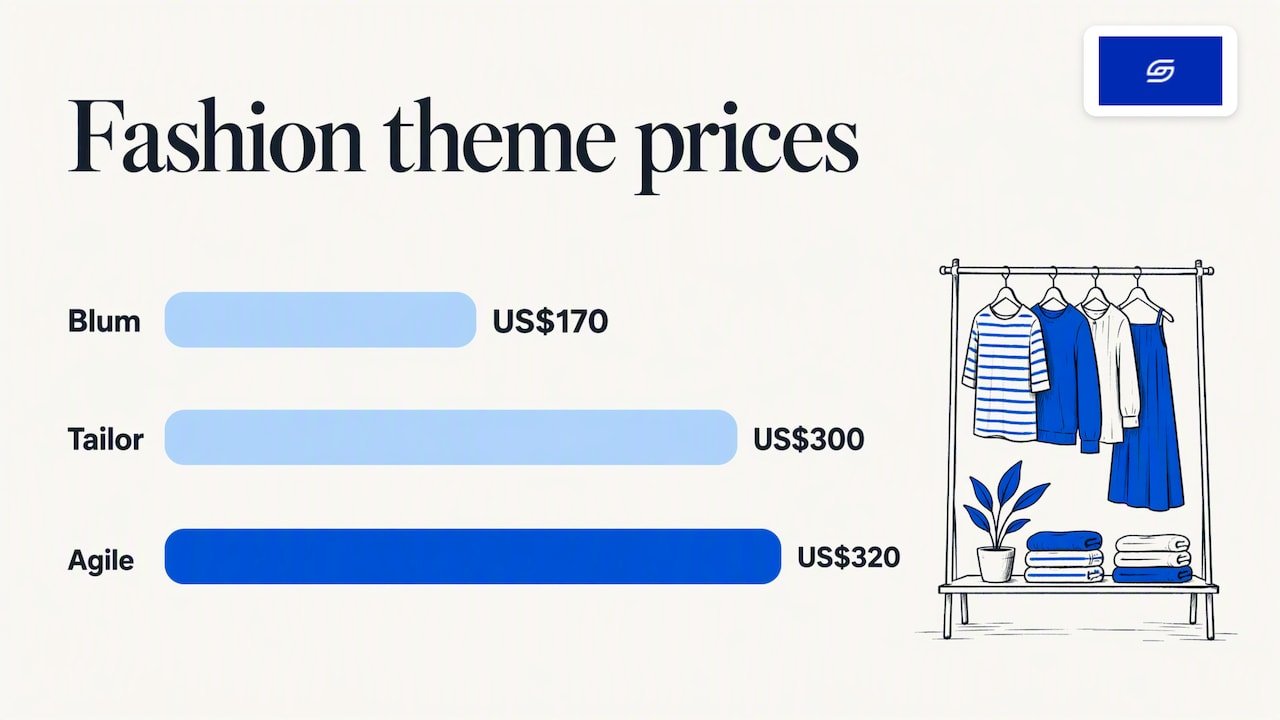
The official Theme Store shows the trade-off clearly. Free options such as Colorblock can include filtering, mega menus, swatches, lookbooks and size-chart support. Paid fashion themes add specialised layouts. For example, Blum, listed at US$170, is an editorial fashion theme built around lookbooks, hotspots and outfit-building collections. Other paid fashion examples in the Theme Store, such as Tailor and Agile, are priced higher, at US$300 and US$320 in the listing we checked.
| Fashion need | Free theme may be enough if… | Consider paid if… |
|---|---|---|
| Size and colour variants | Swatches and a size chart are included | You want size guidance built into the product page layout |
| Storytelling | You have a simple brand page | You want shoppable lookbooks and outfit building |
| Large catalogue | Standard filters cover your attributes | You need advanced merchandising sections |
| Seasonal drops | You change banners and collections by hand | You want campaign layouts that reduce manual work |
A small label with 40 products and one drop per season rarely needs a US$300 theme. A multi-category fashion brand with frequent lookbooks might. Run the trial first, then decide.
Common mistakes we see
- Choosing from the demo. Demos use perfect photography and short product names. Your catalogue will not look like that.
- Buying for features you will not use. Every extra section is code that loads on your pages.
- Ignoring app compatibility. Switching themes does not automatically validate third-party integrations, so document your app embeds, custom code and templates before launch.
- Overcustomising a template. Heavy edits make updates hard and speed worse. If you need that much change, a custom build is cheaper in the long run.
- Skipping the homepage logic. A theme gives you sections, not strategy. Our homepage design audit shows patterns worth copying.
Our perspective: the theme is the start, not the result
We are a founder-led agency, and the pattern is consistent: two stores on the same theme can convert very differently. The theme gives you a structure. Conversion comes from what you do with it: product page clarity, trust content, fast mobile pages, honest shipping information and a checkout path with no surprises.
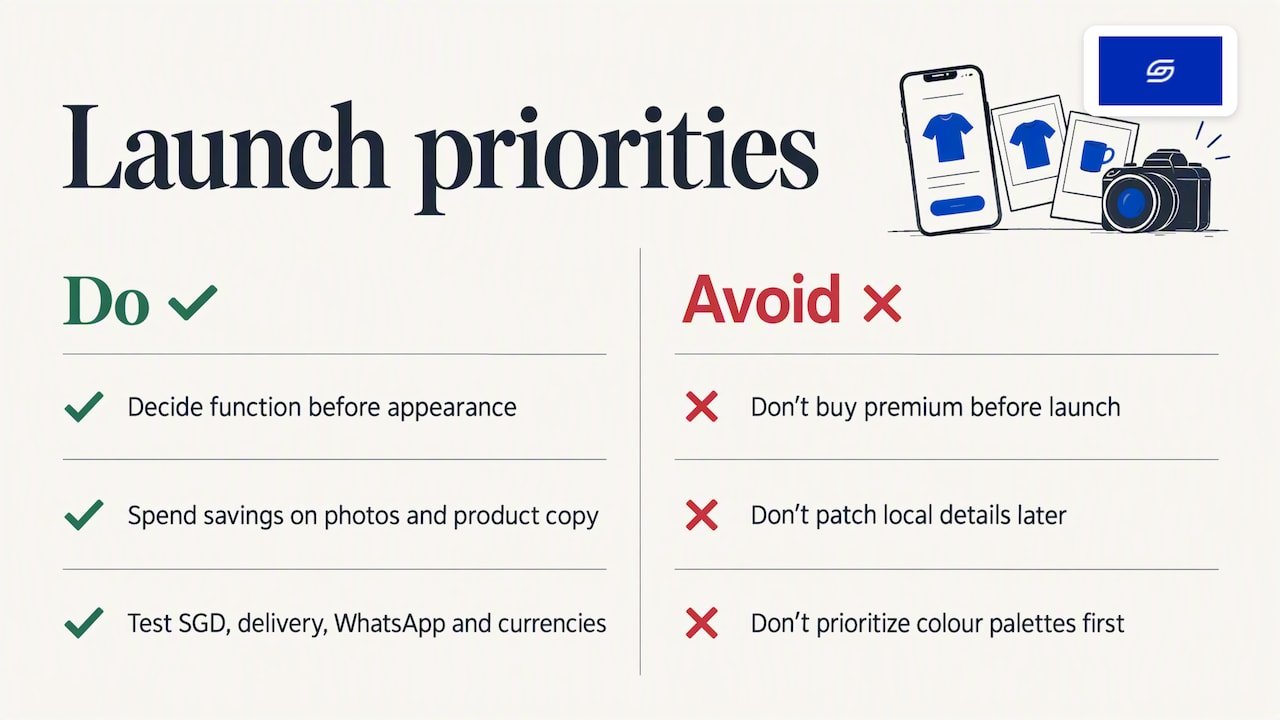
That is why we push clients to decide on function first and appearance second. We would rather you launch on a well-configured free theme and spend the savings on photography and product-page copy than buy a premium theme and run out of budget before launch. When a store has genuinely outgrown templates, we say so, and we scope a custom build at a fixed price.
One more point from working with Singapore and Southeast Asian brands: local details decide sales. SGD pricing, delivery expectations, WhatsApp contact and regional currencies need to be designed in, not patched on. Test those before you worry about colour palettes.
— Soodo
Working with Shopify Plus or several storefronts
Capacity can matter if you run seasonal versions or regional stores. Shopify’s documentation says Basic, Grow and Advanced stores can add up to 20 themes, while Shopify Plus can add up to 100. Expansion stores need a theme licence for each live store. If you are weighing the upgrade, see what Shopify Plus includes and who needs it.
Need help choosing or building?
If you would rather not run the trials yourself, we can do it with you. Our new Shopify website development service starts from SGD 4,500, with conversion-focused design and a mobile-first build. If you already have a store that feels slow or underperforms, Shopify revamp starts from SGD 1,600. Moving from WooCommerce? Our WooCommerce to Shopify migration service covers the theme decision as part of the move. You can also browse our portfolio to see how we have set up stores.
FAQ
Is a free Shopify theme good enough?
For many stores, yes. Free themes are developed by Shopify and come with Shopify’s customisation support. If your must-have list is covered by built-in features and your trial feels fast on mobile, you do not need to pay. Upgrade only when a paid theme replaces apps or custom work.
Can I change my Shopify theme later?
Yes. Your products, collections, menus, pages and blog posts are managed separately from the theme, so they are not deleted when you switch. Theme-specific customisations and app embeds do need to be rebuilt and checked, so keep notes and test a draft theme before you publish it.
Should I pick a theme by industry category?
Use the category as a starting point only. Shopify itself says a store can use a theme listed under another industry. Filter by the features you need, then confirm with a trial using your own products.
Does a high Lighthouse score mean my store will be fast?
Not by itself. Themes need a minimum average score of 60 to enter the Theme Store, but apps, large images and tracking scripts can lower the result. Test your real store on the homepage, a product page and a collection page, and retest after changes.
When should I go custom instead of buying a theme?
When your buying journey is unusual, or you find yourself stacking apps and code to make a template behave. At that point the workarounds usually cost more than a purpose-built theme.
Sources
- Shopify Help Center: Choosing themes
- Shopify Help Center: Adding, previewing, and buying themes
- Shopify developers: Best practices for building themes
- Shopify developers: Performance best practices
- Shopify developers: Accessibility best practices
- Shopify Theme Store
- Shopify Theme Store: all themes
- Shopify Theme Store: Blum
Recommended

Jessica Bong
Jessica Bong is the founder of Soodo, a Singapore Shopify agency that builds, revamps and migrates Shopify stores, with every store set up to be found in AI search (GEO). She has spent over 10 years in ecommerce and runs her own Shopify brand, Patch&Bagel, where every Soodo technique is tested first. Jessica is also a WSQ-certified Shopify trainer at Equinet Academy.