

Shopify Collection Sorting: How to Set and Control Product Order
To change collection sorting in Shopify, go to Products > Collections, open the collection, pick a value under Default sort and save. Choose Manual if you want to place products yourself. That is the whole core of it. The rest of this guide covers what each option does, how the shopper-facing sort dropdown works, what to do when the order looks wrong, and when you have outgrown the built-in controls.
We are Soodo, a founder-led Shopify agency in Singapore. We build, revamp and migrate Shopify stores for brands in Singapore and Southeast Asia, so collection order comes up on almost every project.
Key Takeaways
- Set the default order per collection in Products > Collections, under Collection items > Default sort. Manual lets you drag products or move them to a set position.
- Shopify offers Most relevant, Best selling, alphabetical, price, date and Manual sorting. Best selling counts all-time orders, so it favours older products.
- The sort dropdown shoppers see is built into your theme. It works through a
sort_byvalue in the collection URL. - If the storefront order does not match the admin, check the sort setting, then the theme settings, then any apps that touch collections.
- Built-in sorting covers most small catalogues. Large ranges with rules, such as colour or margin, may need an app or custom theme work.
Table of Contents
- What are the sorting options for a Shopify collection?
- How do you change the product order in a collection?
- How does the sort dropdown on a collection page work?
- Can you sort by a custom property such as colour or margin?
- Why is my collection order not changing on the storefront?
- Does collection order affect sales?
- When are the built-in sorting controls not enough?
- Who can help if your collections need rebuilding?
- A quick checklist for tidy collection sorting
- FAQ
- Sources
What are the sorting options for a Shopify collection?
Shopify lets you sort a collection by Most relevant, Best selling, alphabetical or reverse alphabetical, price high or low, oldest or newest, and Manual. You choose one as the default for each collection. Shoppers can then change it on the storefront if your theme shows a sort dropdown.
In the Admin API these appear as named values. Shopify’s developer documentation lists them as MOST_RELEVANT, BEST_SELLING, ALPHA_ASC, ALPHA_DESC, PRICE_ASC, PRICE_DESC, CREATED, CREATED_DESC and MANUAL. You will see these names if you ever work with an app or a developer.
Here is what each option means in practice.
| Option | What it does | Best used for |
|---|---|---|
| Manual | You decide the order by hand | Hero collections, launches, seasonal edits |
| Best selling | Ranks by all-time number of orders containing the product | Evergreen ranges with a long sales history |
| Newest to oldest | Latest products first | New arrivals, fashion drops |
| Oldest to newest | Earliest products first | Rarely used as a default |
| Price, low to high | Cheapest first | Entry-level ranges, gift guides |
| Price, high to low | Most expensive first | Premium ranges |
| Alphabetical A-Z or Z-A | By product title | Large catalogues where shoppers browse by name |
| Most relevant | Shopify’s relevance ranking | Search-style browsing |
One detail catches many owners out. Best selling is based on the all-time number of orders that contain a product. If nothing has sold yet, Shopify falls back to newest to oldest. So a strong new product can sit below older items for a long time.
How do you change the product order in a collection?
Open Products > Collections in your Shopify admin, select the collection, set Default sort under Collection items, and save. For hand placement, pick Manual first. This follows Shopify’s own guide to collection layout.
Here are the steps.
- In the admin, go to Products, then Collections.
- Open the collection you want to change.
- Under Collection items, open the Default sort menu.
- Choose a value. Pick Manual if you want to drag products yourself.
- If you chose Manual, drag products into position. You can also select products and move them to the beginning, the end, or a numbered position.
- Save.
The Shopify mobile app has equivalent controls under View all.
Why does Manual sorting need a plan?
Manual order is the most powerful setting and the easiest to neglect. New products added to a manual collection do not rank themselves. Decide who owns the order, and when it gets reviewed. A good habit is to review your top collections whenever you launch a campaign.
For a Singapore brand, that rhythm often follows the retail calendar: Chinese New Year, 11.11, Great Singapore Sale, year-end gifting. Put the products you are promoting in the first row, and check how the collection looks on a phone, because most of your shoppers will see only the first few products.
What about smart collections?
Smart collections add products automatically from rules such as tags, type or price. The same Default sort setting applies. You can still use Manual on a smart collection to pin products, but the rules decide which products appear. When you create a collection, Shopify asks you to choose a sorting method as part of setup, so it is worth deciding the logic at that point rather than later.
How does the sort dropdown on a collection page work?
The dropdown is part of your theme, not a separate Shopify feature. The theme reads the collection’s sort options, marks the current one as selected, and when a shopper changes it, adds the chosen value to the collection URL as sort_by and reloads the page. A URL such as ?sort_by=price-descending is the result.
Two things follow from this.
- Appearance depends on the theme. Shopify notes that collection appearance depends on the theme and template, so an admin sort choice does not decide every part of the storefront layout.
- Filters should survive a sort change. Shopify’s documented pattern keeps existing query parameters in the URL, so a shopper who has filtered by size does not lose that filter when they re-sort. If your theme drops filters on sort, that is a build fault worth fixing. Our guide to Shopify product filters covers how filters and URLs fit together.
If you are choosing a theme, check its collection page on a real phone with a real catalogue before you commit. Our guide on how to choose a Shopify theme explains what to look at.
Can you add sort options with Liquid?
Yes. A developer applies Liquid’s sort_by filter to the collection URL. Supported values include manual, best-selling, title-ascending and descending, price-ascending and descending, and created-ascending and descending.
This lets a theme show only the options that make sense for your range. A skincare brand might offer Best selling, Newest and Price. A furniture brand might not need alphabetical at all. Fewer, clearer options usually serve shoppers better than a long list.
One technical limit matters on big collections. Shopify’s theme documentation says collection products should be paginated, with a limit of 50 products per page in Liquid. Plan your collection page around that.
Can you sort by a custom property such as colour or margin?
Not directly with the default menu. Shopify’s built-in sort options are the list above. Custom properties are usually used to decide which products belong in a collection, not their order.
Here is what Shopify supports. Product or variant metafield values can be used as collection conditions, but the metafield definition must be activated for collections. For developers, metafield queries need filtering enabled on the metafield definition before values can be used to filter results.
So a typical approach looks like this:
- Store the property (colour family, season, range) as a metafield or tag.
- Use it to build smart collections or storefront filters.
- Set the collection’s default order, and pin hero products with Manual or a custom setup.
If you need the order itself to follow a score, such as stock level or margin, you are in app or custom development territory. We come back to that below.
Why is my collection order not changing on the storefront?
Start with the simplest cause: the sort setting. Then work outward. In order:
- Confirm the setting. Open the collection and check that Default sort is what you think it is. If you want to drag products, it must be Manual.
- Check the theme. Some themes have their own collection or product-grid settings in the theme editor. Look there for a sort or order setting that may override what you chose.
- Check URL parameters. A link with
sort_byin it overrides the default. If you share or link to a sorted URL, shoppers see that order, not your default. - Check apps. Merchandising, filter and search apps can reorder products. Switch one off in a test, or compare what the app shows with what the admin shows.
- Allow processing time and clear caches. Changes made in bulk or through an app can take a while to show. Check again after a short wait, using a private browser window.
If you have worked through all five and the order is still wrong, ask the person who built the theme, or Shopify Support. The cause is often a small theme edit made years ago.
What is the /collections/all trap?
Many stores link to the all-products page and forget about its order. Shopify says /collections/all is alphabetical by default. Its guide recommends creating a collection with the handle all if you need to control the order of your catalogue page. For a store with a few hundred products, that one change can make the page far more useful.
Does collection order affect sales?
It shapes what shoppers see first, and that matters. We will not quote a statistic here, because the effect depends on your range, traffic and price points. What we can say is how we think about it.
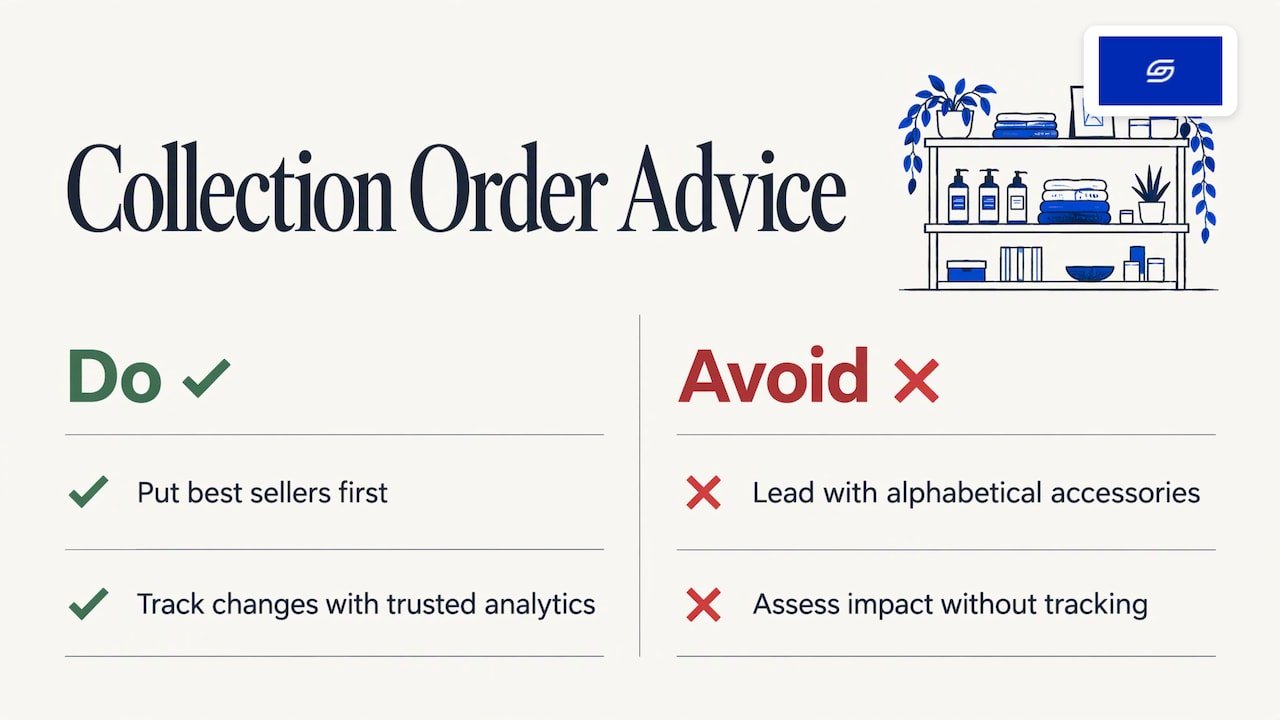
Shoppers scan the first row. If the first row shows your best sellers at sensible prices, a new visitor sees your brand at its strongest. If it shows an alphabetical run of accessories, they see something else. Collection order is one of the cheapest levers in a store because it costs nothing to change.
To see whether a change helped, you need tracking you trust. Our guide to Shopify GA4 ecommerce tracking explains the events to set up, and the Shopify conversion rate calculator helps you turn visits and orders into a rate in SGD.
When are the built-in sorting controls not enough?
The built-in controls are enough for most stores under a few hundred products. They start to strain in these cases:
- Large catalogues. Hand-ordering 1,000 products is not realistic. Owners in that position often look for rule-based sorting, for example by colour, stock or sales in the last 30 days.
- Fast-moving ranges. Fashion and drop-based brands change what is new every few days. Best selling, which counts all-time orders, lags behind.
- Complex variants. Products with many options can behave differently in collections. Our notes on the Shopify variant limit and product options beyond three axes explain how that affects structure.
- B2B and multiple catalogues. Different buyers may need different ranges and orders. See our overview of Shopify B2B features.
Before you add an app or ask for custom development, ask four questions.
- Can a cleaner collection structure solve this? Often smarter collections and tags remove the need for complex sorting.
- Does the app run on the storefront, and how does it affect page speed?
- What happens to your order if you remove the app later?
- Who will own the rules once the store is live?
If the answer points to a theme change, a developer can add or rework sort options in Liquid, and handle the filters, URLs and pagination that go with it.
How we approach collection order on client stores
We are a small team on purpose. Jessica Bong, our founder, leads strategy, and a dedicated developer builds. Jessica has more than 10 years in ecommerce and is a WSQ Shopify trainer at Equinet Academy. That mix shapes how we treat something as small as collection sorting.
Our approach is sales-first. We build every page, menu and app around how customers actually buy. For collections, that means we decide the first row of each key collection with the owner, set a sensible default sort for the rest, and keep the dropdown short and clear.
We also run our own ecommerce brand, Patch&Bagel, and we test our recommendations there first. Collection order is one of the things we adjust on a live store before we suggest it to a client.
Every store we build is set up for AI search (GEO) too. Clean collection titles, clear descriptions and a tidy structure help both shoppers and AI search tools understand what you sell. You can read more in our guide to what GEO is. We do not offer a monthly GEO or SEO service. For long-term GEO growth, we point brands to specialist partners.
Soodo is a Shopify Partner with 30+ live stores. On every project we hand over training, so your team knows how to reorder collections without calling us.
Soodo
Who can help if your collections need rebuilding?
If collection pages are messy because the whole store was built in a hurry, a sorting tweak will not fix it. That is the point at which a rebuild of the collection layer, or the store, pays off.
We work in three ways:
- A new Shopify store starts from SGD 8,500.
- A Shopify Revamp starts from SGD 3,000. It suits a live store whose collections, navigation and layout need to work harder.
- A migration to Shopify starts from SGD 6,000. It suits brands moving from WooCommerce or another platform and wanting their catalogue structured properly from day one.
Every project includes handover training and 6 months of post-launch fixes. If something we built breaks, we fix it. Revisions are unlimited within the agreed scope. The timeline and start date are agreed before we begin. Projects start on set monthly start dates, and a 50% non-refundable deposit secures your date, with the balance due on completion. We take on a small number of projects each month, by application. If you are unsure which route fits, our comparison of revamp, rebuild and migration is a good place to start.
A quick checklist for tidy collection sorting
Use this list on your next review.
- Each key collection has a deliberate default sort.
- Hero collections use Manual, with the first row chosen on purpose.
- The
allcollection exists if you link to a full catalogue page. - The sort dropdown shows only options that make sense for your range.
- Filters stay applied when a shopper changes the sort.
- Mobile view is checked on a real phone.
- Someone on your team owns the order and reviews it before each campaign.
Want a wider review of your store? Our free Shopify optimisation checklist covers collections and much more.
FAQ
What is the default sort order for a Shopify collection?
It is whatever you pick under Default sort for that collection. If you have not chosen, check the collection page in the admin, because the setting is per collection. Note that /collections/all is alphabetical by default.
Why can’t I drag products in my Shopify collection?
Dragging works only when Default sort is set to Manual. Switch it to Manual, save, and the drag controls become available. On a smart collection, the rules decide which products appear, but you can still reorder them in Manual.
Can shoppers sort products themselves?
Yes, if your theme includes a sort dropdown. It works by adding a sort_by value to the collection URL. If your theme has no dropdown, a developer can add one with Liquid, or you can choose a theme that includes it.
Does Best selling show what sold recently?
No. Shopify’s Best selling is based on the all-time number of orders containing a product. For new launches, use Manual or Newest to oldest, and move products as your campaign calendar changes.
When should I use an app instead of the built-in options?
Consider one when you have a very large catalogue, or want rules such as sorting by colour or stock. Check the effect on page speed and what happens to your order if you remove it. For smaller ranges, built-in sorting and a clean collection structure usually do the job.
Sources
- Shopify Help Center: Editing collection details and layout
- Shopify Help Center: Collections
- Shopify Help Center: Creating collections
- Shopify Help Center: Change your catalog page
- Shopify Help Center: Collections with metafields
- Shopify developer docs: CollectionSortOrder
- Shopify developer docs: collection template
- Shopify developer docs: sort_by filter
- Shopify developer docs: Query using metafields
Ready to talk about your store? Apply for a project slot or start with the free Shopify optimisation checklist.
Recommended

Jessica Bong
Jessica Bong is the founder of Soodo, a Singapore Shopify agency that builds, revamps and migrates Shopify stores, with every store set up to be found in AI search (GEO). She has spent over 10 years in ecommerce and runs her own Shopify brand, Patch&Bagel. Jessica is also a WSQ-certified Shopify trainer at Equinet Academy.